Fingerprint Door Locks Worth Trusting on Your Front Door
The Ultraloq U-Bolt Pro is the strongest all-around pick, combining a fast fingerprint sensor with keypad, key and app backup entry methods in one deadbolt. The Schlage Encode Plus suits buyers who want built-in Wi-Fi without a separate smart home hub, while the SIFELY lock fits anyone on a tighter budget.
The Ultraloq U-Bolt Pro stands out because it packs fingerprint, keypad, key and app unlocking into one deadbolt, covering more backup entry options than locks limited to one or two methods. Its main limitation is a need for a separate Wi-Fi bridge accessory for remote access.
We compared fingerprint sensor speed, backup entry methods, smart home compatibility and build quality across each listing rather than running our own forced-entry testing.
What we recommend
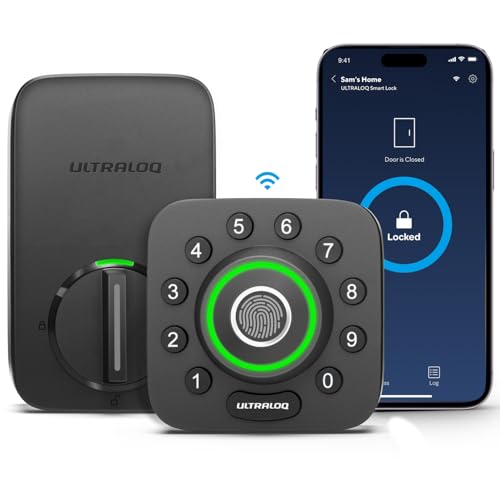
Ultraloq U-Bolt Pro
Four unlock methods, fingerprint, keypad code, physical key and smartphone app, cover more backup options than locks limited to one or two entry types. The fingerprint sensor reads in roughly 0.3 seconds, fast enough to avoid the noticeable delay some budget sensors have. Auto-lock and auto-unlock features work through the companion app once a Wi-Fi bridge accessory is added.
Pros
- Four unlock methods cover more backup scenarios than simpler locks
- Fast fingerprint sensor avoids noticeable unlock delay
- Auto-lock and auto-unlock add convenience once connected
Cons
- Wi-Fi bridge for remote access sold as a separate accessory
- App setup takes more steps than simpler standalone locks

Schlage Encode Plus
Built-in Wi-Fi connects directly to a home network without needing a separate hub or bridge accessory, simplifying remote access setup. Apple Home key compatibility lets compatible iPhones unlock the door directly through the Wallet app. A fingerprint reader sits above the keypad, giving three total unlock methods alongside a physical key override.
Pros
- Built-in Wi-Fi skips the need for a separate bridge accessory
- Apple Home key support adds iPhone-based unlocking
- Backed by Schlage’s established lock hardware reputation
Cons
- Higher price than locks without built-in Wi-Fi
- Apple Home key feature does not benefit Android users

Kwikset Halo Touch
Built-in Wi-Fi pairs with the Kwikset app for remote locking and unlocking, without requiring a bridge or hub for basic smart features. The fingerprint sensor doubles as a touchscreen for entering a backup code, keeping the exterior design cleaner than locks with a separate keypad. Compatibility extends to Amazon Alexa and Google Assistant for voice-based status checks.
Pros
- Combined fingerprint and touchscreen keeps the exterior design simple
- Built-in Wi-Fi avoids a separate hub for basic smart features
- Voice assistant compatibility adds remote status checks
Cons
- Touchscreen can be harder to read in direct sunlight
- Fewer unlock methods than locks with a separate physical keypad

eufy Security Smart Lock Touch
A fingerprint and keypad combination unlock runs on standard batteries rated for several months of typical daily use, longer than some competing smart locks. Local fingerprint storage processes unlocking on the device itself rather than requiring a constant cloud connection. A separate Wi-Fi bridge extends the lock with remote app access when needed.
Pros
- Longer rated battery life than many competing smart locks
- Local fingerprint processing avoids constant cloud dependency
- Keypad backup works even without the Wi-Fi bridge installed
Cons
- Remote app access requires purchasing a separate Wi-Fi bridge
- Fewer total unlock methods than four-way locks like the Ultraloq
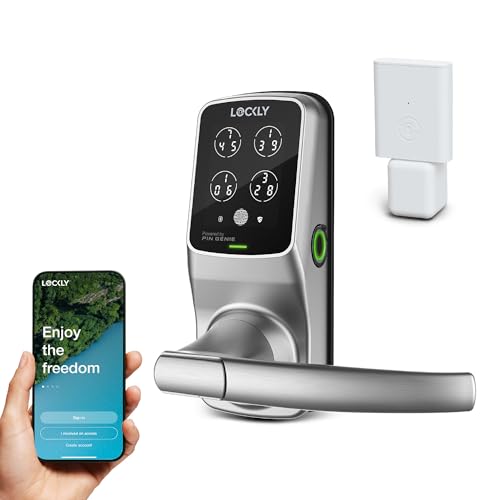
Lockly Secure Pro
A patented anti-peek keypad randomizes the visible numbers, making it harder for someone watching nearby to learn a code by observing the entry pattern. Fingerprint, keypad, key and app unlocking cover the same four methods as higher-end competitors. A built-in camera and video doorbell option extends the lock into a wider home security package.
Pros
- Anti-peek keypad reduces the risk of a code being observed
- Four unlock methods match higher-end competing locks
- Expands into a wider security setup with a compatible doorbell
Cons
- Higher price once the optional doorbell add-on is included
- App setup process is more involved than simpler locks

Yale Assure Lock 2 Touch
A modular design lets the fingerprint and touch module be swapped later for a different Yale module, like a traditional keypad, without replacing the entire lock body. Auto-relock automatically secures the door after a set delay following an unlock. Compatibility spans several smart home hubs, including August and Yale’s own connect module.
Pros
- Modular front module can be swapped without replacing the lock body
- Auto-relock adds a security backup if the door is left unlocked
- Broad smart home hub compatibility beyond one single ecosystem
Cons
- Full smart features require purchasing a separate connect module
- Fingerprint-only module offers fewer backup methods than keypad versions

SIFELY Fingerprint Door Lock
This lock keeps costs down by skipping Wi-Fi and app connectivity entirely, relying on fingerprint, keypad code and physical key for standalone operation. It stores multiple fingerprints locally, enough for a typical household without needing an account or subscription. A simple battery-powered design makes installation straightforward on a standard deadbolt-prepped door.
Pros
- Lower price than Wi-Fi-connected fingerprint locks
- No account, app or subscription required to operate
- Straightforward installation on standard deadbolt-prepped doors
Cons
- No remote access or smart home integration available
- Lacks the auto-lock and activity log features of connected locks
How they stack up
| # | Model | Unlock Methods | Best for | Score | Price |
|---|---|---|---|---|---|
| 1 | Ultraloq U-Bolt Pro | Fingerprint, keypad, key, app | Best Overall | 9.1 | Check price |
| 2 | Schlage Encode Plus | Fingerprint, keypad, key, app | Best for Built-In Wi-Fi | 9.0 | Check price |
| 3 | Kwikset Halo Touch | Fingerprint, touchscreen code, key | Best for Simple Smart Home Setup | 8.6 | Check price |
| 4 | eufy Security Smart Lock Touch | Fingerprint, keypad, key | Best for Battery Life | 8.4 | Check price |
| 5 | Lockly Secure Pro | Fingerprint, anti-peek keypad, key, app | Best for Anti-Peek Keypad Security | 8.5 | Check price |
| 6 | Yale Assure Lock 2 Touch | Fingerprint, touch, key | Best for Modular Design | 8.3 | Check price |
| 7 | SIFELY Fingerprint Door Lock | Fingerprint, keypad, key | Best Budget Pick | 8.0 | Check price |
Before you buy
What to look for in a fingerprint door lock A fingerprint door lock needs a backup entry method for when a sensor fails to read a print, whether from wet hands or a bandage, which is why most reliable locks also include a keypad, key or app option. Sensor accuracy and speed affect daily convenience more than any other single feature, since a slow or unreliable reader turns a smart lock into a frustration rather than an upgrade. Smart home connectivity, through built-in Wi-Fi or a separate bridge, adds remote access and activity logs but is not required for a lock to function at the door itself. Build quality and deadbolt strength still matter as much on a smart lock as on a traditional mechanical one.
Fingerprint sensor speed and backup entry methods A faster fingerprint sensor, like the roughly 0.3 second reading on the Ultraloq U-Bolt Pro, reduces the wait at the door compared to slower budget sensors. Backup entry methods matter just as much as sensor speed, since every fingerprint lock eventually needs a fallback, whether that is the keypad on the Kwikset Halo Touch or the physical key included on nearly every lock in this category. Locks offering four total unlock methods, like the Ultraloq U-Bolt Pro and Lockly Secure Pro, give the most flexibility when one method is unavailable.
Built-in Wi-Fi versus a separate smart home bridge Built-in Wi-Fi, found on the Schlage Encode Plus and Kwikset Halo Touch, connects directly to a home network without buying any additional hardware. Locks that rely on a separate bridge accessory, like the Ultraloq U-Bolt Pro and eufy Security Smart Lock Touch, cost less upfront but require that extra purchase before remote app access works. Buyers who only want local fingerprint and keypad access, without any app or remote features, can skip connectivity entirely with a standalone lock like the SIFELY Fingerprint Door Lock.
Security features beyond fingerprint recognition An anti-peek keypad, like the one on the Lockly Secure Pro, randomizes the on-screen numbers so a code cannot be learned just by watching someone enter it from a distance. Local fingerprint processing, used by the eufy Security Smart Lock Touch, keeps biometric data on the device itself rather than depending on a constant cloud connection to unlock the door. Modular designs, like the Yale Assure Lock 2 Touch, let the front unlocking module be replaced later without buying an entirely new lock body if preferences change.
Good to know
What happens if a fingerprint door lock does not recognize a print?
Every reliable fingerprint lock, including the Ultraloq U-Bolt Pro and SIFELY lock, includes a backup method like a keypad code or physical key for exactly this situation.
Do fingerprint door locks need Wi-Fi?
No. Locks like the SIFELY Fingerprint Door Lock operate fully standalone, while others like the Schlage Encode Plus use built-in Wi-Fi for optional remote access.
Is a separate smart home hub required for a fingerprint lock?
It depends on the lock. The Schlage Encode Plus and Kwikset Halo Touch include built-in Wi-Fi, while the Ultraloq U-Bolt Pro needs a separate bridge accessory for remote access.
How many fingerprints can a smart lock store?
Most locks, including the SIFELY Fingerprint Door Lock, store multiple fingerprints locally, enough to cover a typical household.
What is an anti-peek keypad?
It randomizes the number positions on the keypad display, a security feature found on the Lockly Secure Pro that makes it harder for someone nearby to learn a code by watching.
Can a fingerprint door lock be used with a physical key as backup?
Yes, nearly every lock in this category, including the Ultraloq U-Bolt Pro and Yale Assure Lock 2 Touch, includes a physical key override.
Do fingerprint locks work with Alexa or Google Assistant?
Some do. The Kwikset Halo Touch supports both platforms for voice-based status checks when connected to compatible smart home hardware.
What is a modular smart lock design?
It lets the front unlocking module, such as a fingerprint reader, be swapped out later for a different module without replacing the entire lock body, as with the Yale Assure Lock 2 Touch.
How long do batteries last in a fingerprint door lock?
It varies by model. The eufy Security Smart Lock Touch is rated for several months of typical daily use per battery set.
The bottom line
The Ultraloq U-Bolt Pro earns the top recommendation for most front doors, since its four unlock methods cover more backup scenarios than locks limited to one or two options. Buyers who want built-in Wi-Fi without buying a separate bridge accessory should choose the Schlage Encode Plus instead. Anyone who wants fingerprint security without any app, account or connectivity should skip smart features entirely and pick the SIFELY Fingerprint Door Lock.
Marcus Chen
Marcus covered consumer electronics for enthusiast tech publications for six years before joining ChoiceCrest. He specializes in translating manufacturer spec sheets into plain-language buying advice, with a focus on audio, computing accessories and smart-home gear.