Which Ergonomic Keyboard Actually Eases Wrist Strain?
Logitech Ergo K860 pairs a curved split with a built in wrist rest, giving most typists real relief without a steep learning curve. Kinesis Advantage360 suits heavy typists ready for fully separated, contoured keywells. Logitech Wave Keys offers the gentlest first step into ergonomic typing.
A curved split with an attached wrist rest makes Logitech Ergo K860 the safest starting point for most desks. Kinesis Advantage360 rewards typists willing to relearn hand position for deeper contoured keywells. Logitech Wave Keys eases in anyone unsure about switching shapes at all.
The same ergonomic layout that relieves one person’s wrist pain can slow another person to a crawl for weeks. We compared split geometry, tenting range, key feel, wrist rest quality and connectivity across seven widely sold models, then weighed what long term owners report about the adjustment period over first impressions.
The top picks, ranked

Logitech Ergo K860
A fixed curved split delivers most of the ergonomic benefit without a fully separated board’s learning curve. Bluetooth or the bundled Logi Bolt receiver pairs with up to three devices. Most owners report adjusting within days rather than weeks.
Pros
- Gentle learning curve for a split layout
- Large memory foam wrist rest included
- Switches between three paired devices
Cons
- Split angle is fixed and cannot widen
- Large footprint on shallow desks

Kinesis Advantage360
Concave keywells and thumb clusters move common modifiers off the pinkies entirely. Two fully separate halves make this the most aggressive and most programmable design here, with onboard layers and remapping. Several weeks of reduced typing speed typically precede the reported relief.
Pros
- Thumb clusters cut down pinky reaching
- Fully separable halves fit any shoulder width
- Deeply programmable without extra software
Cons
- Long adjustment period for most typists
- Requires considerable desk depth

Logitech Wave Keys
A gentle wave shaped key bed eases wrist extension while keeping the familiar flat layout intact. An integrated cushioned palm rest comes built in, and the board is more compact than the K860. Anyone unsure they will stick with an ergonomic shape should start here.
Pros
- Almost no relearning required
- Compact footprint for a full size board
- Quiet key action suits shared offices
Cons
- Less wrist relief than a true split
- Palm rest cannot be removed

Microsoft Sculpt Ergonomic Keyboard
A domed split key bed pairs with a detachable numeric pad, keeping the mouse closer to the shoulder line. Negative tilt from the included riser encourages a flatter forearm position. Owners whose discomfort centers on wrist extension tend to favor this layout.
Pros
- Detachable numpad frees up mouse space
- Strong palm support with negative tilt
- Compact main key block
Cons
- No Bluetooth, only a proprietary receiver
- Membrane keys feel soft to some typists
Kinesis Freestyle2
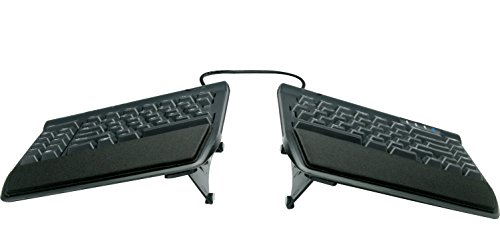
Two cable linked halves let you set the separation to match your own shoulder width. A standard flat key layout stays familiar, unlike contoured designs. Optional lifter kits add tenting later, once you know whether you want it.
Pros
- Familiar key layout across split halves
- Separation adjusts to fit your body
- Tenting can be added later
Cons
- Tenting kit sold as a separate accessory
- No wrist rest included in the base version

ProtoArc EK01
Adjustable tenting feet and a magnetically attached palm rest arrive on a two piece wireless split, unusual at this price. Multi device pairing moves the board between a laptop and a tablet. Build quality leans plastic, though the geometry still shifts wrist position noticeably.
Pros
- True split geometry at an accessible price
- Built in tenting adjustment
- Rechargeable battery instead of disposables
Cons
- Plastic chassis flexes under pressure
- Key feel is lighter than premium boards

Perixx PERIBOARD-512
A fixed centre wedge splits this wired board while a broad wrist pad runs its full width. No software, pairing or battery is needed, which suits shared workstations and locked down office machines. It stays basic, but the shape does what the specifications promise.
Pros
- No batteries or pairing to manage
- Works on locked down work computers
- Wide wrist pad across the full board
Cons
- Cable limits desk placement
- No tenting or split adjustment available
What to look for
Split, curved or contoured: which ergonomic shape fits you? Curved and wave boards keep one continuous key bed and simply angle the halves, the easiest shape to adapt to. Split boards separate the halves so you can match shoulder width. Contoured boards add concave keywells and thumb clusters, the biggest hand position change and the longest relearning period. Pick the mildest shape that addresses your actual discomfort.
Do tenting and negative tilt matter more than key count? Two adjustments do most of the ergonomic work. Tenting raises the inner edges so palms rotate inward less, while negative tilt drops the back edge so wrists stay flatter. Negative tilt alone removes most strain for many people. Without either adjustment, a keyboard’s ergonomic claim rests on split angle alone, a smaller effect.
Where should the numpad and mouse sit? A full size board pushes the mouse hand far right, loading the shoulder over a workday. Boards with a detachable numpad or a tenkeyless layout let the mouse sit closer to center. Anyone who rarely enters numbers gets a better shoulder position from a compact board plus a separate numpad set aside.
How long does it take to adjust to a new ergonomic keyboard? Owners consistently report a slowdown after switching, from a couple of days on a wave board to several weeks on a contoured one. Avoid changing keyboards the week before a deadline. Keep the old board within reach for the first two weeks, and give any new layout at least three weeks before judging it.
Side by side
| # | Model | Layout | Best for | Score | Price |
|---|---|---|---|---|---|
| 1 | Logitech Ergo K860 | Fixed curved split, full size | Best overall | 9.4 | Check price |
| 2 | Kinesis Advantage360 | Two separate contoured halves | Best for heavy typists | 9.2 | Check price |
| 3 | Logitech Wave Keys | Wave contoured, full size with numpad | Best value | 9.0 | Check price |
| 4 | Microsoft Sculpt Ergonomic Keyboard | Domed split with separate numpad | Best for wrist angle | 8.7 | Check price |
| 5 | Kinesis Freestyle2 | Standard split, cable linked halves | Best for adjustable split | 8.5 | Check price |
| 6 | ProtoArc EK01 | Two piece split, full size | Best budget split | 8.2 | Check price |
| 7 | Perixx PERIBOARD-512 | Fixed split with centre wedge | Best wired simplicity | 8.0 | Check price |
Questions worth asking
Do ergonomic keyboards actually reduce wrist pain?
They change wrist extension and forearm rotation, two common contributors to discomfort. Owners frequently report relief, though desk height, chair and mouse position matter just as much as the keyboard. A keyboard alone rarely fixes a poor overall setup.
How long does it take to get used to a split keyboard?
Wave and curved boards typically take a few days. Fully split boards take one to two weeks. Contoured keywell boards like the Advantage360 commonly take three to six weeks before speed returns.
Is a wrist rest necessary with an ergonomic keyboard?
A rest helps when it supports the heel of the palm rather than propping up the wrist joint itself. Resting the wrist on a hard edge can make things worse, so a soft, palm positioned rest is the safer pick.
Mechanical or membrane switches for ergonomic typing?
Mechanical switches allow a lighter actuation force, which some typists find reduces finger fatigue. Membrane boards run quieter and cheaper. Neither switch type is inherently more ergonomic, so pick whichever feels comfortable for hours of typing.
Do I need a keyboard with tenting?
Tenting helps when strain shows up across the forearms from keeping palms flat. Negative tilt matters more if discomfort centers on the wrist crease instead. Boards like the Freestyle2 and EK01 let you add or adjust tenting to test which one helps.
Are wireless ergonomic keyboards reliable enough for daily work?
Modern receivers and Bluetooth hold up fine for office use. Battery management is the real difference: AAA cell boards run for months, while rechargeable models need a cable every few weeks depending on backlighting.
Can an ergonomic keyboard work with a laptop?
Yes, and pairing one is often the single biggest upgrade to a laptop setup. Add a laptop stand so the screen sits at eye level while the keyboard stays at elbow height.
Which ergonomic keyboard is easiest for a first time user?
Logitech Wave Keys, since the layout stays unchanged and only the key bed contour differs. Most typists return to full speed within a day or two.
The verdict
Logitech Ergo K860 balances real ergonomic change against a short adjustment period, which is why it leads this list. Typists who spend all day at the keyboard and want the biggest shift in hand position should accept the relearning curve on Kinesis Advantage360. Curious whether a different shape even helps? Logitech Wave Keys is the low commitment way to find out.
Marcus Chen
Marcus covered consumer electronics for enthusiast tech publications for six years before joining ChoiceCrest. He specializes in translating manufacturer spec sheets into plain-language buying advice, with a focus on audio, computing accessories and smart-home gear.
You might also need
Reduce Wrist Strain While Typing With These Habits

7 Desk Organisers That Actually Keep Clutter Off Your Desk