Top Ergonomic Display Boards for Comfortable Viewing
The Dell UltraSharp U2723QE is our top pick for most people. It pairs a 4K resolution with a fully adjustable stand and extensive connectivity. Its main advantage is exceptional ergonomic flexibility plus USB-C hub convenience. The main limitation is its premium price.
Ergonomic display boards are more than just monitors. They help you maintain a healthy posture and reduce eye strain during long work sessions. The right model can transform your daily comfort and productivity.
We compared seven popular models that excel in ergonomic design. Each offers a range of adjustments and eye care features. This guide helps you choose the one that fits your desk and work style.
Our top picks

Dell UltraSharp U2723QE
The Dell UltraSharp U2723QE is a 27-inch 4K monitor with a robust ergonomic stand. It offers height, tilt, swivel, and pivot adjustments. Its IPS Black technology delivers deep blacks and wide viewing angles. The USB-C hub with 90W power delivery simplifies your desk setup.
Pros
- Excellent color accuracy
- Versatile USB-C hub with power delivery
- Fully adjustable stand
Cons
- High price
- No built-in speakers

LG UltraFine 27UP850-W
The LG UltraFine 27UP850-W is a 27-inch 4K display designed with Mac compatibility in mind. It features a USB-C port with 96W power delivery and supports Thunderbolt 3. The stand offers height and tilt adjustments. Its IPS panel covers 95% of DCI-P3, making it vibrant.
Pros
- One-cable USB-C solution
- Great color for creative work
- Ergonomic stand with smooth adjustments
Cons
- No pivot option
- Average contrast ratio

ASUS ProArt Display PA278CV
The ASUS ProArt PA278CV is a 27-inch WQHD monitor with factory-calibrated color accuracy. It covers 100% of sRGB and 100% of Rec.709. The stand is fully adjustable, including pivot. It also has a USB-C port with 65W power delivery, making it a great value for designers.
Pros
- Calibrated color out of the box
- Affordable for the features
- Extensive ergonomic adjustments
Cons
- Not 4K
- Speakers are weak

BenQ PD2705U Designer Monitor
The BenQ PD2705U is a 27-inch 4K monitor with a KVM switch and daisy-chain capability. It supports M-book color mode for Mac compatibility. The ergonomic stand offers full adjustability. It includes a USB-C port with 65W power delivery and is factory calibrated.
Pros
- KVM switch for multiple devices
- Excellent out-of-box color
- Eye-care tech with low blue light
Cons
- Stand is a bit wobbly at full height
- No Thunderbolt support

Samsung ViewFinity S80A
The Samsung ViewFinity S80A is a 27-inch 4K monitor with a sleek design. It offers a fully adjustable stand with a clean cable management system. The IPS panel delivers sharp text and vivid colors. It supports USB-C with 90W power delivery and has an ergonomic tilt, height, and pivot.
Pros
- Slim bezels and modern look
- Great text clarity
- Powerful USB-C charging
Cons
- Limited swivel range
- No built-in speakers
ViewSonic VP2768a
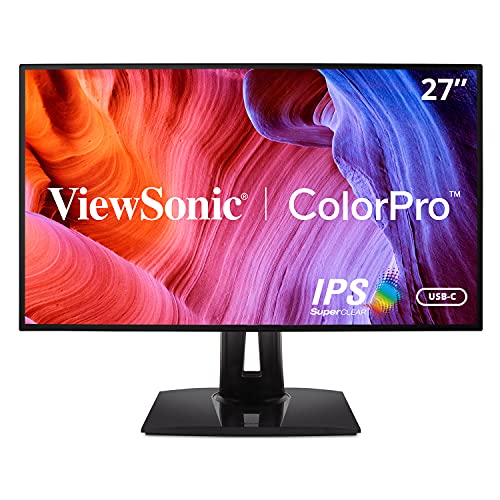
The ViewSonic VP2768a is a 27-inch QHD monitor with Pantone validation and factory calibration. It covers 100% of sRGB and 95% of DCI-P3. The stand offers height, tilt, swivel, and pivot. It includes a USB-C port with 60W power delivery and a built-in USB hub.
Pros
- Pantone validated color
- Multiple preset modes
- Robust ergonomic stand
Cons
- Not 4K
- Slightly warm color temperature out of box

AOC U27V4EA
The AOC U27V4EA is a 27-inch 4K IPS monitor that offers a lot for the price. It has a height-adjustable stand with tilt, but no swivel or pivot. It features a 3-sided frameless design and low blue light mode. While not as feature-rich, it provides a crisp 4K experience for less.
Pros
- Very affordable
- 4K sharpness
- Good for basic productivity
Cons
- Limited stand adjustments
- No USB-C port
The lineup, side by side
| # | Model | Screen Size | Best for | Score | Price |
|---|---|---|---|---|---|
| 1 | Dell UltraSharp U2723QE | 27 inches | Best overall for most professionals | 9.4 | Check price |
| 2 | LG UltraFine 27UP850-W | 27 inches | Best for Mac users and USB-C connectivity | 9.2 | Check price |
| 3 | ASUS ProArt Display PA278CV | 27 inches | Best for color-critical work on a budget | 9.0 | Check price |
| 4 | BenQ PD2705U Designer Monitor | 27 inches | Best for Mac and Windows hybrid use | 8.9 | Check price |
| 5 | Samsung ViewFinity S80A | 27 inches | Best for sharp text and detailed work | 8.8 | Check price |
| 6 | ViewSonic VP2768a | 27 inches | Best for professional color work | 8.6 | Check price |
| 7 | AOC U27V4EA | 27 inches | Best on a tight budget | 8.0 | Check price |
Before you buy
Questions worth asking
What is the ideal height for an ergonomic monitor?
The top of the monitor should be at or slightly below eye level. This allows you to look slightly downward at the screen, which is more natural for your neck. Adjust the height so you can read without tilting your head.
Is a 4K resolution necessary for an ergonomic display?
Not necessary but beneficial for sharpness and screen space. 4K allows you to run at higher scaling for crisp text or fit more windows side by side. For most users, QHD is sufficient, but 4K is great if you work with detailed spreadsheets or photos.
What does flicker-free technology do?
Flicker-free backlights reduce or eliminate the invisible flicker that can cause eye strain and headaches. This is especially helpful during long work sessions. Most modern ergonomic monitors include this feature.
Can I use an ergonomic monitor with a laptop?
Yes, many ergonomic monitors offer USB-C connectivity. A single USB-C cable can connect your laptop and provide power, video, and data. This creates a clean, efficient setup. Check if the monitor’s USB-C power delivery matches your laptop’s needs.
What is the difference between tilt, swivel, pivot, and height adjustments?
Tilt moves the screen forward and backward. Swivel rotates the screen left and right. Pivot rotates the screen 90 degrees to portrait orientation. Height raises or lowers the screen. Full adjustability gives you all these options for optimal positioning.
Are built-in speakers on monitors any good?
Generally, monitor speakers are basic and lack bass. For casual use they are fine, but for music or video editing, separate speakers or headphones are recommended. If you value audio quality, check for models with better sound or plan to use external speakers.
How do I know if a monitor is ergonomic?
Look for a stand that offers height adjustment, tilt, and possibly swivel and pivot. Also consider eye comfort features like flicker-free and low blue light. Reviews and product specs will indicate these capabilities.
What is the best screen size for ergonomic use?
For most desks, 27 inches is a sweet spot. It provides ample screen space without overwhelming your field of view. Larger sizes like 32 inches require more distance and may cause more head movement. Consider your desk depth and viewing distance.
Do I need a monitor arm for ergonomic benefits?
Not necessarily. Many monitors come with fully adjustable stands that provide good ergonomics. A monitor arm can offer more flexibility and free up desk space, but it adds cost. Choose a monitor with a good stand to start.
What is the importance of color accuracy in an ergonomic display?
Color accuracy is important for tasks like photo editing or design. It ensures that what you see on screen matches the final output. Ergonomic monitors often feature factory calibration and wide color gamut coverage. For general office work, color accuracy is less critical.
Our take
The Dell UltraSharp U2723QE is the best ergonomic display board for most people. It combines a fully adjustable stand, 4K resolution, and USB-C hub convenience. Its build quality and eye care features justify the price. If you need a budget option, the AOC U27V4EA offers 4K at a lower price but with fewer adjustments.
Marcus Chen
Marcus covered consumer electronics for enthusiast tech publications for six years before joining ChoiceCrest. He specializes in translating manufacturer spec sheets into plain-language buying advice, with a focus on audio, computing accessories and smart-home gear.