Ergonomic Desks That Save Your Back and Boost Focus
The Flexispot EC1 stands out as the top pick for most users because it offers a dual motor lift system, solid stability, and a reasonable price. Its main advantage is the smooth, quiet operation even under heavy loads, but its limitation is that the frame is not as heavy duty as some premium models.
Sitting all day is a health risk. An ergonomic desk helps you alternate between sitting and standing, reducing back pain and boosting energy. But not all desks are equal. We compared the most popular models to find the ones that actually deliver.
Our picks range from budget friendly to premium, each with its own strengths. Whether you need a small desk for a home office or a large one for a gaming setup, there is a desk here for you.
What we recommend

Flexispot EC1
The Flexispot EC1 is a sit stand desk with a dual motor system that lifts up to 154 pounds. Owners report smooth height transitions and minimal wobble at standing height. It comes in multiple sizes and colors, and assembly is straightforward with clear instructions.
Pros
- Quiet and stable motors
- Spacious desktop options
- Easy assembly
Cons
- Cable management tray not included
- Some users report slight wobble at max height

Uplift V2 Standing Desk
The Uplift V2 is a premium standing desk known for its rock solid stability and extensive customization. It offers a wide range of desktop materials and sizes, plus optional accessories like under desk cable trays. The advanced control panel has four memory presets and a child lock.
Pros
- Exceptional stability
- Huge selection of desktops
- Long warranty
Cons
- Higher price point
- Shipping can be slow

Vari Electric Standing Desk
The Vari Electric Standing Desk is a favorite in offices due to its tool free assembly. It has a simple two button controller and a sturdy frame. The desk glides smoothly between heights and holds up well under frequent use.
Pros
- Tool free setup
- Sturdy construction
- Reliable performance
Cons
- Limited color options
- No USB ports on the control panel
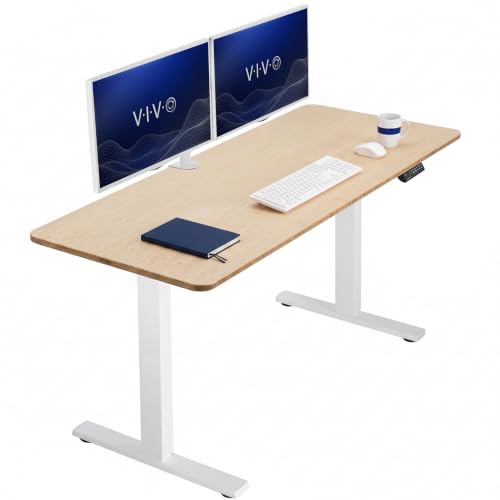
Fully Jarvis Bamboo Standing Desk
The Jarvis Bamboo desk combines sustainability with performance. Its bamboo surface is durable and beautiful. The frame is solid, and the desk offers many customization options. Owners appreciate the environmental friendliness without sacrificing quality.
Pros
- Beautiful bamboo desktop
- Strong and stable frame
- Eco friendly materials
Cons
- Bamboo can scratch easily
- Price is on the higher side

ApexDesk Elite Series 71
The ApexDesk Elite Series 71 offers a massive 71 inch desktop, ideal for multi monitor setups or those who need extra space. The motorized lift is powerful and smooth. It includes a free monitor mount and a cable management tray, adding value.
Pros
- Huge work surface
- Free monitor mount included
- Sturdy build
Cons
- Single motor is slower
- Takes up a lot of space
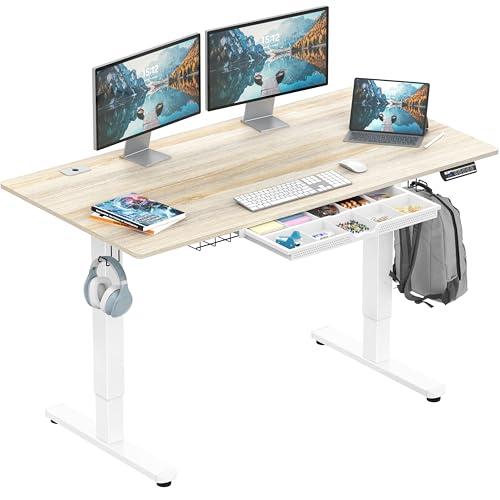
SHW Electric Height Adjustable Standing Desk
The SHW desk offers an affordable way to get a sit stand desk. It has a simple design with a single motor and a compact frame. Owners report that it is easy to assemble and works well for basic needs, though it may wobble at higher heights.
Pros
- Very affordable
- Simple assembly
- Compact for small spaces
Cons
- Lower weight capacity
- Wobble at standing height

SMUG Standing Desk 55×28 Inches
The SMUG desk is designed for smaller areas, offering a compact 55 by 28 inch surface. It has a quiet motor and a memory controller. Owners like the stability and value, but the frame is not as heavy duty as larger models.
Pros
- Compact footprint
- Quiet dual motor
- Stable at moderate heights
Cons
- Not ideal for heavy equipment
- Limited color choices
How to choose
How to choose an ergonomic desk Look for a desk that allows you to alternate between sitting and standing. The desk should have a height range that suits your body. A good rule is to ensure your elbows are at a 90 degree angle when typing. Check the weight capacity to support your monitor and accessories. Stability is critical. Read owner reviews about wobble at standing height.
Key features to consider Motor type matters. Dual motors offer smoother and faster height adjustments, especially under load. Memory presets allow you to save your preferred heights. Cable management helps keep your workspace tidy. Consider the desktop size and material. Some materials are more durable and scratch resistant.
Ergonomic desk setup tips Position the desk so that your monitor is at eye level. Place the keyboard and mouse close to your body to avoid reaching. Alternate between sitting and standing every 30 to 60 minutes. Use an anti fatigue mat when standing for extra comfort. Keep frequently used items within easy reach.
Maintenance and care Keep the desk clean and avoid spilling liquids on the motor. Tighten screws periodically to prevent wobble. If you move to a new location, follow the instructions to disassemble and reassemble. Avoid overloading the desk beyond its weight capacity.
Side by side
| # | Model | Adjustable Height Range | Best for | Score | Price |
|---|---|---|---|---|---|
| 1 | Flexispot EC1 | 28 to 47.6 inches | Best overall for most users | 9.4 | Check price |
| 2 | Uplift V2 Standing Desk | 25.3 to 50.9 inches | Best for customization and premium build | 9.2 | Check price |
| 3 | Vari Electric Standing Desk | 25 to 50.5 inches | Best for quick assembly and corporate use | 9.0 | Check price |
| 4 | Fully Jarvis Bamboo Standing Desk | 25.5 to 50.5 inches | Best eco friendly desktop option | 8.8 | Check price |
| 5 | ApexDesk Elite Series 71 | 29 to 49 inches | Best large surface for multiple monitors | 8.6 | Check price |
| 6 | SHW Electric Height Adjustable Standing Desk | 27.5 to 47.6 inches | Best budget friendly option | 8.2 | Check price |
| 7 | SMUG Standing Desk 55×28 Inches | 27.5 to 47.2 inches | Best for small spaces and home offices | 8.0 | Check price |
Good to know
What is the ideal height for an ergonomic desk?
The ideal height depends on your height and how you sit. When sitting, your feet should be flat and your knees at a 90 degree angle. When standing, your elbows should be at a 90 degree angle with your forearms parallel to the floor.
How often should I alternate between sitting and standing?
Experts suggest alternating every 30 to 60 minutes. Start with short standing periods and gradually increase. Listen to your body and adjust as needed.
Are dual motor desks better than single motor?
Yes, dual motors provide smoother and faster height adjustments, especially under heavy loads. They also tend to be quieter and more durable. Single motor desks are cheaper but may struggle with heavier set ups.
Can I use a standing desk with a treadmill?
Yes, many people use standing desks with under desk treadmills. Ensure the desk has a sufficient height range to accommodate the treadmill height. Also, check that the desk is stable enough for movement.
What is the weight capacity I should look for?
A weight capacity of at least 150 pounds is usually sufficient for a monitor, keyboard, and other desk items. If you have heavy equipment like a large monitor arm, choose a desk with a higher capacity.
Do ergonomic desks help with back pain?
Many users report reduced back pain when they alternate between sitting and standing. The key is to move frequently and maintain good posture. A desk alone may not solve existing pain, but it can help prevent it.
Are expensive desks worth the money?
Premium desks often offer better stability, more features, and longer warranties. If you use your desk daily, investing in a quality model can be worthwhile. Budget desks serve basic needs but may have more wobble and fewer features.
How long does it take to assemble an ergonomic desk?
Assembly time varies. Some desks like the Vari can be assembled in under 10 minutes without tools. Others may take an hour or more. Check the instructions and customer reviews for average assembly times.
The bottom line
For most people, the Flexispot EC1 offers the best balance of performance, stability, and value. Its dual motor system and solid build make it a reliable choice for daily use. If you need a premium desk with extensive customization, the Uplift V2 is worth the investment. For budget conscious buyers, the SHW desk is a practical option but expect some trade offs in stability.
Marcus Chen
Marcus covered consumer electronics for enthusiast tech publications for six years before joining ChoiceCrest. He specializes in translating manufacturer spec sheets into plain-language buying advice, with a focus on audio, computing accessories and smart-home gear.


