Electronics Accessories That Earn a Spot on Your Desk
Anker 737 Power Bank handles both phones and laptops thanks to its 140W output and built in screen. UGREEN Nexode 65W Charger replaces a bulky laptop brick for travel. Anker 553 USB-C Hub adds the ports a modern laptop dropped, making it the pick for anyone working from a single USB-C port.
Most desk clutter comes from chargers and cables that do one job poorly. Anker’s 737 power bank stands out because it can top off a laptop, not just a phone, thanks to 140W output and a readout showing exactly how much charge is left. Its size and weight are the tradeoff for that extra capacity.
Electronics accessories get tricky because wattage and port labels rarely explain what they can actually power. We compared real output specs, port types, and how each accessory fits a specific setup, from a home office to a travel bag.
How to choose
What counts as a useful electronics accessory The best accessories solve a specific bottleneck instead of adding another gadget. A charger that is too slow, a hub missing one port, or a cable that frays in a month all create more hassle than they remove. Output wattage, port selection, and build material are the three specs worth checking first.
Charging speed and port types explained USB-C now carries far more power than USB-A, often up to 100W or more on modern chargers and cables. A 65W charger covers most laptops, while phones rarely need more than 30W. Matching cable rating to charger output avoids bottlenecking either one.
Best picks for a home office setup A desk benefits most from a hub that restores lost ports, a surge protector rated above 2,000 joules, and one durable cable instead of several cheap ones. Wireless charging stands add convenience but should not replace a fast wired option for a primary device.
Keeping cables and power strips out of sight A cable box or clip system keeps a desk looking intentional instead of tangled. Ventilated boxes matter more than sealed ones, since several chargers running at once generate real heat that needs somewhere to go.
Our top picks

Anker 737 Power Bank (PowerCore 24K)
This power bank pushes up to 140W through its USB-C port, enough to charge most laptops alongside a phone. A small digital display shows remaining capacity instead of leaving that to guesswork.
Pros
- Powerful enough to charge most laptops
- Digital display removes the guesswork
- Three ports allow charging multiple devices at once
Cons
- Heavier than phone only power banks
- Full 140W output needs a compatible device
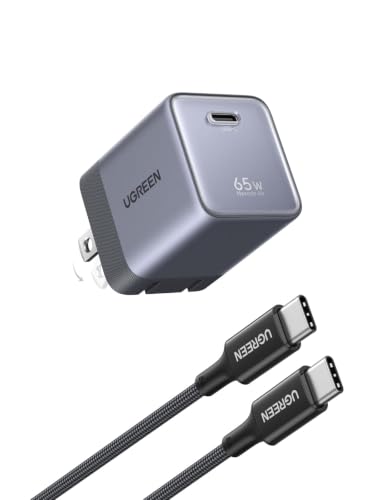
UGREEN Nexode 65W GaN Charger
GaN components let this charger fit 65W of output into a block barely bigger than a deck of cards. It replaces separate phone and laptop chargers for most travel setups.
Pros
- Small enough to replace multiple chargers
- GaN design runs cooler than standard chargers
- Can split power across three devices at once
Cons
- Full 65W only available from one port at a time
- Folding prongs add minor bulk versus flat plugs

Anker 553 USB-C Hub (8-in-1)
Modern laptops often drop ports the moment they go thin, and this hub adds them back. HDMI, Ethernet, an SD slot, and extra USB ports all run through one USB-C cable.
Pros
- Replaces ports most new laptops removed
- 4K HDMI output handles external monitors well
- Passthrough charging keeps the laptop topped up
Cons
- Gets warm during extended heavy use
- Ethernet port tops out at standard gigabit speed

Belkin BoostCharge Pro 3-in-1 Wireless Charger
Phone, watch, and earbuds each get a dedicated charging spot, which keeps a nightstand tidier than three separate cables. The stand folds flat for travel.
Pros
- Charges three device types from one outlet
- Folds down small enough to pack for trips
- MagSafe alignment keeps the phone centered
Cons
- Slower than a dedicated wired fast charger
- Watch puck only supports Apple Watch models

Anker PowerLine III USB-C to USB-C Cable
Braided exterior and a bend rating in the tens of thousands set this apart from the thin cables bundled with most devices. It charges at up to 60W, enough for laptops and fast charging phones alike.
Pros
- Braided design resists fraying far longer than stock cables
- 60W output covers most laptop charging needs
- Six foot length reaches across a desk comfortably
Cons
- Data transfer speed is limited to USB 2.0
- Thicker braiding is less flexible than slim cables

APC P11U2 11-Outlet Surge Protector
Eleven outlets and two USB ports cover a full desk setup without daisy chaining power strips. A 3,420 joule rating gives real protection against power spikes, not just a marketing number.
Pros
- Enough outlets for a full desk without extensions
- Joule rating is high enough for real surge protection
- Built in USB ports reduce the need for separate adapters
Cons
- Takes up more wall or floor space than compact strips
- No USB-C port, only USB-A

JOTO Cable Management Box
A power strip and its tangle of cords disappear into this ventilated box instead of sitting exposed on the floor. Side vents keep heat from building up around the hidden strip.
Pros
- Hides an entire power strip and its cords
- Ventilation prevents heat buildup inside
- Fire resistant material adds a safety margin
Cons
- Only fits one standard sized power strip
- Lid needs to be lifted to access outlets directly
How they compare
| # | Model | Capacity | Best for | Score | Price |
|---|---|---|---|---|---|
| 1 | Anker 737 Power Bank (PowerCore 24K) | 24,000mAh | Best overall | 9.4 | Check price |
| 2 | UGREEN Nexode 65W GaN Charger | 65W GaN total | Best fast wall charger | 9.1 | Check price |
| 3 | Anker 553 USB-C Hub (8-in-1) | HDMI, Ethernet, SD, 2 USB-A, USB-C | Best for laptop expansion | 8.9 | Check price |
| 4 | Belkin BoostCharge Pro 3-in-1 Wireless Charger | Phone, watch, earbuds | Best wireless charging station | 8.6 | Check price |
| 5 | Anker PowerLine III USB-C to USB-C Cable | 6 feet | Best durable cable | 8.4 | Check price |
| 6 | APC P11U2 11-Outlet Surge Protector | 11 AC outlets | Best surge protector | 8.2 | Check price |
| 7 | JOTO Cable Management Box | Medium, holds 1 power strip | Best for cord organization | 8.0 | Check price |
Questions worth asking
What is the difference between USB-C and USB-A charging?
USB-C supports higher power delivery, often up to 100W or more, while USB-A typically tops out around 12 to 18W. USB-C also carries faster data transfer on compatible cables.
Do I need a surge protector for electronics?
A surge protector rated at least 1,000 joules protects sensitive electronics from power spikes that a basic power strip does not block. Higher joule ratings give more protection margin.
Can a USB-C hub run two monitors at once?
Some hubs support dual displays, but many budget models only output to one external monitor at a time. Check the HDMI and DisplayPort specs before assuming dual monitor support.
Is a 65W charger enough for a laptop?
Most ultrabooks and mid size laptops charge fine at 65W. Larger gaming laptops often need 90W or higher to charge at full speed while in use.
How many joules should a surge protector have?
Home office setups are generally well covered above 2,000 joules. Lower rated strips still work but offer less protection during larger power spikes.
What accessories does a home office really need?
A capable hub, one dependable charger, a surge protector, and a single durable cable cover most needs. Extra gadgets beyond that often go unused.
Are wireless charging stands slower than cables?
Yes, most wireless stands cap out around 15W compared to 30W or more on a wired fast charger. The convenience tradeoff suits overnight charging better than quick top ups.
How do I hide power strips and cables neatly?
A ventilated cable management box or wall mounted clips keep cords out of sight without covering the outlets completely. Ventilation matters when multiple devices are charging at once.
Is a power bank with a screen worth it?
A screen showing exact remaining capacity helps avoid running out of charge unexpectedly, which matters more on higher capacity banks used for laptops.
The verdict
The Anker 737 Power Bank is the strongest overall pick because it covers both phone and laptop charging with a readout that removes the guesswork. Anyone working mainly from one laptop port should prioritize the Anker 553 hub instead, and travelers who want to cut down on chargers should start with the UGREEN Nexode 65W.
Marcus Chen
Marcus covered consumer electronics for enthusiast tech publications for six years before joining ChoiceCrest. He specializes in translating manufacturer spec sheets into plain-language buying advice, with a focus on audio, computing accessories and smart-home gear.
You might also need
Nintendo Game & Watch: Super Mario Bros Review: Still Worth It as a Collectible?

Ray-Ban Meta (Gen 2) Wayfarer Smart Glasses: Worth $379 for Clear Lenses?
AlyKets Nikon UC-E6 Replacement USB Cable: Does a $7.95 Cord Work as Well as the Original?
