Gear That Teaches Beginners How Electronic Music Is Made
Akai’s MPK Mini MK3 gives new producers pads, knobs, and keys in one compact controller, making it the easiest starting point. Novation’s Launchkey Mini MK3 suits anyone building tracks in Ableton Live specifically. Korg’s Volca Keys works for beginners who want to learn sound design on a standalone synth instead of a laptop.
Akai’s MPK Mini MK3 leads this list because it packs pads, knobs, and a mini keyboard into one small controller without overwhelming a first-time producer. Its keys run smaller than full size, which some beginners outgrow once they want a more traditional piano feel. Anyone prioritizing full-size keys should look at M-Audio’s Keystation instead.
Beginner electronic music gear splits into MIDI controllers that need a laptop and standalone synths or samplers that work on their own, and each path teaches a different skill first. We compared key count, onboard controls, and included software across seven picks to match the right starting gear to how someone actually wants to learn.
The top picks, ranked

Akai Professional MPK Mini MK3
Akai packs 25 mini keys, 8 velocity sensitive pads, and 8 assignable knobs into a controller small enough for a desk with limited space. Bundled software includes a sample library and a simplified version of MPC Beats, giving beginners a complete starting kit. USB bus power means no separate adapter to carry around.
Pros
- Compact size fits small desks and travel bags
- Pads and knobs cover beat making and mixing basics
- Bundled software gets beginners producing immediately
Cons
- Mini keys feel cramped for players used to full size pianos
- Limited knob count for complex synth patches
Novation Launchkey Mini MK3
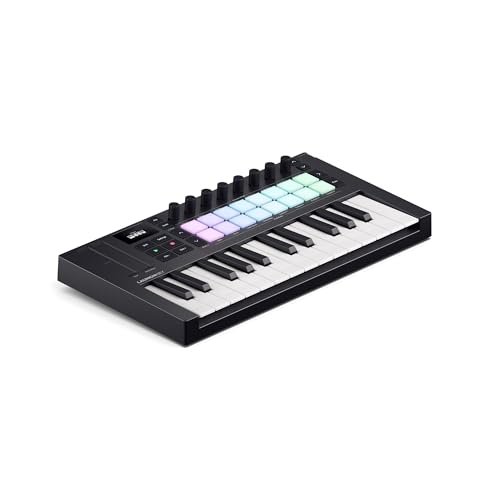
Novation designs this controller around tight mapping with Ableton Live, so pads and knobs line up with the software’s clip launching and mixing views without manual setup. A capture MIDI feature saves ideas played before hitting record. Beginners who already know they want to learn Ableton specifically get the fastest start here.
Pros
- Deep integration with Ableton Live out of the box
- RGB pads make clip launching easier to follow visually
- Capture MIDI feature saves spontaneous playing
Cons
- Mapping benefits shrink when used with other DAWs
- Mini keys still limit traditional piano practice

Arturia MiniLab 3
Arturia leans into analog-style knob control, giving beginners physical hands-on access to filter and envelope parameters instead of clicking through software menus. A bundled Analog Lab software synth collection gives sounds worth tweaking right away. Touch strips add pitch and modulation control without a traditional wheel.
Pros
- Physical knobs teach synth parameters hands-on
- Bundled synth sounds are ready to tweak immediately
- Touch strips save space versus a full mod wheel
Cons
- Fewer pads than Akai’s or Novation’s controllers
- Touch strips feel less precise than a physical wheel
Korg Volca Keys
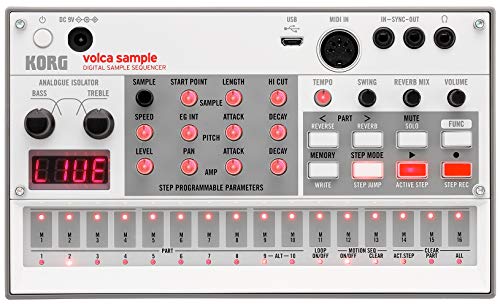
Korg’s Volca Keys works entirely on its own battery power, teaching sound design through real analog circuitry instead of software plugins. A built in sequencer lets beginners program patterns without a laptop at all. Small sliders and knobs map directly to pitch, filter, and envelope controls.
Pros
- Teaches analog sound design without a computer
- Battery power makes it fully portable
- Built in sequencer works without other gear
Cons
- Limited to synth sounds, no sampling or beat pads
- Keys are small and not velocity sensitive

M-Audio Keystation 49 MK3
M-Audio stretches to 49 full-size keys, suited to beginners coming from piano lessons who find mini keys cramped. A pitch bend wheel and octave buttons extend playable range beyond the physical keys. Simple USB connection skips extra setup for a first controller.
Pros
- Full-size keys suit players coming from piano backgrounds
- Pitch bend wheel adds expressive playing options
- Simple plug and play USB setup
Cons
- Larger footprint than mini key controllers
- Fewer pads and knobs than beat-focused controllers

Teenage Engineering Pocket Operator PO-33 K.O.
Teenage Engineering shrinks sampling down to a device that fits a pocket, with a built in microphone for grabbing sounds anywhere. Sixteen step sequencing teaches pattern based beat making without any software at all. Small buttons take some adjustment but reward quick, improvised sessions.
Pros
- Fully portable with no laptop or software needed
- Built in microphone makes sampling instantly accessible
- Low cost entry point into beat making
Cons
- Tiny buttons take practice to use accurately
- Small built in speaker is quiet for serious listening
Alesis V49
Alesis combines 49 full-size keys with 8 backlit pads at a lower price than most competing controllers in this category. A bundled software package covers a basic DAW, virtual instruments, and a short lesson series for absolute beginners. Build quality trades some durability for the lower price point.
Pros
- Full-size keys and pads together at a lower price
- Bundled lessons help total beginners get oriented
- Backlit pads make beat patterns easier to see
Cons
- Build quality feels less solid than pricier competitors
- Software bundle is more basic than Akai’s or Novation’s
How to pick the right one
What to look for in a first electronic music controller Key count and pad count decide what kind of music comes easiest at first, since piano-style playing favors more keys while beat making favors more pads. Bundled software matters just as much as hardware, since a controller without sounds to trigger needs separate software bought or downloaded. Portability becomes relevant for anyone planning to practice outside a home studio desk.
Controllers versus standalone synths and samplers MIDI controllers like Akai’s, Novation’s, Arturia’s, M-Audio’s, and Alesis’s need a laptop running a DAW to make any sound at all. Korg’s Volca Keys and Teenage Engineering’s Pocket Operator work independently, making sound on their own without software. Beginners unsure about committing to computer-based production often learn faster starting with a standalone instrument first.
Matching key size and feel to playing background Beginners coming from piano lessons notice mini keys on Akai’s, Novation’s, and Arturia’s controllers feel cramped compared to a real piano. M-Audio’s Keystation 49 MK3 and Alesis’s V49 keep full-size keys, better suited to that background. Beat making focused beginners rarely need full-size keys, since pads matter more than key feel for that style.
Best picks for specific learning goals Anyone committed to Ableton Live specifically should start with Novation’s Launchkey Mini MK3 over a generic controller. Beginners who want to understand analog sound design from the ground up learn more from Korg’s Volca Keys than from software plugins alone. Budget conscious beginners wanting full-size keys and pads together get the most for the price from Alesis’s V49.
Compared at a glance
| # | Model | Keys | Best for | Score | Price |
|---|---|---|---|---|---|
| 1 | Akai Professional MPK Mini MK3 | 25 mini keys, velocity sensitive | Best overall for beginner music production | 9.3 | Check price |
| 2 | Novation Launchkey Mini MK3 | 25 mini keys, velocity sensitive | Best for Ableton Live integration | 9.1 | Check price |
| 3 | Arturia MiniLab 3 | 25 mini keys, velocity sensitive | Best for hands-on synth control | 8.9 | Check price |
| 4 | Korg Volca Keys | Analog synthesizer | Best standalone synth for learning sound design | 8.7 | Check price |
| 5 | M-Audio Keystation 49 MK3 | 49 full-size keys, semi-weighted | Best full-size keys for piano-style beginners | 8.5 | Check price |
| 6 | Teenage Engineering Pocket Operator PO-33 K.O. | Pocket sampler and sequencer | Best pocket sampler for learning on the go | 8.3 | Check price |
| 7 | Alesis V49 | 49 full-size keys | Best budget full-size controller bundle | 8.0 | Check price |
Frequently asked questions
What is the easiest way to start making electronic music?
A compact MIDI controller like Akai’s MPK Mini MK3 paired with free or bundled DAW software gives the simplest entry point for most beginners.
Do I need a computer to make electronic music?
No, standalone instruments like Korg’s Volca Keys and Teenage Engineering’s Pocket Operator make sound entirely on their own without a laptop.
Are mini keys good enough for learning electronic music?
Mini keys on controllers like Novation’s and Arturia’s work fine for programming and triggering sounds, though players from a piano background may prefer full-size keys.
What is the difference between a MIDI controller and a synthesizer?
A MIDI controller like M-Audio’s Keystation sends note data to software and makes no sound on its own, while a synthesizer like Korg’s Volca Keys generates its own sound internally.
Does Ableton Live work with any MIDI controller?
Most controllers here work with Ableton Live, but Novation’s Launchkey Mini MK3 maps more of its pads and knobs automatically to the software’s layout.
Is a pocket sampler a good first instrument for electronic music?
Teenage Engineering’s Pocket Operator PO-33 K.O. works well as a first instrument for learning sampling and sequencing without a full studio setup.
How many pads do I need for beat making?
Eight pads, found on Akai’s and Alesis’s controllers, cover most beginner beat patterns, while sixteen pads on Novation’s controller allow more complex layouts.
Can beginner electronic music gear be used for live performance?
Standalone gear like Korg’s Volca Keys and Teenage Engineering’s Pocket Operator works well live since it needs no laptop, while MIDI controllers depend on a connected computer.
What software comes with a beginner MIDI controller?
Most bundles include a trial or lite version of a DAW plus a sample or virtual instrument library, though the depth varies between Akai’s, Novation’s, and Alesis’s included packages.
Is it worth buying full-size keys as a beginner?
Only if piano-style playing matters to the music being made. Beat making and sound design focused beginners rarely need the extra size that M-Audio’s or Alesis’s full-size keys add.
Our take
Akai’s MPK Mini MK3 remains the strongest starting point for most beginners, since its pads, knobs, and keys cover beat making and melody work without overwhelming a first session. Anyone set on learning Ableton Live specifically should start with Novation’s Launchkey Mini MK3 instead, since its deeper mapping saves setup time. Beginners who want to understand sound design before touching a laptop should skip controllers entirely and start with Korg’s Volca Keys.
Marcus Chen
Marcus covered consumer electronics for enthusiast tech publications for six years before joining ChoiceCrest. He specializes in translating manufacturer spec sheets into plain-language buying advice, with a focus on audio, computing accessories and smart-home gear.


