Smart Easels for Digital Artists and Creators
Top pick: Wacom Cintiq 16. It offers a crisp 15.6 inch display and natural pen feel for digital artists. Main limitation: it requires a computer connection, so it is not standalone.
Smart easels combine traditional drawing surfaces with digital technology. They let you create directly on a screen, see your strokes in real time, and use software like Photoshop or Procreate.
Whether you are a professional illustrator, a student, or a hobbyist, a smart easel can enhance your creativity. This roundup covers a range of options, from portable tablets to large desktop displays.
How to choose
Our top picks

Wacom Cintiq 16
The Wacom Cintiq 16 is a trusted pen display that connects to your Mac or PC. It features a 15.6 inch Full HD screen with 96% sRGB color accuracy. The Pro Pen 2 offers 8192 levels of pressure sensitivity, making it ideal for detailed work. Owners report a sturdy build and seamless driver installation.
Pros
- Excellent color accuracy
- Natural pen feel
- Compact footprint
Cons
- Requires computer connection
- No touch support
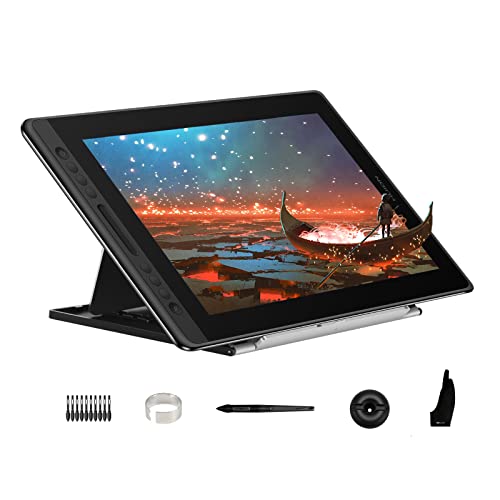
Huion Kamvas Pro 16
The Huion Kamvas Pro 16 offers a 15.6 inch laminated display with anti-glare glass. It covers 120% sRGB and has a fully laminated screen that reduces parallax. The PW517 pen provides 8192 pressure levels and tilt support. Users appreciate the adjustable stand and slim bezel.
Pros
- Laminated display reduces parallax
- Wide color gamut
- Includes adjustable stand
Cons
- Build quality feels less premium
- Driver updates can be finicky

Apple iPad Pro 12.9 (M2)
The iPad Pro 12.9 with M2 chip is a versatile smart easel when paired with the Apple Pencil 2. It features a Liquid Retina XDR display with ProMotion and True Tone. The M2 chip handles demanding apps like Procreate and Adobe Fresco. Owners praise its portability and long battery life.
Pros
- Ultra-portable
- Stunning display with ProMotion
- Access to iOS creative apps
Cons
- Expensive when adding Pencil and keyboard
- Limited file management

XP-Pen Artist 24 Pro
The XP-Pen Artist 24 Pro offers a 23.8 inch 2K QHD display with 92% Adobe RGB coverage. It comes with a wireless shortcut remote for efficiency. The PA2 pen provides 8192 pressure levels and tilt recognition. Users like the adjustable stand and wide viewing angles.
Pros
- Large workspace
- High resolution
- Included shortcut remote
Cons
- Takes up desk space
- Heavy and bulky

Samsung Galaxy Tab S9 Ultra
The Galaxy Tab S9 Ultra features a 14.6 inch AMOLED display with 120Hz refresh rate. It comes with the S Pen, which offers low latency and air actions. The device is water-resistant and has a long battery life. Owners report excellent performance for drawing apps like Clip Studio Paint.
Pros
- Vibrant AMOLED screen
- S Pen included
- Expandable storage
Cons
- S Pen not as precise as others
- Android apps may have limitations
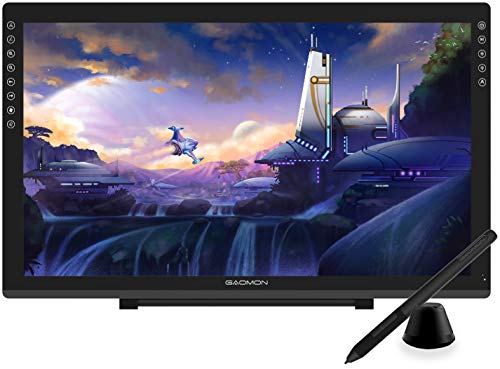
Gaomon PD2200
The Gaomon PD2200 offers a 21.5 inch Full HD display with 120% sRGB coverage. It includes a battery-free stylus with 8192 pressure levels. The stand is adjustable, and the pen holder adds convenience. Users find it a solid entry point into digital art.
Pros
- Low price point
- Large screen
- Battery-free stylus
Cons
- Lower resolution
- Colors may need calibration

Lenovo Yoga Book 9i
The Lenovo Yoga Book 9i is a unique dual-screen laptop with a 13.3 inch OLED display on each side. It can be used as a smart easel with the included stylus and digital keyboard. The device runs Windows 11, giving access to full desktop software. Owners appreciate its flexibility but note the battery drains quickly.
Pros
- Dual screens for multitasking
- Full Windows OS
- Stylus included
Cons
- Battery life is short
- Heavier than standard tablets
How they compare
| # | Model | Screen Size | Best for | Score | Price |
|---|---|---|---|---|---|
| 1 | Wacom Cintiq 16 | 15.6 inches | Professional digital artists seeking a reliable pen display | 9.4 | Check price |
| 2 | Huion Kamvas Pro 16 | 15.6 inches | Budget-conscious professionals who need a large display | 9.0 | Check price |
| 3 | Apple iPad Pro 12.9 (M2) | 12.9 inches | Artists who want a portable smart easel with powerful apps | 9.2 | Check price |
| 4 | XP-Pen Artist 24 Pro | 23.8 inches | Artists needing a large 2K display for detailed work | 8.8 | Check price |
| 5 | Samsung Galaxy Tab S9 Ultra | 14.6 inches | Android users who want a large drawing tablet | 8.6 | Check price |
| 6 | Gaomon PD2200 | 21.5 inches | Beginners looking for a budget-friendly large display | 8.2 | Check price |
| 7 | Lenovo Yoga Book 9i | 13.3 inches (dual) | Multitaskers who want a dual-screen laptop and easel | 8.0 | Check price |
Good to know
Do smart easels work without a computer?
Standalone tablets like the iPad Pro and Galaxy Tab S9 Ultra work without a computer. They have built-in processors and run drawing apps directly. Pen displays like the Wacom Cintiq require a computer to function, as they act as a second monitor.
Can I use a smart easel with Photoshop?
Yes, most smart easels work with Photoshop. Pen displays connect to your computer and function as a monitor, so you can use Photoshop there. Standalone tablets have Photoshop for iPad, which is a limited version but still powerful. For tablets, you might also consider alternatives like Procreate.
What is the difference between a smart easel and a graphics tablet?
A graphics tablet, like a Wacom Intuos, has no screen. You draw on the tablet while looking at your monitor. A smart easel has a built-in display, so you draw directly on the screen. Smart easels are more intuitive but often more expensive.
How much pressure sensitivity do I need?
Most artists find 4096 levels sufficient, but many smart easels offer 8192 levels for finer control. Higher pressure sensitivity allows you to vary line thickness and opacity more precisely. It is particularly useful for detailed illustrations and calligraphy.
Are smart easels good for beginners?
Yes, smart easels can be great for beginners because they offer a natural drawing experience. Budget-friendly models like the Gaomon PD2200 are ideal for learning. However, beginners might start with a simpler graphics tablet to see if they enjoy digital art before investing in a smart easel.
Can I use a smart easel for photo editing?
Absolutely. Smart easels work well for photo editing because they offer precise stylus control. Pen displays with accurate colors, like the Wacom Cintiq, are popular among photographers. Standalone tablets with apps like Lightroom also allow for on-the-go editing.
Do smart easels have a glare issue?
Some smart easels have glossy screens that can reflect light. Many models, like the Huion Kamvas Pro, include anti-glare coatings or etched glass to reduce reflections. If you work in a brightly lit room, look for a matte screen option.
What is the lifespan of a smart easel?
With proper care, smart easels can last several years. Pen displays tend to have a longer lifespan because they are essentially monitors. Standalone tablets may slow down as software updates demand more resources. Battery life also degrades over time, but many tablets allow battery replacement.
Can I connect a smart easel to a laptop?
Pen displays can connect to laptops via USB and HDMI or USB-C. Some laptops have limited ports, so you might need an adapter. Standalone tablets do not need a laptop, but they can connect for file transfer or screen mirroring.
Are smart easels compatible with Mac and PC?
Most pen displays are compatible with both Mac and PC. Check the manufacturer’s specifications for system requirements. Standalone tablets are platform-specific: iPad Pro runs iOS, Galaxy Tab runs Android, and Windows tablets run Windows. Choose based on your existing devices and preferred software.
Final word
For most artists, the Wacom Cintiq 16 remains the best smart easel because of its reliable performance and excellent color accuracy. If you need portability, the Apple iPad Pro 12.9 offers unmatched flexibility. Budget-minded buyers should consider the Gaomon PD2200 as a solid entry point. Ultimately, choose a smart easel that matches your creative workflow and budget.
Marcus Chen
Marcus covered consumer electronics for enthusiast tech publications for six years before joining ChoiceCrest. He specializes in translating manufacturer spec sheets into plain-language buying advice, with a focus on audio, computing accessories and smart-home gear.


