Kindle vs Kobo: Which E-Reader Fits Your Reading Habits
Kindle Paperwhite (11th Gen) leads this comparison, combining a 6.8-inch glare-free screen with IPX8 waterproofing for pool and beach use. Kobo Clara BW offers similar waterproofing for less money. Budget shoppers without water exposure needs should consider the basic Kindle (11th Gen) instead.
Kindle Paperwhite (11th Gen) tops this comparison for readers who want one device that handles fiction, nonfiction and audiobooks. Its 6.8-inch glare-free screen and IPX8 waterproof rating survive pool days, bathtubs and humid trips. One tradeoff stands out: it skips the physical page-turn buttons some readers still prefer for one-handed use.
Storage, waterproofing and screen size shift confusingly between Kindle and Kobo models within the same lineup. We compared listed specifications for resolution, storage capacity and waterproof ratings, then checked owner feedback for recurring complaints about glare or button durability.
Before you buy
Kindle vs Kobo: Which Ecosystem Fits Your Reading Habits Amazon’s Kindle lineup ties into the Kindle Store and Audible, a natural fit for readers already inside Amazon’s ecosystem. Kobo devices connect to OverDrive and Libby, better suited to heavy library borrowers. Neither ecosystem locks out other formats; both support side-loading EPUB or PDF files from a computer. Store loyalty usually decides the choice more than hardware specs.
How Much Storage Do You Actually Need Text-only ebooks take up very little space, so even 8GB holds thousands of titles. Audiobooks change that math fast, since a single title can use several hundred megabytes. Frequent Audible or Kobo audiobook listeners should look at 16GB or 32GB models. Note-taking devices like the Kindle Scribe benefit from 64GB when storing scanned documents alongside ebooks.
Waterproofing and Screen Size for Travel Reading An IPX8 rating means a device survives brief submersion in fresh water, covering most pool, bathtub or rain exposure. Larger 7-inch screens on the Oasis or Libra Colour show more text per page, cutting down page turns on long flights. Smaller 6-inch models pack lighter for carry-on bags but need more frequent page turns. Glare-free E Ink stays legible in direct sunlight at any screen size, unlike a phone or tablet display.
When a Note-Taking E-Reader Makes Sense Standard e-readers cover fiction and general reading well but fall short for marking up documents. A stylus-equipped model like the Kindle Scribe or Kobo Elipsa 2E lets readers annotate PDFs, sign documents or sketch notes directly on the page. Larger screens add bulk and cost, so these fit students or professionals handling paperwork more than casual readers. Neither carries a waterproof rating, since the added components make sealing the case harder.
Our top picks
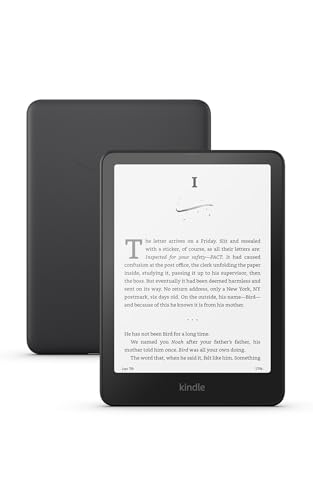
Amazon Kindle Paperwhite (11th Gen, 2021)
A 6.8-inch glare-free screen delivers 300 ppi resolution for sharp, paper-like text on the Kindle Paperwhite. IPX8 waterproofing handles splashes at the pool or in the bathtub. Storage starts at 8GB, enough for thousands of ebooks plus a modest audiobook library over Bluetooth.
Pros
- Glare-free screen stays legible in direct sunlight
- IPX8 rating survives pool splashes and bathtub drops
- Adjustable warm light cuts eye strain at night
Cons
- No physical page-turn buttons
- Base 8GB storage fills quickly with audiobooks

Kobo Clara BW
A 6-inch E Ink Carta 1200 screen gives the Kobo Clara BW the same 300 ppi sharpness as the Paperwhite in a smaller body. IPX8 waterproofing and 16GB of storage beat the entry Kindle’s spec sheet. Native OverDrive support lets owners borrow library ebooks straight from the device.
Pros
- 16GB storage beats the base Kindle at a similar price tier
- Built-in OverDrive simplifies library borrowing
- ComfortLight PRO adjusts warmth for night reading
Cons
- Screen runs smaller than the Paperwhite’s 6.8 inches
- Kobo’s ebook store carries a smaller catalog than Amazon’s
Amazon Kindle (11th Gen, 2022)
Screen specs carry over from pricier Kindle models: 6 inches, 300 ppi, sharp text at a lower price. Waterproofing drops out entirely to hit that price tier. Storage sits at 16GB, enough for a large text-based library, and an adjustable front light works well indoors without the Paperwhite’s warm-tone option.
Pros
- Same 300 ppi resolution as pricier Kindle models
- 16GB storage handles thousands of ebooks
- Lightweight body stays easy to hold one-handed
Cons
- No waterproofing, so pool or beach use carries risk
- Front light skips the warm amber adjustment

Amazon Kindle Oasis
Physical page-turn buttons line one edge of the Kindle Oasis, letting readers flip pages without touching the screen. A 7-inch display and asymmetric grip make one-handed reading easier on a commute or in bed. IPX8 waterproofing matches the Paperwhite’s rating.
Pros
- Physical buttons allow page turns without touching the screen
- Asymmetric grip suits extended one-handed reading
- 32GB option stores large audiobook collections
Cons
- Heavier than the standard Paperwhite
- Aluminum back feels cold in cooler climates

Kobo Libra Colour
A Kaleido color E Ink layer sits over a 300 ppi monochrome panel on the Kobo Libra Colour, showing book covers and highlights in color. Built-in OverDrive and Libby-compatible access make library borrowing straightforward without a separate app. Physical page-turn buttons line one edge, and IPX8 waterproofing covers splashes.
Pros
- Color screen displays book covers and highlighted text
- Native library borrowing skips separate library apps
- Physical page-turn buttons included
Cons
- Color resolution runs lower than the black-and-white layer beneath it
- Costs more than monochrome Kobo models
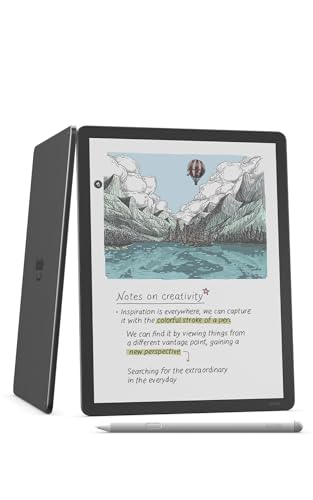
Amazon Kindle Scribe
A 10.2-inch screen, the largest in the current Kindle lineup, gives the Scribe room for handwritten notes and PDF markup with the included stylus. Storage options climb to 64GB, suited to readers who keep large ebook and document libraries on one device. No official waterproof rating means it fits indoor reading and note-taking best.
Pros
- Large 10.2-inch screen suits documents and PDFs
- Included stylus supports handwritten notes
- 64GB option holds large ebook and document libraries
Cons
- No waterproof rating, unlike the Paperwhite or Oasis
- Larger size makes it less pocketable for travel
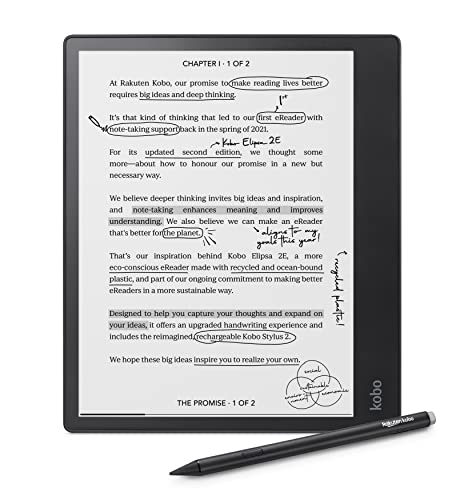
Kobo Elipsa 2E
A 10.3-inch E Ink screen and included stylus target readers who annotate PDFs, manuscripts or textbooks on the Kobo Elipsa 2E. Storage sits at 32GB, and ComfortLight PRO adjusts screen warmth for evening use. Like the Kindle Scribe, it carries no official waterproof rating.
Pros
- Included stylus handles PDF and document annotation
- ComfortLight PRO adjusts warmth for evening sessions
- Large screen suits textbooks and manuscripts
Cons
- Lower pixel density than the smaller Kobo and Kindle models
- No waterproofing limits use near pools or the beach
The lineup, side by side
| # | Model | Screen size | Best for | Score | Price |
|---|---|---|---|---|---|
| 1 | Amazon Kindle Paperwhite (11th Gen, 2021) | 6.8 inches | Best overall | 9.4 | Check price |
| 2 | Kobo Clara BW | 6 inches | Best value | 9.1 | Check price |
| 3 | Amazon Kindle (11th Gen, 2022) | 6 inches | Best budget | 8.8 | Check price |
| 4 | Amazon Kindle Oasis | 7 inches | Best for one-handed reading | 8.6 | Check price |
| 5 | Kobo Libra Colour | 7 inches | Best for library ebook borrowing | 8.4 | Check price |
| 6 | Amazon Kindle Scribe | 10.2 inches | Best for note-taking and large ebook libraries | 8.2 | Check price |
| 7 | Kobo Elipsa 2E | 10.3 inches | Best for reading and annotating documents | 8.0 | Check price |
Frequently asked questions
Is a Kindle or Kobo e-reader better for library books?
Kobo devices include native OverDrive and Libby-compatible borrowing, so library ebooks load without a separate app. Kindle owners can still borrow through the Libby app on a phone, then send titles to a Kindle, which adds an extra step.
How much storage do I need on an e-reader?
8GB covers thousands of text-based ebooks. Readers who also store audiobooks or scanned documents should choose 16GB or higher, since audio files and PDFs take up far more space than plain text.
Can e-readers get wet at the pool or beach?
Only IPX8-rated models, including the Kindle Paperwhite, Kindle Oasis, Kobo Clara BW and Kobo Libra Colour, are built to survive splashes or brief submersion. Unrated models like the base Kindle, Kindle Scribe or Kobo Elipsa 2E should stay away from water.
What is the difference between E Ink and E Ink Kaleido color screens?
Standard E Ink shows black text on a white or gray background at full resolution. Kaleido color panels, used on the Kobo Libra Colour, add a color filter layer on top, so covers and highlights show color at a lower effective resolution than the black-and-white layer beneath.
Do e-readers work for taking notes or annotating PDFs?
Only stylus-equipped models like the Kindle Scribe and Kobo Elipsa 2E support handwritten notes and PDF markup. Standard Kindle and Kobo readers are built for reading text, not writing on the page.
How long does e-reader battery life actually last?
E Ink screens only draw power when the page changes, so most current Kindle and Kobo models last weeks on a single charge under normal reading habits. Heavy use of the front light, Bluetooth audiobooks or a stylus shortens that considerably.
Are physical page-turn buttons worth it on an e-reader?
Buttons let readers flip pages without touching the screen, which helps in the bath or with wet hands. The Kindle Oasis and Kobo Libra Colour include them; most other current models rely on touchscreen taps or swipes instead.
What screen size is best for reading on an e-reader?
A 6-inch screen keeps the device compact and light for commuting or travel. A 7-inch screen, found on the Oasis and Libra Colour, shows more text per page and suits readers who prefer fewer page turns.
Kindle Paperwhite vs Kobo Clara BW: which should I buy?
Both carry IPX8 waterproofing and 300 ppi screens, so the choice often comes down to ecosystem and screen size. The Paperwhite’s 6.8-inch display and Amazon’s larger ebook catalog suit heavy Kindle Store shoppers, while the smaller, cheaper Clara BW favors library borrowers already using OverDrive.
Which e-reader is best for students?
The Kindle Scribe and Kobo Elipsa 2E both include a stylus for annotating PDFs and textbooks, which suits coursework better than a standard reading-only model. Students who only need ebooks and don’t annotate documents can save money with the base Kindle or Kobo Clara BW instead.
Our take
Kindle Paperwhite (11th Gen) remains the strongest pick for most readers, combining a 6.8-inch glare-free screen, IPX8 waterproofing and Amazon’s large ebook catalog in one package. Readers who borrow heavily from public libraries or want a color screen should choose the Kobo Libra Colour instead, since its native OverDrive integration simplifies borrowing. Anyone planning to mark up documents or take handwritten notes gets more use from the Kindle Scribe or Kobo Elipsa 2E.
Sierra Daniels
Sierra's background is in landscape design and nursery retail. She focuses on lawn and garden equipment, outdoor furniture and gear durability, weighing published specs against how materials actually hold up outside.
You might also need

Minikey Solar Bird Feeder Camera: Is the AI Bird ID Worth the Subscription?

Refresh Sports Glider Ray Pool Torpedo: A Good Pick for Underwater Pool Play?

Sweet Home Collection Patio Chair Cushions: Enough Padding for Daily Outdoor Use?
