Top Digital Heavy Duty Diagnostic Scanners for Pros
The Autel MaxiCOM MK808BT is our top pick for most heavy duty users. It offers broad vehicle coverage and wireless convenience. Its main limitation is the lack of heavy duty truck protocols, so for commercial fleets consider the Launch X431 HD III.
Heavy duty car diagnostic scanners have evolved into powerful digital tools. They now read and clear codes, perform active tests, and program modules. Choosing the right one can save you hours in the garage.
We looked at popular models that professionals and serious DIYers use. We compared their features, coverage, and ease of use. This guide highlights the strengths of each to help you decide which fits your work.
Our top picks

Autel MaxiCOM MK808BT
The Autel MaxiCOM MK808BT is a wireless OBD2 scanner with advanced features like active tests and coding. It covers all OBD2 protocols and many manufacturer-specific systems. The 7 inch touchscreen is responsive and bright. Bluetooth connection works reliably with Android and iOS apps. Owners report it handles most repairs efficiently.
Pros
- Wireless convenience
- Extensive system coverage
- Regular software updates
Cons
- No heavy duty truck support
- Price is higher for occasional users

Launch X431 HD III
The Launch X431 HD III is designed for commercial vehicles. It reads and clears codes on trucks, buses, and trailers. It supports J1939 and J1708 protocols. The tablet based interface is rugged and easy to use. It includes DPF regeneration and injector coding for diesel engines. Owners in fleet maintenance praise its comprehensive coverage.
Pros
- Specialized for heavy duty
- Diesel engine functions
- Large screen
Cons
- Bulky to handle
- Expensive
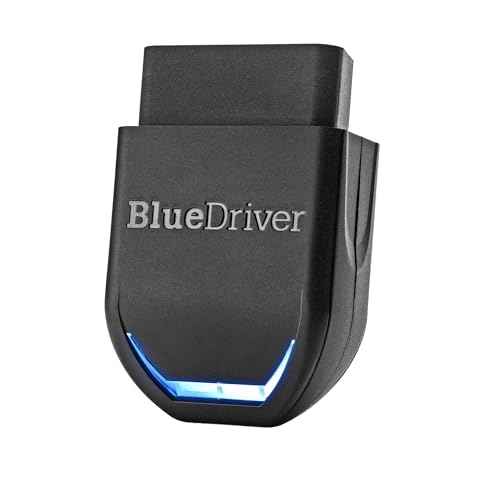
BlueDriver Pro
BlueDriver Pro is a compact Bluetooth scanner that works with a mobile app. It reads and clears engine codes and provides live data. It offers repair reports and recall information. The app is intuitive and regularly updated. It does not support heavy duty protocols but is great for cars and light trucks.
Pros
- Affordable
- User friendly app
- Live data graphing
Cons
- Limited to OBD2 functions
- No advanced coding

Innova 5610
The Innova 5610 is a handheld scanner that reads ABS and airbag codes in addition to engine codes. It has a 3.5 inch color display and keyless entry test. It provides ABS and airbag live data. It is easy to operate without a smartphone. Owners like its dedicated buttons for quick menu navigation.
Pros
- Specialized ABS and airbag
- Fast code reading
- No smartphone needed
Cons
- Limited to specific systems
- Smaller screen

Foxwell NT710
Foxwell NT710 offers extensive coverage for European car brands like BMW, Mercedes, and VW. It supports coding and adaptations for many modules. The 5 inch touchscreen is clear. It includes oil reset and battery registration functions. Owners report it works well for routine maintenance on European models.
Pros
- Deep European coverage
- Coding functions
- Battery registration
Cons
- Not ideal for Asian or domestic
- User interface can be complex

Ancel AD410
The Ancel AD410 is a pocket sized code reader that reads and clears engine codes. It displays live data and graphs. It has a 2.4 inch TFT screen. It is simple to use with one click operation. It is ideal for quick checks but not for heavy diagnostics.
Pros
- Very affordable
- Compact design
- Easy for beginners
Cons
- No ABS or airbag
- Limited to OBD2 systems

Autel MaxiDAS DS808
The Autel MaxiDAS DS808 is a full system scanner that covers engine, transmission, ABS, airbag, and more. It offers bi-directional control and coding. The 7 inch display is large and clear. It includes a built in printer for reports. Owners compare it to high end models but at a lower price.
Pros
- Comprehensive system coverage
- Bi-directional control
- Built in printer
Cons
- Learning curve for new users
- Heavier than handheld units
Compared at a glance
| # | Model | Display | Best for | Score | Price |
|---|---|---|---|---|---|
| 1 | Autel MaxiCOM MK808BT | 7 inch touchscreen | Best Overall for Professional Mechanics | 9.4 | Check price |
| 2 | Launch X431 HD III | J1939, J1708, heavy duty protocols | Best for Heavy Duty Trucks and Fleets | 9.2 | Check price |
| 3 | BlueDriver Pro | Bluetooth 4.0 | Best Budget Friendly for DIY Enthusiasts | 8.8 | Check price |
| 4 | Innova 5610 | Engine, ABS, airbag | Best for ABS and Airbag Diagnostics | 8.5 | Check price |
| 5 | Foxwell NT710 | European makes | Best for European Vehicles | 8.3 | Check price |
| 6 | Ancel AD410 | 2.4 inch TFT | Best Compact and Portable Option | 8.0 | Check price |
| 7 | Autel MaxiDAS DS808 | All major systems | Best for All System Diagnostics | 9.0 | Check price |
What matters most
Frequently asked questions
What is a heavy duty diagnostic scanner?
A heavy duty diagnostic scanner is a tool that communicates with a vehicle’s onboard computer to read and clear trouble codes, display live data, and perform special functions like programming and coding. Heavy duty models support protocols used in commercial trucks and buses.
Can a heavy duty scanner work on cars?
Yes, many heavy duty scanners also work on cars. They typically include OBD2 protocols and may offer manufacturer specific coverage. The Autel MaxiDAS DS808 covers all systems for cars and light trucks. However, dedicated heavy duty models like the Launch X431 HD III focus on commercial vehicles but also handle standard OBD2 functions.
What is the difference between a code reader and a scanner?
A code reader only reads and clears engine codes. A scanner offers more advanced features, such as live data, bi-directional control, and access to multiple systems like ABS and airbag. Heavy duty scanners are full diagnostic tools for professional mechanics.
Do I need a heavy duty scanner for my personal car?
If you only want to check engine codes and reset the check engine light, a basic code reader is sufficient. If you plan to do more advanced diagnostics, like testing sensors or coding new modules, a scanner with more features is helpful. For personal cars, a mid range scanner like the BlueDriver Pro offers good value.
How do I update my diagnostic scanner?
Most scanners update through a computer or mobile app. Connect the scanner to your computer via USB or use Bluetooth to your phone. Download the manufacturer’s software and follow the instructions. Some updates require a subscription or fee. Check your device’s manual for specific steps.
What are bi-directional controls?
Bi-directional controls allow you to send commands to a vehicle component, such as turning a fuel pump on or off, to test its operation. This feature is useful for diagnosing intermittent issues and verifying repairs.
Can I use a scanner on heavy duty trucks?
Yes, but you need a scanner that specifically supports heavy duty protocols like J1939 and J1708. The Launch X431 HD III is designed for trucks and fleets. Standard OBD2 scanners may not communicate with commercial vehicle systems.
What is the best budget heavy duty scanner?
For those on a budget, the Ancel AD410 is a low cost option that reads and clears engine codes and shows live data. However, it lacks heavy duty support. If you need heavy duty coverage at a moderate price, the Foxwell NT710 offers European coverage but not heavy duty. For a true heavy duty budget option, consider the Launch X431 HD III used or refurbished.
The bottom line
For most professional mechanics who service cars and light trucks, the Autel MaxiCOM MK808BT is the best choice. It offers a great balance of features, coverage, and usability. If your work involves commercial heavy duty vehicles, the Launch X431 HD III is essential for its specialized protocols. For DIYers on a budget, the BlueDriver Pro provides reliable performance at a lower cost. Choose the Autel for all around capability and the Launch for fleet work.
Tony Russo
Tony trained as an automotive technician and spent years in service and parts retail before moving into writing. He focuses on garage tools, car care products and accessories from a hands-on maintenance perspective.