Desktop Laser Cutters That Earn Their Place on Your Workbench
For most hobbyists and small studios, the Glowforge Pro stands out as the top pick because it combines a large cutting area with a built-in camera and cloud software, making it easy to use right out of the box. Its main limitation is the high price and the need for an internet connection to operate.
Desktop laser cutters have moved from industrial workshops to home studios, maker spaces, and small businesses. They let you cut and engrave wood, acrylic, leather, and more with precision, turning digital designs into physical objects.
Choosing the right one can be tough because power, bed size, and software vary greatly. We compared leading models to help you decide which fits your projects and budget.
The shortlist, ranked

Glowforge Pro
The Glowforge Pro is a 45-watt CO2 laser cutter that offers a large 20 x 11 inch work area. Its integrated camera and auto-focus simplify setup, while the cloud-based software provides a vast library of designs. Owners praise its reliability and print quality, but it requires an internet connection and a subscription for advanced features.
Pros
- Powers through thick materials
- Camera and autofocus for precise placement
- Large community and design library
Cons
- Requires internet connection
- Premium subscription for some features

xTool D1 Pro 10W
The xTool D1 Pro 10W is a diode laser that offers a compact and affordable entry into laser cutting. It engraves a variety of materials and cuts thin wood and acrylic. Users like its open-frame design and compatibility with LightBurn. It is less powerful than CO2 lasers, so cutting thick materials is slow.
Pros
- Low cost
- Portable and lightweight
- Active community support
Cons
- Cannot cut thick acrylic or metal
- Open design requires proper ventilation

Ortur Laser Master 3 10W
The Ortur Laser Master 3 10W is another popular diode laser known for its sturdy frame and user-friendly interface. It handles engraving tasks on wood, leather, and stone, and can cut up to 10mm wood. Owners appreciate the offline control and safety features, though it lacks an enclosure.
Pros
- Rigid construction reduces vibrations
- Offline operation with SD card
- Compatible with multiple software
Cons
- No enclosure included
- Slow cutting on thicker woods

Atomstack X7 Pro 50W
The Atomstack X7 Pro 50W is a diode laser with a higher optical power output (though actual cutting is around 10W). It features a larger work area and faster speed compared to competitors. It includes an air assist nozzle and a better cooling system, making it suitable for longer sessions. Owners note that it cuts through 10mm wood easily.
Pros
- Fast engraving speed
- Air assist for cleaner cuts
- Great value for the power
Cons
- No enclosure or safety features
- Not for cutting thick acrylic

Neje Master 2S Plus Max
The Neje Master 2S Plus Max is a 40W diode laser with a focus on precision engraving. It has a compact footprint and a high-resolution control board that allows fine details. Owners like its compatibility with various software and its low price, but it requires manual focusing.
Pros
- Affordable
- Good for detailed engraving
- Compatible with many apps
Cons
- Manual focus
- Limited cutting power
Glowforge Aura
The Glowforge Aura is a newer, more affordable model from Glowforge. It offers a 12 x 12 inch work area and 20W of power, suitable for engraving and cutting thin materials. It is fully enclosed with safety features like a lid interlock and built-in air filter (optional). Owners find it easy to use, but it still requires internet.
Pros
- Enclosed and safe
- Simple setup
- Good for small projects
Cons
- Smaller work area
- Requires internet connection
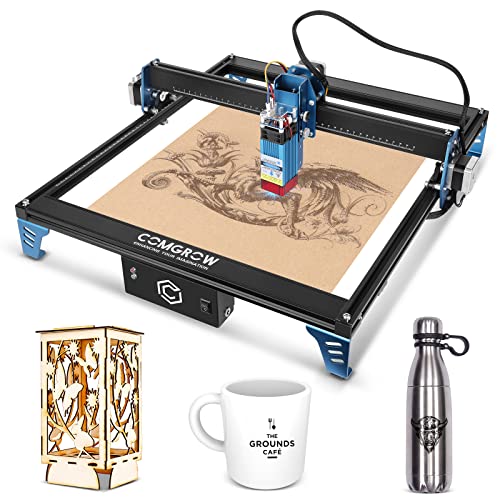
Comgrow Z1 10W
The Comgrow Z1 10W is a diode laser with an extended work area of 21.7 x 21.7 inches, making it ideal for larger projects. It features a solid frame and includes an air assist pump. Owners like the spacious bed and the ability to engrave large signs. It is less refined than some other models, but the price is attractive.
Pros
- Very large work area
- Air assist included
- Good for large signs and art
Cons
- Some users report assembly issues
- Not the best for fine details
How to pick the right one
How they compare
| # | Model | Laser type | Best for | Score | Price |
|---|---|---|---|---|---|
| 1 | Glowforge Pro | CO2, 45 watts | Best overall for versatility and ease of use | 9.4 | Check price |
| 2 | xTool D1 Pro 10W | Diode, 10 watts | Best budget diode laser for beginners | 8.9 | Check price |
| 3 | Ortur Laser Master 3 10W | Diode, 10 watts | Best value for hobbyists on a budget | 8.5 | Check price |
| 4 | Atomstack X7 Pro 50W | Diode, 50W (optical power 10W) | Best for fast engraving and cutting on a budget | 8.7 | Check price |
| 5 | Neje Master 2S Plus Max | Diode, 40W (optical power 5.5W) | Best for intricate engraving on small items | 8.3 | Check price |
| 6 | Glowforge Aura | CO2, 20 watts | Best for beginners who want a simple enclosed cutter | 8.8 | Check price |
| 7 | Comgrow Z1 10W | Diode, 10 watts | Best for large-scale engraving on a budget | 8.1 | Check price |
Good to know
Which desktop laser cutter is best for cutting acrylic?
For cutting acrylic, a CO2 laser like the Glowforge Pro is ideal because it can cut through thick acrylic cleanly. Diode lasers struggle with acrylic and may produce cloudy edges.
Can desktop laser cutters engrave metal?
Most desktop laser cutters cannot directly engrave metal without special coatings. Diode lasers can mark anodized aluminum or metal with a marking spray. CO2 lasers are generally not effective on bare metal.
Do I need an air filter or ventilation?
Yes, laser cutting produces fumes and smoke. Enclosed models often have filters or exhaust ports. Diode lasers are open, so you need a well-ventilated area and possibly an air purifier.
What materials can I cut with a 10W diode laser?
A 10W diode laser can cut thin wood (up to 5-8mm), paper, cardboard, leather, and some plastics. It cannot cut thick acrylic or metal.
How long does it take to learn to use a desktop laser cutter?
Beginners can start making simple engraving projects within an hour of setup. Learning design software and adjusting settings for different materials takes a few days of practice.
Are desktop laser cutters safe to use at home?
They are safe if used properly. Always use safety goggles, ensure proper ventilation, and never leave the machine unattended while running. Models with enclosures are safer for homes.
How much electricity does a desktop laser cutter use?
Typically, they draw between 60 and 200 watts, depending on power. CO2 lasers with a cooling system may use more. Running costs are relatively low.
What is the difference between engraving and cutting?
Engraving marks the surface without cutting through, while cutting separates the material. Laser cutters can do both by adjusting power and speed settings.
Our pick
After comparing, the Glowforge Pro is the best choice for those who want a reliable, high-quality desktop laser cutter and are willing to invest. It offers the best combination of power, ease of use, and results. For budget-conscious users, the xTool D1 Pro provides excellent value and versatility for light to medium tasks.
Marcus Chen
Marcus covered consumer electronics for enthusiast tech publications for six years before joining ChoiceCrest. He specializes in translating manufacturer spec sheets into plain-language buying advice, with a focus on audio, computing accessories and smart-home gear.
You might also need
Nintendo Game & Watch: Super Mario Bros Review: Still Worth It as a Collectible?

Ray-Ban Meta (Gen 2) Wayfarer Smart Glasses: Worth $379 for Clear Lenses?
AlyKets Nikon UC-E6 Replacement USB Cable: Does a $7.95 Cord Work as Well as the Original?
