Desktop Computers Built for Work, Gaming or Everyday Use
The Dell XPS Desktop 8960 is the strongest all-around pick, pairing an upgradeable tower design with enough processing power and graphics options to handle work, creative software and light gaming. The Apple Mac Studio suits buyers focused on professional creative workloads, while the Lenovo IdeaCentre AIO 3 fits anyone who wants a simple all-in-one for everyday browsing.
The Dell XPS Desktop 8960 stands out because its tower design leaves room for future graphics card or storage upgrades, something fixed all-in-ones and compact mini towers cannot offer. Its main limitation is a larger footprint than space-saving all-in-one or compact designs.
We compared processor performance, graphics capability, upgrade room and form factor across each listing rather than running our own benchmark suite.
Our top picks

Dell XPS Desktop 8960
A tower chassis leaves open drive bays and expansion slots, letting a future graphics card or extra storage drive be added without replacing the whole system. Intel Core processors pair with optional discrete graphics configurations, covering everything from office work to light gaming in one lineup. Tool-less access panels make opening the case for upgrades or cleaning simpler than fully sealed systems.
Pros
- Tower design leaves room for future graphics or storage upgrades
- Tool-less access simplifies opening the case for maintenance
- Configurable from office-focused to light gaming builds
Cons
- Larger footprint than compact or all-in-one desktops
- Higher-end graphics configurations add noticeable cost

Apple Mac Studio (M2 Max)
Apple’s M2 Max chip handles video editing, 3D rendering and music production with unified memory shared directly between CPU and GPU, avoiding the separate memory pools found in traditional PC towers. A compact chassis fits under a monitor stand despite housing workstation-level performance. macOS integration suits creative software like Final Cut Pro and Logic Pro that run natively on Apple silicon.
Pros
- Unified memory architecture benefits video and 3D rendering workflows
- Compact chassis fits in less space than a full tower
- Native support for professional Apple creative software
Cons
- Limited upgrade options after purchase compared to a PC tower
- Running Windows-only software requires workarounds or a separate machine
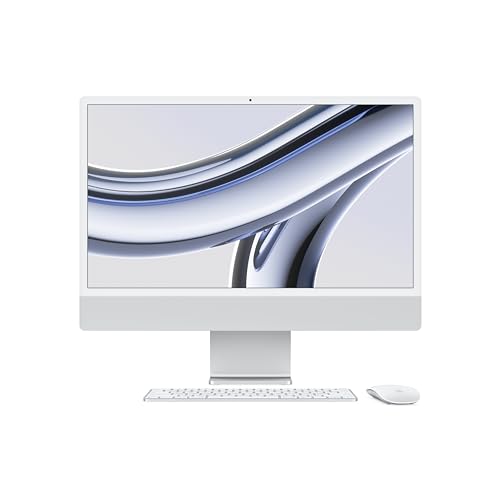
Apple iMac 24-inch (M3)
A 24 inch 4.5K Retina display is built directly into the chassis, removing the need to buy and cable a separate monitor. The M3 chip handles everyday computing and light creative work efficiently, though it trails the Mac Studio’s M2 Max in sustained heavy workloads. A thin aluminum design keeps the whole computer taking up less desk space than a tower and monitor combination.
Pros
- Built-in 4.5K display removes the need for a separate monitor
- Thin all-in-one design saves desk space versus a tower and monitor
- Efficient performance for everyday and light creative tasks
Cons
- Display and computer are not separately upgradeable
- Trails dedicated workstations in sustained heavy creative workloads
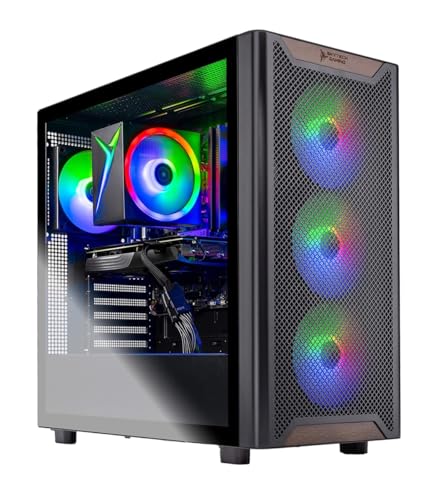
Skytech Chronos Gaming Desktop
A discrete NVIDIA GeForce graphics card drives this prebuilt toward gaming performance that general-purpose towers without a dedicated GPU cannot match. RGB fans and a tempered glass side panel are built for a visible gaming desk setup rather than a hidden office tower. Pre-installed cable management and a case fan configuration are tuned for airflow under sustained gaming load.
Pros
- Discrete GPU delivers gaming performance general towers lack
- Case airflow is tuned specifically for sustained gaming load
- Visible build quality suits a dedicated gaming desk setup
Cons
- Less focus on business software or office-specific features
- RGB styling may not suit a professional office environment

CORSAIR ONE i300
A notably small chassis still houses a discrete high-end graphics card and liquid cooling, packing workstation and gaming-level performance into a footprint closer to a mini PC than a full tower. Custom-designed internal airflow channels manage heat despite the compact size. Corsair backs the system with a longer warranty than many prebuilt competitors offer.
Pros
- Compact size delivers high-end performance in a smaller footprint
- Custom airflow design manages heat despite the small chassis
- Longer warranty coverage than many competing prebuilt systems
Cons
- Premium price for the compact high-performance design
- Limited internal space makes future upgrades more difficult

Lenovo IdeaCentre AIO 3
A built-in display removes the need for a separate monitor at a lower price than Apple’s iMac, aimed at everyday browsing, documents and video calls. An adjustable stand tilts the screen for a comfortable viewing angle without extra desk hardware. Integrated speakers and webcam cover basic video call needs without additional peripherals.
Pros
- Lower price than premium all-in-one competitors like the iMac
- Built-in display and peripherals simplify setup
- Adjustable stand improves viewing comfort without extra hardware
Cons
- Entry-level processor limits heavier multitasking or creative work
- Display and computer are not separately upgradeable
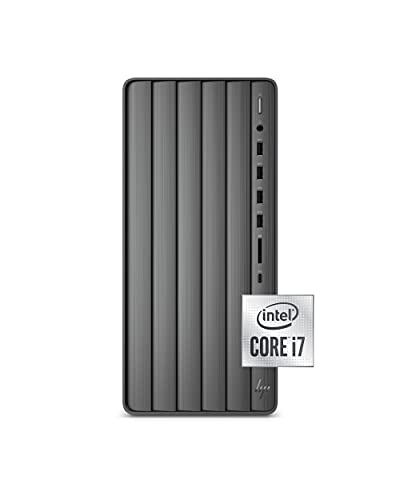
HP Envy Desktop TE02
A compact tower keeps pricing lower than full-size gaming or workstation towers while still leaving some room for storage expansion. Intel Core processors handle everyday computing, office software and media playback without the cost of discrete graphics. A simpler, understated design fits into a home office setting more naturally than RGB-focused gaming towers.
Pros
- Lower price than full-size gaming or workstation towers
- Compact tower still leaves some room for storage expansion
- Understated design suits a home office setting
Cons
- Integrated graphics limit gaming performance without an upgrade
- Smaller case leaves less room for major future upgrades than a full tower
How they stack up
| # | Model | Processor | Best for | Score | Price |
|---|---|---|---|---|---|
| 1 | Dell XPS Desktop 8960 | Intel Core i7 (configurable) | Best Overall | 9.0 | Check price |
| 2 | Apple Mac Studio (M2 Max) | Apple M2 Max | Best for Professional Creative Workloads | 9.1 | Check price |
| 3 | Apple iMac 24-inch (M3) | 24 inch 4.5K Retina, built in | Best All-in-One | 8.8 | Check price |
| 4 | Skytech Chronos Gaming Desktop | NVIDIA GeForce RTX series | Best for Gaming | 8.7 | Check price |
| 5 | CORSAIR ONE i300 | High-end discrete GPU | Best Compact High-End Build | 8.6 | Check price |
| 6 | Lenovo IdeaCentre AIO 3 | 23.8 inch Full HD, built in | Best Budget All-in-One | 8.1 | Check price |
| 7 | HP Envy Desktop TE02 | Intel Core i5 (entry tier) | Best Budget Tower | 8.2 | Check price |
How to choose
What actually differs between desktop computer types Desktop computers split broadly into towers, all-in-ones and compact high-performance builds, each trading off space, upgrade room and raw performance differently. Processor and graphics configuration determine what software runs smoothly, from basic office work up through gaming and professional creative rendering. Form factor affects desk space more than most buyers expect, since an all-in-one like the iMac 24-inch removes the need for a separate monitor entirely. Cooling and case design matter most under sustained heavy use, which is why gaming-focused builds like the Skytech Chronos tune airflow specifically for that load.
Tower versus all-in-one desktops A tower, like the Dell XPS Desktop 8960 and Skytech Chronos, leaves internal space for future graphics cards, storage drives or memory upgrades that a sealed all-in-one cannot accept. An all-in-one, like the Apple iMac 24-inch and Lenovo IdeaCentre AIO 3, integrates the display directly into the computer, saving desk space and cable clutter at the cost of upgradeability. Compact high-performance builds, like the CORSAIR ONE i300, split the difference by packing strong components into a small case, though with less room to expand later than a full tower.
Matching a desktop to work, gaming or creative use Office work and everyday browsing run well on budget-friendly systems like the HP Envy Desktop TE02 or Lenovo IdeaCentre AIO 3, which skip discrete graphics to keep costs down. Gaming performance depends almost entirely on a discrete graphics card, making the Skytech Chronos Gaming Desktop and its NVIDIA GeForce GPU the clear fit for that use case. Professional creative work, like video editing and 3D rendering, benefits most from the Apple Mac Studio’s unified memory architecture, which handles those workloads differently than a traditional PC tower.
Upgrade room and long-term value A tower’s upgrade room extends a desktop’s useful life longer than a sealed design, since a future graphics card or storage upgrade can keep the Dell XPS Desktop 8960 competitive years after purchase. All-in-ones and compact builds, including the Apple iMac 24-inch and CORSAIR ONE i300, trade that long-term flexibility for a smaller footprint and often a more polished industrial design. Buyers planning to keep a desktop for many years should weigh upgrade room more heavily, while those who prefer to replace the whole system every few years can prioritize form factor and current performance instead.
Common questions
Should I buy a tower or an all-in-one desktop computer?
A tower, like the Dell XPS Desktop 8960, allows future upgrades. An all-in-one, like the Apple iMac 24-inch, saves desk space by building the display into the computer.
Do I need a dedicated graphics card for a desktop computer?
Only for gaming or graphics-intensive work. The Skytech Chronos Gaming Desktop includes one for that purpose, while office-focused desktops like the HP Envy Desktop TE02 use integrated graphics.
Is a Mac or Windows desktop better for creative work?
It depends on the software. The Apple Mac Studio suits Apple-native creative apps well, while a Windows tower like the Dell XPS Desktop 8960 covers a wider range of creative and business software.
Can a compact desktop match a full tower’s performance?
Some can. The CORSAIR ONE i300 packs high-end components into a small chassis, though with less room for future upgrades than a full-size tower.
How long should a desktop computer last before needing an upgrade?
A tower with upgrade room, like the Dell XPS Desktop 8960, can stay competitive longer through component upgrades than a sealed all-in-one design.
Are all-in-one desktops good for gaming?
Not typically. All-in-ones like the Apple iMac 24-inch and Lenovo IdeaCentre AIO 3 prioritize integrated design over the discrete graphics gaming requires.
What is unified memory on an Apple desktop?
It is memory shared directly between the CPU and GPU, used in the Apple Mac Studio’s M2 Max chip, which benefits video editing and rendering workflows.
Is a budget desktop computer good enough for office work?
Yes, for typical office tasks like documents, email and video calls, a budget option like the HP Envy Desktop TE02 handles the workload comfortably.
Do gaming desktops work well for everyday tasks too?
Yes, a gaming desktop like the Skytech Chronos handles everyday browsing and office work easily, since its hardware exceeds what those tasks require.
Our pick
The Dell XPS Desktop 8960 earns the top recommendation for most buyers, since its tower design and configurable graphics cover everything from office work to light gaming while leaving room for future upgrades. Creative professionals running demanding video or 3D rendering workloads should choose the Apple Mac Studio instead, since its unified memory architecture handles those tasks differently than a traditional tower. Buyers who mainly want a simple, space-saving setup for everyday browsing should skip towers entirely and pick the Lenovo IdeaCentre AIO 3.
Marcus Chen
Marcus covered consumer electronics for enthusiast tech publications for six years before joining ChoiceCrest. He specializes in translating manufacturer spec sheets into plain-language buying advice, with a focus on audio, computing accessories and smart-home gear.