Top Desktop Computers for Professionals in 2025
For most professionals, the Dell XPS Desktop stands out as the top pick, offering a powerful balance of performance, upgradeability, and reliability. It suits creative pros and analysts who need robust processing and graphics without the hefty price tag of a dedicated workstation. The main limitation is its relatively compact size, which may restrict some internal expansion options.
Choosing the right desktop computer is crucial for productivity and performance. Professionals need machines that can handle demanding tasks without slowdowns. The market offers a wide range of options, from sleek all-in-ones to powerful towers.
We analyzed specifications and user feedback to bring you a curated list of the best desktop computers for professional use. Whether you prioritize raw power, silent operation, or compact design, this guide will help you make an informed decision.
What matters most
The best picks, ranked
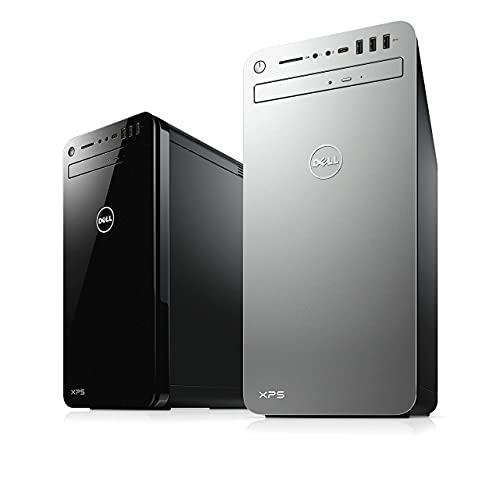
Dell XPS Desktop
The Dell XPS Desktop is a sleek and powerful machine that excels in both performance and design. With options for up to Intel Core i9 processors and NVIDIA RTX graphics, it handles demanding tasks like video editing and 3D rendering with ease. Its compact chassis still offers room for upgrades, making it a future-proof investment.
Pros
- Excellent performance for multitasking
- Quiet operation
- Compact yet upgradeable design
Cons
- Limited internal expansion compared to larger towers
- Can be pricey with high-end configs
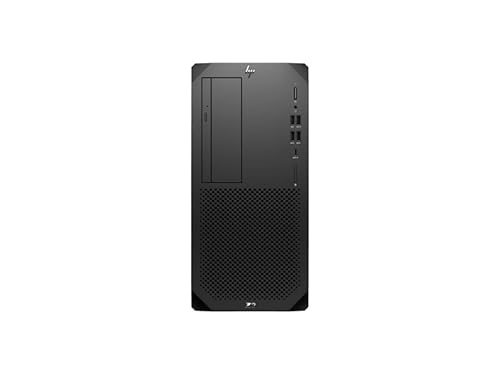
HP Z2 Tower G9 Workstation
The HP Z2 Tower G9 is a true workstation built for professionals who need maximum reliability and processing power. It supports Intel Xeon and Core processors, professional graphics cards like NVIDIA RTX A-series, and massive memory capacities. Its tool-less chassis allows for easy upgrades, and it comes with ISV certifications to ensure stability in demanding applications.
Pros
- ISV certified for professional software
- Exceptional expandability
- Reliable and durable build
Cons
- Bulkier than consumer desktops
- Higher starting price

Apple Mac Studio
The Mac Studio offers incredible performance in a small form factor, powered by Apple’s M2 Max or M2 Ultra chips. It’s ideal for video editors, musicians, and designers who rely on macOS ecosystem. With excellent thermal management and silent operation, it handles intensive workflows effortlessly. However, internal upgrades are not possible, so choose your configuration wisely.
Pros
- Outstanding performance per watt
- Silent operation even under load
- Compact footprint
Cons
- No internal user upgrades
- Limited to macOS

Lenovo ThinkCentre M90t Gen 3
The Lenovo ThinkCentre M90t is a reliable business desktop with robust security features and manageability. It offers Intel vPro support, ample ports, and a durable design. Performance is solid for office tasks, data analysis, and light content creation. Its tool-less design simplifies maintenance and upgrades.
Pros
- Strong security features
- Easy serviceability
- Quiet operation
Cons
- Graphics options are limited to integrated
- Design is plain

Apple iMac 24-inch
The 24-inch iMac with M1 chip delivers excellent performance for everyday professional tasks, design work, and media consumption. Its stunning 4.5K Retina display is a standout, covering wide color gamut. The all-in-one design saves space and eliminates cable clutter. While not upgradeable, the M1 chip ensures smooth operation for years.
Pros
- Beautiful display with true color
- Silent and energy efficient
- Compact and elegant design
Cons
- Limited ports (two Thunderbolt/USB 4)
- Cannot upgrade RAM or storage later

Corsair Vengeance i7400
The Corsair Vengeance i7400 is a gaming-oriented desktop that also excels in professional content creation. It features liquid cooling for the CPU, high-end graphics cards, and fast NVMe SSDs. Its customizable RGB lighting might appeal to some, but it can be toned down. It’s a great choice for video editors and 3D artists who also enjoy gaming.
Pros
- Excellent raw performance
- Effective cooling system
- Easy access for upgrades
Cons
- Aggressive gaming aesthetic
- May be overkill for office work

Microsoft Surface Studio 2+
The Surface Studio 2+ is a premium all-in-one with a unique zero-gravity hinge that allows the display to fold into a creative canvas. It supports the Surface Pen and dial, making it ideal for illustrators and designers. The 28-inch touchscreen is vibrant and accurate. However, its specs are not the most current, and the price is premium.
Pros
- Innovative fold-down display
- Excellent pen support
- Stunning build quality
Cons
- Outdated internal components
- Very expensive
How they stack up
| # | Model | Processor | Best for | Score | Price |
|---|---|---|---|---|---|
| 1 | Dell XPS Desktop | 12th Gen Intel Core i5 up to i9 | Best overall for professional productivity | 9.4 | Check price |
| 2 | HP Z2 Tower G9 Workstation | Intel Core or Xeon up to 24 cores | Best for heavy-duty CAD and engineering | 9.2 | Check price |
| 3 | Apple Mac Studio | Apple M2 Max or M2 Ultra | Best for creative professionals using macOS | 9.3 | Check price |
| 4 | Lenovo ThinkCentre M90t Gen 3 | 12th Gen Intel Core up to i9 | Best for business and office use | 8.9 | Check price |
| 5 | Apple iMac 24-inch | Apple M1 chip with 8-core CPU | Best all-in-one for creative home offices | 8.8 | Check price |
| 6 | Corsair Vengeance i7400 | 12th Gen Intel Core i5 to i9 | Best for content creators and gamers | 8.7 | Check price |
| 7 | Microsoft Surface Studio 2+ | Intel Core i7-11370H | Best for digital artists and designers | 8.5 | Check price |
Frequently asked questions
What is the best desktop computer for professional use?
The best desktop depends on your specific field. For a balanced mix of performance and price, the Dell XPS Desktop is a top choice. For creative professionals on macOS, the Apple Mac Studio offers exceptional performance. Engineers and CAD users should consider the HP Z2 Tower for its ISV certifications.
How much RAM do I need for professional work?
For basic office tasks, 8GB is sufficient, but 16GB is recommended for smooth multitasking. Professionals using video editing, 3D modeling, or virtualization should opt for 32GB or more. Some workstations support up to 128GB for extreme workloads.
Are all-in-one desktops suitable for professional work?
Yes, models like the Apple iMac 24-inch are excellent for design and content creation due to their high-quality displays and solid performance. However, they lack upgradeability, so you must choose specs that will last. For heavy tasks, a tower or compact desktop might be better.
What is the difference between a workstation and a regular desktop?
Workstations are designed for high reliability and performance, using professional components like ECC memory and certified graphics cards. They undergo rigorous testing to work seamlessly with professional software. Regular desktops are more consumer-oriented, often prioritizing cost-effectiveness.
Can I upgrade components in a desktop computer later?
Many desktop towers allow upgrades to RAM, storage, and sometimes graphics cards. All-in-ones and compact desktops like the Mac Studio have soldered components that cannot be upgraded. If you anticipate needing more power later, choose a tower with accessible internals.
What processor is best for professional workloads?
Intel Core i7 and i9 or AMD Ryzen 7 and 9 are excellent for most professional tasks. For extreme multitasking and rendering, consider Intel Xeon or AMD Threadripper, though they are more expensive. Apple Silicon chips like M2 Pro/Max offer outstanding performance for creative apps.
How much storage do I need on a professional desktop?
At least 512GB SSD for your operating system and applications. If you work with large files (videos, high-res images), consider 1TB or more. Many desktops offer multiple drive bays, allowing you to add additional HDDs for bulk storage.
Are integrated graphics enough for professional software?
Integrated graphics like Intel UHD or Iris Xe handle office tasks and even light photo editing. But for applications that utilize GPU acceleration (e.g., Premiere Pro, AutoCAD), a dedicated graphics card is recommended for smoother performance and faster rendering.
Is it better to buy a pre-built desktop or build my own?
Pre-built desktops offer convenience, warranty, and technical support. Building your own can save money and provide customization, but requires technical knowledge and troubleshooting skills. For professionals, pre-built systems are often more reliable and time-saving.
What connectivity ports are essential for a professional desktop?
Look for a mix of USB-A and USB-C ports, at least two display outputs (HDMI, DisplayPort), an Ethernet port for stable networking, and audio jacks. Thunderbolt ports are valuable for high-speed data transfer and connecting multiple monitors.
The bottom line
After thorough comparison, the Dell XPS Desktop emerges as the best overall for most professionals due to its balanced performance, quality construction, and upgrade potential. If you are a creative professional using macOS, the Apple Mac Studio is a powerful alternative. For heavy engineering tasks, the HP Z2 Tower is the recommended choice. We advise you to select the machine that aligns with your specific workload and budget.
Marcus Chen
Marcus covered consumer electronics for enthusiast tech publications for six years before joining ChoiceCrest. He specializes in translating manufacturer spec sheets into plain-language buying advice, with a focus on audio, computing accessories and smart-home gear.