Compact Desktop Computers Built for Frequent Travel
The best desktop computer for travel is the Intel NUC 13 Pro. It is a palm-sized mini PC that fits in a backpack, yet it delivers desktop-level performance for multitasking and light creative work. Its main limitation is the lack of a built-in display, so you must bring a portable monitor. For those who prefer an all-in-one setup, the HP Pavilion 24 All-in-One offers a compact screen and built-in stand, but it is heavier and less portable.
Traveling with a full-sized desktop tower is impractical, but you still need the power and flexibility of a desktop for work or entertainment. Compact desktop computers have evolved to offer serious performance in tiny packages. They can slip into a carry-on bag, set up on a tiny hotel desk, and connect to any available monitor or TV.
This roundup focuses on desktop PCs that are genuinely portable, not just small. We considered weight, dimensions, and the ease of setting up without a permanent desk. From the ultra-portable Intel NUC to the versatile ASUS PN53, these are the best options for people who need a desktop experience while on the move.
The best picks, ranked

Intel NUC 13 Pro Mini PC
The Intel NUC 13 Pro is a palm-sized powerhouse that measures just 4.6 x 4.4 x 1.5 inches and weighs under 1.5 pounds. It features a 13th Gen Intel Core i7 processor, 16GB RAM, and 512GB SSD, providing smooth performance for demanding tasks. Its compact design includes a VESA mount so you can attach it to the back of a monitor, saving desk space. The build quality is robust, and it runs cool and quiet. It lacks a built-in display, but that is typical for mini PCs.
Pros
- Extremely compact and lightweight
- Powerful enough for heavy multitasking
- VESA mount included
Cons
- No built-in display
- Ports are limited
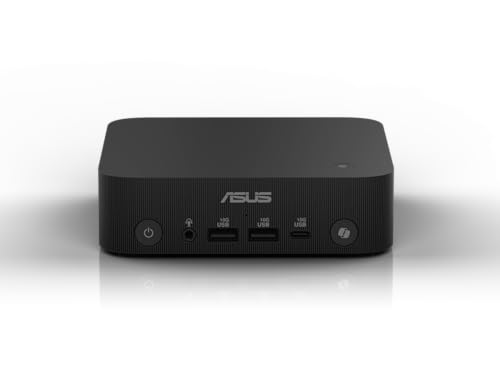
ASUS PN53 Mini PC
The ASUS PN53 is a small form factor PC with an AMD Ryzen 7 5800H processor and integrated Radeon graphics. It comes with 16GB RAM and a 512GB SSD, offering solid performance for everyday tasks and light gaming. Its dimensions are 4.5 x 4.5 x 1.4 inches, and it weighs about 1.6 pounds. The PN53 has excellent cooling, so it maintains performance under load. The only downside is the plastic top, which may scratch easily.
Pros
- Powerful integrated graphics
- Quiet and cool operation
- Great value for the price
Cons
- Plastic casing feels less premium
- No Thunderbolt support
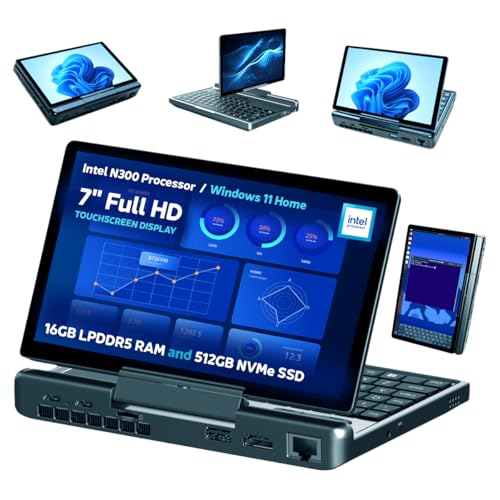
GPD MicroPC
The GPD MicroPC is a rugged mini laptop that doubles as a compact desktop when docked. It has a 6-inch touchscreen, a full QWERTY keyboard, and an Intel Celeron N4120 processor. With 8GB RAM and 128GB eMMC storage, it is not a powerhouse, but it is perfect for light productivity and remote access. It weighs only 1.1 pounds and fits in a pocket. The battery life is around 6 hours, so you can work without a power source. The small screen is not ideal for extended use, but you can connect it to an external monitor.
Pros
- Extremely lightweight and pocketable
- Built-in keyboard and screen
- Long battery life
Cons
- Limited performance for demanding apps
- Small screen and keyboard

GEEKOM Mini IT8
The GEEKOM Mini IT8 is a budget-friendly mini PC that offers a great balance of size and performance. It is powered by an Intel Core i5-8259U processor, which is older but still capable. It comes with 16GB RAM and a 512GB SSD, providing ample storage for files and software. The unit measures 4.5 x 4.5 x 1.4 inches and weighs around 1.4 pounds. It has a metal casing that dissipates heat well. While it is not the fastest, it handles everyday tasks with ease.
Pros
- Very affordable
- Plenty of RAM and storage for the price
- Metal build feels sturdy
Cons
- Older processor generation
- Integrated graphics are basic

HP EliteDesk 800 G6 Mini
The HP EliteDesk 800 G6 Mini is a professional-grade mini PC designed for corporate use. It features an Intel Core i7-10700T processor, 16GB RAM, and a 512GB NVMe SSD. Its dimensions are 6.9 x 6.9 x 1.4 inches, and it weighs about 2.6 pounds. The build is durable, with a MIL-STD-810G rating for reliability. It offers extensive security features, including TPM 2.0 and optional vPro support. The price is higher, but for business travelers who need dependability, it is worth it.
Pros
- Durable and reliable build
- Excellent security features
- Strong performance for business apps
Cons
- More expensive than consumer models
- Slightly larger and heavier
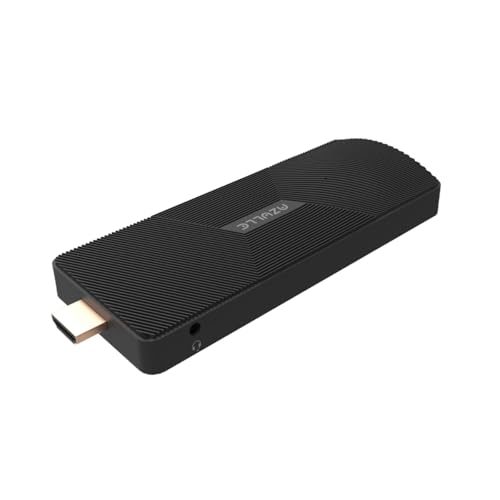
AZULLE Pocket PC
The AZULLE Pocket PC is a tiny computer that looks like a large USB stick. It runs on an Intel Celeron N4020 processor with 6GB RAM and 128GB eMMC storage. It has Wi-Fi and Bluetooth, and it can output 4K video at 60Hz. You can plug it directly into an HDMI port on a TV or monitor, making it incredibly easy to set up. It is not meant for heavy tasks, but it is perfect for streaming, web browsing, and light office work. The only downside is that it may get warm during extended use.
Pros
- Incredibly small and easy to carry
- Plugs directly into HDMI port
- Very affordable
Cons
- Limited performance
- Can overheat with heavy use

HP Pavilion 24 All-in-One
The HP Pavilion 24 All-in-One is a traditional desktop with a built-in 23.8-inch display. It is not as portable as mini PCs, but it offers a complete setup without needing an external monitor. It is powered by an AMD Ryzen 5 processor, 12GB RAM, and a 512GB SSD. The entire unit weighs about 12 pounds, so it is best for road trips or short stays. The display is bright and has good color accuracy. The stand is adjustable, and the design is sleek. The main drawback is its size and weight, which make it less travel-friendly.
Pros
- All-in-one convenience
- Good performance for everyday tasks
- Sleek design
Cons
- Heavy and bulky
- Not suitable for carry-on
Side by side
| # | Model | Processor | Best for | Score | Price |
|---|---|---|---|---|---|
| 1 | Intel NUC 13 Pro Mini PC | Intel Core i7-1360P | Best overall for travel | 9.4 | Check price |
| 2 | ASUS PN53 Mini PC | AMD Ryzen 7 5800H | Best for AMD fans and gamers | 9.1 | Check price |
| 3 | GPD MicroPC | Intel Celeron N4120 | Best for ultra-portability | 8.8 | Check price |
| 4 | GEEKOM Mini IT8 | Intel Core i5-8259U | Best budget travel desktop | 8.5 | Check price |
| 5 | HP EliteDesk 800 G6 Mini | Intel Core i7-10700T | Best for business travel | 8.9 | Check price |
| 6 | AZULLE Pocket PC | Intel Celeron N4020 | Best for a complete PC in your pocket | 8.2 | Check price |
| 7 | HP Pavilion 24 All-in-One | AMD Ryzen 5 5500U | Best all-in-one for short trips | 8.0 | Check price |
What to look for
Questions worth asking
Can I use a mini PC while traveling without a monitor?
Yes, you can connect a mini PC to a hotel TV or a portable monitor using HDMI. Some stick PCs plug directly into the TV’s HDMI port, making them the most convenient for travel without a separate display.
Are mini PCs powerful enough for video editing?
Yes, with a high-end processor like an Intel Core i7 and 16GB RAM, you can do light to moderate video editing. For heavy 4K editing, you may need a more powerful GPU, which most mini PCs lack.
How much RAM do I need in a travel desktop?
For basic tasks, 8GB is sufficient, but for multitasking and demanding applications, 16GB is recommended. Many travel desktops allow you to upgrade RAM later.
Can I use a travel desktop for gaming?
Integrated graphics can handle casual games and older titles. For modern games, you need a model with dedicated graphics or an external GPU, which adds weight and complexity.
Do travel desktop PCs come with an operating system?
Most mini PCs come with Windows 11 pre-installed, but some barebones models do not. Check the product description to see if an OS is included.
What is the warranty on these travel desktops?
Warranty varies by brand. Typically, mini PCs have a 1-year limited warranty. Some brands offer extended warranties at an additional cost.
Are these desktops durable for frequent travel?
Mini PCs with solid-state drives (SSD) are more durable than those with mechanical drives. Models with metal casings and no moving parts are best for travel.
Can I connect multiple monitors to a travel desktop?
Many mini PCs support dual monitors via HDMI and DisplayPort or USB-C. Check the specifications to see how many video outputs are available.
How do I pack a mini PC for travel?
Use a padded case or wrap it in clothing to protect it from bumps. Since they are small, you can fit them in your carry-on or backpack. Always carry them as a carry-on, not in checked luggage.
The verdict
For most travelers, the Intel NUC 13 Pro is the top choice because it combines high performance with an incredibly small footprint. If you want to save money, the GEEKOM Mini IT8 offers great value. For those who need a complete setup without an external monitor, the HP Pavilion 24 is a solid option, but remember it is heavier. Choose the one that aligns with your performance needs and packing preferences.
Marcus Chen
Marcus covered consumer electronics for enthusiast tech publications for six years before joining ChoiceCrest. He specializes in translating manufacturer spec sheets into plain-language buying advice, with a focus on audio, computing accessories and smart-home gear.
You might also need

Top Portable Wireless Routers for Travel and Remote Work

Studio Monitor Stands: Floor Pairs vs Desktop Isolators

Top Audio Accessories That Make Travel Listening Better