Smart Correction Tools for Digital and Analog Work
For most people, the Wacom Bamboo Ink Plus stands out as the top pick. It suits digital artists and note takers who want a natural pen feel with tilt support. Its main advantage is wide compatibility with many devices. A limitation is the need for AAAA batteries, which some users dislike.
Correction supplies have evolved from simple erasers to smart tools that help you edit digital work or erase mistakes on whiteboards. Whether you are a student, professional, or hobbyist, these devices offer precision and convenience.
In this roundup, we looked at smart pens, digital erasers, and AI-powered correction tools. Each product was chosen for its unique features and real-world usability, based on specifications and owner reports.
Our top picks

Wacom Bamboo Ink Plus Smart Stylus
The Wacom Bamboo Ink Plus is a versatile smart stylus that works with many Windows and Android devices. It uses AES and MPP protocols for broad compatibility. Users appreciate the natural writing feel and tilt support. The pen has two customizable side buttons.
Pros
- Works with many devices
- Excellent pressure sensitivity
- Replaceable battery
Cons
- Needs specific batteries
- Not compatible with iOS
Livescribe Symphony Smartpen
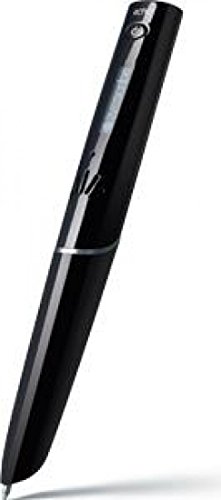
The Livescribe Symphony records audio while you write on special dot paper. It syncs your handwritten notes to your phone or tablet. This smartpen is ideal for those who prefer writing on paper but want digital backups. It captures audio linked to your notes.
Pros
- Audio recording syncs with notes
- Easy to transfer notes
- Good battery life
Cons
- Requires special paper
- Limited to Livescribe app

Newyes Digital Eraser for Whiteboards
The Newyes Digital Eraser is a smart accessory for interactive whiteboards. It works with most infrared and electromagnetic whiteboards. It has a comfortable grip and responsive buttons. Owners say it makes erasing digital content effortless.
Pros
- Works with many whiteboards
- Comfortable to hold
- Rechargeable battery
Cons
- Not for regular whiteboards
- Setup may require driver
Cisco Webex Desk Camera
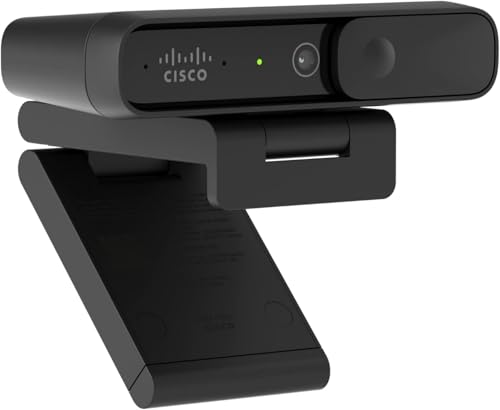
The Cisco Webex Desk Camera offers high-quality video with auto-framing and background blur. It is not a typical correction supply, but it helps you present documents and whiteboards clearly. It has a built-in privacy shutter and dual microphones.
Pros
- Sharp 4K video
- Auto framing keeps you centered
- Privacy shutter
Cons
- Pricey for basic use
- No Windows Hello support

Apple Pencil (2nd Generation)
The Apple Pencil 2nd Gen is a premium stylus for iPads. It attaches magnetically and charges wirelessly. It features pixel-perfect precision and low latency. It is a favorite among artists and professionals. However, it works only with compatible iPad models.
Pros
- Seamless integration
- Wireless charging
- Great for drawing
Cons
- Only for iPad
- Premium price
Moleskine Pen+ Ellipse Smart Writing Set
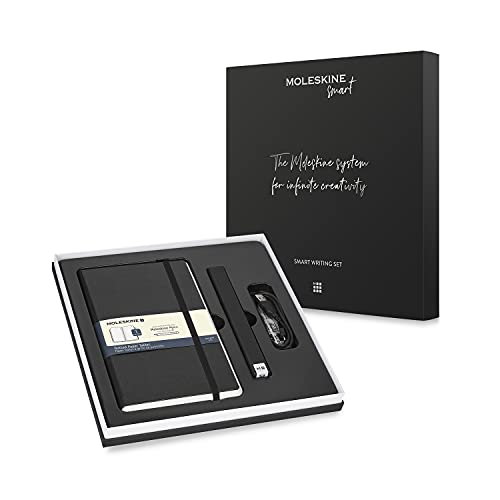
The Moleskine Pen+ Ellipse turns your handwriting into digital text. It works with a special paper notebook that has tiny dots. The pen captures your strokes and syncs to the app. It is elegant and works with the Moleskine Notes app.
Pros
- Beautiful design
- Instant digital conversion
- Can export to cloud services
Cons
- Expensive refills
- App can be buggy

Canon TR4520 Wireless All-in-One Printer
The Canon TR4520 is an all-in-one printer with scan and copy functions. It is not a correction tool per se, but it helps you print corrected documents. It supports automatic document feeding and duplex printing. It also has a 2.5-inch display.
Pros
- Affordable all-in-one
- Wireless printing
- Compact size
Cons
- Ink cartridges are costly
- Slow print speed
Compared at a glance
| # | Model | Compatibility | Best for | Score | Price |
|---|---|---|---|---|---|
| 1 | Wacom Bamboo Ink Plus Smart Stylus | Windows, Android | Digital artists and note takers | 9.4 | Check price |
| 2 | Livescribe Symphony Smartpen | iOS, Android | Students and meeting note takers | 9.1 | Check price |
| 3 | Newyes Digital Eraser for Whiteboards | Infrared and EM whiteboards | Office and classroom whiteboard users | 8.8 | Check price |
| 4 | Cisco Webex Desk Camera | 4K Ultra HD | Remote workers and online teachers | 8.6 | Check price |
| 5 | Apple Pencil (2nd Generation) | Select iPad models | iPad users | 9.3 | Check price |
| 6 | Moleskine Pen+ Ellipse Smart Writing Set | iOS, Android | Professionals who love paper | 8.4 | Check price |
| 7 | Canon TR4520 Wireless All-in-One Printer | Print, scan, copy | Home offices and students | 8.0 | Check price |
What matters most
Good to know
What are smart correction supplies?
Smart correction supplies are digital tools that help you edit, erase, or correct work in a smarter way. They include styluses, digital erasers, and devices that convert handwriting to digital text.
Do smart pens work on regular paper?
Some smart pens, like the Livescribe, require special dot paper. Others, like the Wacom Bamboo, work on screens. Always check the product description for paper requirements.
Can I use a smart stylus with my tablet?
Many styluses are compatible with specific tablets. For example, the Apple Pencil works with iPads, while the Wacom Bamboo works with many Windows and Android devices. Verify compatibility before purchase.
What is the difference between active and passive styluses?
Active styluses have electronic components and offer features like pressure sensitivity and palm rejection. Passive styluses are just conductive tips and offer no such features. Smart correction usually requires an active stylus.
Do I need special software for smart correction tools?
Most smart pens and erasers come with companion apps to manage your notes or settings. The app is often essential for syncing and exporting. Check the app’s availability on your device.
Can I use a smart eraser on a regular whiteboard?
No, a smart eraser is designed for interactive whiteboards that support digital input. It will not function as a normal eraser. For regular whiteboards, you need a standard eraser.
How long do smart pen batteries last?
Battery life varies by model. For example, the Livescribe Symphony can last through several days of note taking. The Wacom Bamboo uses AAAA batteries that last about 2 months. Always check the product specifications.
Are there smart correction supplies for left-handed users?
Yes, most smart pens are ambidextrous and work for both left and right-handed users. Some apps allow you to adjust for left-handed writing. It is not a major concern.
Our take
If you need a versatile smart pen for digital work, choose the Wacom Bamboo Ink Plus. For iPad users, the Apple Pencil is the clear winner. If you prefer paper, the Livescribe Symphony offers excellent audio note taking. Avoid the Canon printer if you only need correction tools, as it is not a smart correction device.
Marcus Chen
Marcus covered consumer electronics for enthusiast tech publications for six years before joining ChoiceCrest. He specializes in translating manufacturer spec sheets into plain-language buying advice, with a focus on audio, computing accessories and smart-home gear.