Which Wireless OBD2 Scanner Belongs in Your Glovebox
BlueDriver Bluetooth Pro ranks first here. It reaches ABS, airbag and transmission modules on many makes, then explains each code in a repair report. OBDLink MX+ suits Ford and GM owners plus anyone diagnosing from a Windows laptop. Veepeak OBDCheck BLE+ covers generic engine codes for occasional drivers.
BlueDriver Bluetooth Pro is the dongle to keep in a glovebox for long drives. It reads past generic engine faults into ABS, airbag and transmission modules on many makes, and each code opens a repair report. Platform reach is the catch, since the app runs on phones only with no Windows or desktop version.
Nearly every listing in this category claims to read a check engine light, and almost all of them do. Separation happens elsewhere. Does the tool reach manufacturer specific modules? Will the app define a code with no mobile signal? How much current does it pull while the car sits at a motel overnight? We compared code depth, supported systems, app platforms, offline behaviour, sleep current and licence terms, then weighed those against what owners report after a year of use.
What we recommend
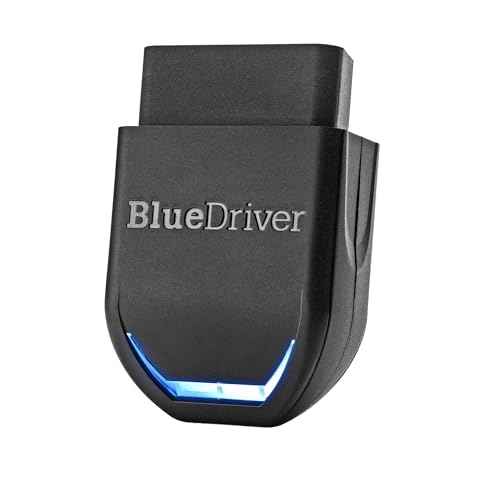
BlueDriver Bluetooth Pro OBDII Scan Tool
Scanning goes past generic powertrain codes into ABS, SRS, transmission and climate modules on a wide list of makes. Every code opens a repair report describing the fixes owners of that vehicle most often needed. Nothing sits behind a subscription, so the tool behaves the same on day one and year five.
Pros
- Manufacturer specific codes across a broad list of makes
- Repair reports turn a code number into likely fixes
- One time purchase with no renewal or premium tier
Cons
- Phone app only, with no Windows or desktop software
- Better unplugged during long stops to avoid slow battery drain

OBDLink MX+
Ford MS-CAN and GM single wire CAN both fall inside its reach, and most dongles skip those networks entirely. Pairing covers iOS, Android and Windows, so one adapter serves a phone app and laptop software. Standby draw sits near 2 mA, low enough to leave connected across a week of driving.
Pros
- Reads body and chassis networks other adapters cannot see
- Works with third party apps and Windows diagnostic software
- Standby current near 2 mA suits permanent connection
Cons
- Advanced functions assume some diagnostic knowledge
- Enhanced system coverage varies noticeably by make

Topdon TopScan Wireless OBD2 Scanner
Reset routines separate TopScan from plain code readers. Oil service, electronic parking brake retraction, steering angle and throttle relearn all run from the phone app. A licence period ships with the hardware and renews once it expires, so read the terms before planning around it long term.
Pros
- Handles common maintenance resets without a garage visit
- Health report exports a shareable summary of every module
- Small housing clears the driver footwell on most cars
Cons
- Feature licence renews after the included period ends
- Reset coverage depends on make and model year
Autel MaxiAP AP200
Autel packs module level scanning into a dongle that stays in the port, reading every system the vehicle exposes rather than engine codes alone. Software licences apply per vehicle brand inside the app, which fits one household car neatly and a mixed fleet poorly. Oil reset, EPB and steering angle calibration run on supported makes.
Pros
- Module level scanning matches shop tools on supported makes
- Service functions cover the usual maintenance resets
- Autel fault database is large and updated regularly
Cons
- Each extra brand needs its own in app licence
- Menus assume some familiarity with module names

FIXD OBD2 Scanner
Severity grading is the point of this one. Codes arrive in everyday language alongside an indication of whether to keep driving or stop. Maintenance reminders and profiles for several vehicles live in the same app, while detailed repair guidance moves to a paid tier.
Pros
- Explanations skip jargon, which suits new drivers
- Severity rating answers the keep going or stop question
- One account tracks several vehicles and their service dates
Cons
- Deeper repair guidance sits behind the premium tier
- Engine codes only, so ABS and airbag faults stay hidden

Veepeak OBDCheck BLE+ Bluetooth OBD2 Scanner
Hardware here stays deliberately simple, and the software choice is yours. Torque Pro, OBD Fusion and Car Scanner all pair with it, so the gauges on screen follow your preference. Coverage stops at generic engine codes and live sensor data rather than body or chassis modules.
Pros
- Pairs with several established third party OBD2 apps
- Live graphing tracks fuel trims and coolant temperature
- Sleeps on its own once the ignition goes off
Cons
- No manufacturer specific access to ABS or airbag modules
- Getting the best from it means buying a third party app

Vgate iCar Pro Bluetooth 4.0 OBD2 Scanner
Leave this one in a second car and forget it is there. Sleep mode engages once the ignition goes off, keeping parasitic draw minimal over long stops. Expect generic code reading and live data through whichever OBD2 app you already run.
Pros
- Low standby draw makes a permanent install practical
- Compatible with common free and paid OBD2 apps
- Housing sits flush enough to miss a driver’s leg
Cons
- Generic codes only, with no enhanced module access
- Plastics feel basic next to OBDLink hardware
How to pick the right one
What a wireless OBD2 scanner actually reads Generic powertrain codes come from every dongle on this list. Those are the faults that light a check engine lamp on any car sold in the US since 1996: misfires, oxygen sensors, evaporative leaks, catalytic efficiency. Access beyond the engine computer is where tools separate. ABS, airbag, transmission and body modules answer in manufacturer specific protocols, and only BlueDriver, OBDLink MX+ and the Autel MaxiAP AP200 translate them here. Live data fills in the rest of the picture. Coolant temperature, fuel trims and misfire counters stream in real time, which tells you whether a fault is worsening or holding steady.
What changes when the light comes on far from home At home a code can wait for a garage appointment. Two states away it cannot. Check whether the app stores code definitions on the phone instead of pulling them from a server, because coverage vanishes in mountains and on rural interstates. Freeze frame data earns its keep on a trip, capturing speed, throttle position and coolant temperature at the moment the fault set. Clearing a code to reach a service town is reasonable. Write it down first, though, since clearing wipes the evidence along with the light.
Leaving a dongle plugged in between drives Power reaches the OBD2 port with the ignition off. A dongle that never sleeps will therefore flatten a battery across a long stop. OBDLink MX+ lists roughly 2 mA in standby, negligible over a week of parking. Vgate iCar Pro and Veepeak OBDCheck BLE+ both drop into sleep once the engine stops. Others pull more and belong unplugged whenever the car sits for a day or two. Airport lots and trailhead overnights are the cases that catch drivers out.
Subscriptions, per brand licences and multi car households Dongles that look identical diverge most on long term terms. BlueDriver includes every feature permanently, with nothing to renew. FIXD holds its deeper repair guidance in a premium tier. Autel licenses software per vehicle brand, which works for one car and turns awkward for a family running three. Topdon ships a licence period that renews after expiry. Scan once or twice a year and recurring terms make little sense, so BlueDriver, Veepeak or Vgate fit that pattern better.
How they compare
| # | Model | Connection | Best for | Score | Price |
|---|---|---|---|---|---|
| 1 | BlueDriver Bluetooth Pro OBDII Scan Tool | Bluetooth to iOS and Android | Best overall | 9.4 | Check price |
| 2 | OBDLink MX+ | Bluetooth to iOS, Android and Windows | Best for deep diagnostics | 9.2 | Check price |
| 3 | Topdon TopScan Wireless OBD2 Scanner | Bluetooth to iOS and Android | Best for service resets | 8.9 | Check price |
| 4 | Autel MaxiAP AP200 | Bluetooth to iOS and Android | Best for one car households | 8.7 | Check price |
| 5 | FIXD OBD2 Scanner | Bluetooth to iOS and Android | Best for non technical drivers | 8.5 | Check price |
| 6 | Veepeak OBDCheck BLE+ Bluetooth OBD2 Scanner | Bluetooth Low Energy to iOS and Android | Best value | 8.2 | Check price |
| 7 | Vgate iCar Pro Bluetooth 4.0 OBD2 Scanner | Bluetooth Low Energy to iOS and Android | Best budget | 8.0 | Check price |
Frequently asked questions
What is the best wireless OBD2 scanner for road trips?
BlueDriver Bluetooth Pro, because it reaches past engine codes and pairs each fault with a repair report at no recurring cost. Drivers carrying a Windows laptop, or running a Ford or GM vehicle with extra networks, get more from OBDLink MX+.
Do cordless OBD2 scanners work without internet?
Reading codes works offline on every dongle here, since the data comes from the car itself. Explanations and repair reports sometimes load from a server. Open the app before leaving coverage and download the offline definition database if the settings offer one.
Can you leave an OBD2 dongle plugged in all the time?
Only when it sleeps properly. OBDLink MX+, Veepeak OBDCheck BLE+ and Vgate iCar Pro all fall to a very low standby current. Higher draw adapters can flatten a battery across a week of airport parking, so pull those out between drives.
Which OBD2 scanner reads ABS and airbag codes?
BlueDriver, OBDLink MX+ and the Autel MaxiAP AP200 reach those modules on supported makes. Veepeak and Vgate stop at generic engine codes. Enhanced coverage always depends on the exact make, model and year, so check the supported vehicle list first.
Is it safe to clear a check engine light during a trip?
Record the code and the freeze frame data first. Clearing to reach a service town is then reasonable. Bear in mind that clearing also resets emissions readiness monitors, so an inspection soon afterwards will likely fail. A light returning within minutes means the fault is still active.
BlueDriver vs OBDLink MX+, which should you pick?
BlueDriver explains faults better, thanks to repair reports written around specific vehicles. OBDLink MX+ sees more, including Ford MS-CAN and GM SW-CAN networks, and runs on Windows as well as phones. Pick BlueDriver for guidance and MX+ for raw access.
Will one scanner work on several different cars?
Generic dongles read any OBD2 compliant vehicle, covering most cars sold in the US since 1996. Enhanced coverage differs by make, and Autel charges per brand licence. Households with three different badges on the driveway avoid that cost with BlueDriver or OBDLink MX+.
Does an OBD2 scanner need a phone signal or mobile data?
Bluetooth carries everything between the dongle and your phone. Data use only appears when an app fetches updates or an online repair database. Airplane mode with Bluetooth switched on is enough to read codes in most apps.
How accurate are the repair suggestions in scanner apps?
Suggestions point at the parts most often replaced for that code on that vehicle, which is a starting shortlist rather than a diagnosis. Wiring faults and vacuum leaks mimic sensor failures regularly. Confirm with live data before buying any part.
Our pick
Buy the BlueDriver Bluetooth Pro for long distance driving. It names the fault, explains what usually causes it, and asks for nothing after the purchase. Ford and GM owners, along with anyone who prefers diagnosing from a Windows laptop, should take the OBDLink MX+ for its extra network access. Drivers who only want to know whether a light means stop now or keep going will live more happily with FIXD.
Tony Russo
Tony trained as an automotive technician and spent years in service and parts retail before moving into writing. He focuses on garage tools, car care products and accessories from a hands-on maintenance perspective.
