Picking a Monitor That Matches What You Do On It
The LG UltraGear 27GP850-B fits most gamers wanting high refresh rate without sacrificing resolution. The Dell UltraSharp U2723QE suits creative professionals needing accurate color. The ASUS TUF Gaming VG27AQ fits buyers who want strong gaming performance at a lower cost.
The LG UltraGear 27GP850-B is the best overall pick here, pairing a 180Hz refresh rate with 1440p resolution for a balance most gamers and general users will not outgrow quickly. Its main limitation is color accuracy that trails dedicated creative monitors out of the box, though calibration narrows the gap.
Monitor shopping comes down to matching panel type, resolution, and refresh rate to actual use, since a panel tuned for color accuracy rarely also leads on refresh rate. This comparison weighs published panel specs, response times, and owner feedback on real world color and motion performance.
How to choose
Matching Resolution and Refresh Rate to Use Case Resolution determines sharpness while refresh rate determines motion smoothness, and the two specs often trade off against each other on budget hardware. Competitive gamers generally favor refresh rate, which is why the Samsung Odyssey G7 pushes to 240Hz at 1440p rather than chasing 4K. Creative professionals favor resolution and color accuracy instead, which is where the Dell UltraSharp U2723QE’s 4K panel earns its place despite a 60Hz refresh rate.
Best for Gaming and Fast Motion Gaming monitors benefit from low response times and adaptive sync technology that matches refresh rate to a GPU’s frame output, reducing tearing and stutter. The LG UltraGear 27GP850-B and ASUS TUF Gaming VG27AQ both support G-Sync and FreeSync compatibility, covering Nvidia and AMD graphics cards without needing separate hardware revisions. A curved panel, like the Samsung Odyssey G7’s 1000R curve, adds a sense of immersion that flat panels cannot replicate, though it comes with some distortion in productivity software.
Best for Color Accurate Creative Work Photo editors, video editors, and designers need accurate color out of the box more than a high refresh rate. The Dell UltraSharp U2723QE ships factory calibrated to 98 percent DCI-P3 coverage, which matters for anyone delivering client work that needs to look correct across different screens. The BenQ PD2705Q takes a more specialized approach with a CAD/CAM mode built for drafting software rather than photo or video work.
Best for a Simple Second Monitor Not every monitor on a desk needs to be a flagship panel. A second screen used mainly for email, reference material, or browsing does fine with a basic full HD IPS panel like the Acer R240HY. Thin bezels matter more in a multi monitor setup than raw specs, since they keep the gap between screens from becoming a visual distraction.
What we recommend

LG UltraGear 27GP850-B
LG’s Nano IPS panel keeps wide viewing angles while still hitting a 180Hz refresh rate, a combination that IPS panels historically struggled to deliver. HDR10 support adds some brightness range for compatible content. Owners cite it as the panel that balances gaming motion clarity with everyday color quality best in this price range.
Pros
- High refresh rate on an IPS panel with wide viewing angles
- Sharp 1440p resolution suits both gaming and productivity
- G-Sync compatible for smooth motion on Nvidia GPUs
Cons
- Color accuracy trails dedicated creative monitors out of the box
- HDR brightness is limited compared to true HDR600 panels

Dell UltraSharp U2723QE
Dell’s IPS Black panel technology improves contrast over standard IPS while keeping color accuracy that photo and video editors rely on. Factory calibration covers 98 percent of the DCI-P3 color space out of the box. A built in USB-C hub with 90 watt power delivery charges a laptop through the same cable carrying video.
Pros
- Factory calibrated color accuracy out of the box
- IPS Black panel improves contrast over standard IPS
- USB-C hub charges a laptop and carries video on one cable
Cons
- 60Hz refresh rate limits fast motion gaming
- Higher cost than gaming focused monitors at the same size

ASUS TUF Gaming VG27AQ
ASUS keeps the TUF Gaming line’s pricing below LG and Samsung’s competing panels while still delivering 1440p resolution at a 165Hz refresh rate. Both G-Sync and FreeSync compatibility cover Nvidia and AMD GPU owners without separate SKUs. Owners cite it often as the entry point into high refresh rate 1440p gaming.
Pros
- Strong value for 1440p high refresh rate gaming
- Compatible with both Nvidia and AMD adaptive sync
- Reliable build quality for the price tier
Cons
- Color accuracy is adequate but not exceptional
- Stand offers less ergonomic adjustment than pricier monitors

Samsung Odyssey G7 LC32G75T
Samsung’s 1000R curve is tighter than most curved monitors, designed to match the natural curvature of the human eye more closely at typical viewing distance. A 240Hz refresh rate pushes past most competitors in this comparison for competitive gaming. Quantum Dot technology widens the color gamut beyond standard IPS panels.
Pros
- Highest refresh rate in this comparison at 240Hz
- Tight 1000R curve adds genuine immersion
- Quantum Dot technology widens the color gamut
Cons
- VA panel viewing angles narrower than IPS alternatives
- Curved design can distort straight lines in productivity apps

Acer Nitro XV272U
Acer’s Nitro line keeps response time low enough for competitive shooters while staying priced below the LG UltraGear and Samsung Odyssey. A 170Hz refresh rate covers most competitive gaming needs without chasing the highest possible number. Owners cite the value against pricier 1440p gaming panels as the main draw.
Pros
- Fast response time suits competitive shooters
- Lower cost than premium 1440p gaming monitors
- IPS panel keeps color better than VA alternatives
Cons
- Build materials feel less premium than LG or Dell
- Stand adjustment range is more limited

BenQ PD2705Q
BenQ built this monitor specifically for design professionals, including a dedicated CAD/CAM mode that enhances line clarity in drafting software. A hotkey puck switches between color modes without digging through on screen menus. Hardware calibration support keeps color drift in check over years of use.
Pros
- CAD/CAM mode improves line clarity for drafting
- Hotkey puck simplifies switching color modes
- Hardware calibration support maintains accuracy over time
Cons
- 60Hz refresh rate is not suited to fast paced gaming
- Lower resolution than the 4K Dell UltraSharp at a similar price
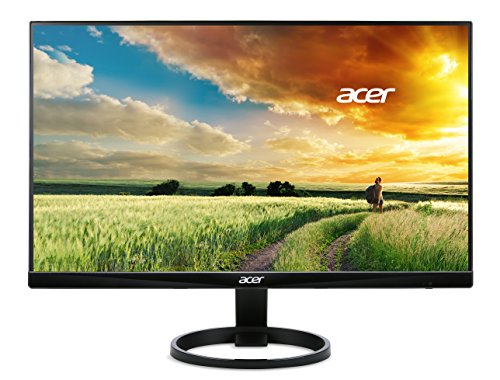
Acer R240HY
Acer’s R240HY keeps things simple with a full HD IPS panel suited to browsing, office work, and light media consumption. An ultra slim profile and thin bezels suit a dual monitor desk setup without excess bulk. Owners use it mainly as an affordable second display rather than a primary gaming or creative screen.
Pros
- Lowest cost monitor in this comparison
- Thin bezels suit a multi monitor desk setup
- IPS panel keeps decent color for everyday use
Cons
- Full HD resolution looks soft on a larger screen size
- No adaptive sync support for gaming
How they stack up
| # | Model | Resolution | Best for | Score | Price |
|---|---|---|---|---|---|
| 1 | LG UltraGear 27GP850-B | 2560×1440 | Best overall for gaming and general use | 9.2 | Check price |
| 2 | Dell UltraSharp U2723QE | 3840×2160 | Best for color accurate creative work | 9.0 | Check price |
| 3 | ASUS TUF Gaming VG27AQ | 2560×1440 | Best value for gaming | 8.8 | Check price |
| 4 | Samsung Odyssey G7 LC32G75T | 2560×1440 | Best for immersive curved gaming | 8.9 | Check price |
| 5 | Acer Nitro XV272U | 2560×1440 | Best for competitive esports | 8.6 | Check price |
| 6 | BenQ PD2705Q | 2560×1440 | Best for design and CAD work | 8.7 | Check price |
| 7 | Acer R240HY | 1920×1080 | Best budget for everyday use | 8.0 | Check price |
Good to know
What refresh rate do I need for gaming?
144Hz is generally considered the entry point for a noticeably smoother gaming experience over standard 60Hz. Competitive players often prefer 165Hz or higher, which is why the Samsung Odyssey G7’s 240Hz panel targets that audience specifically.
Is IPS or VA better for a computer monitor?
IPS panels, used in the LG UltraGear and Dell UltraSharp, offer wider viewing angles and more accurate color. VA panels, like the Samsung Odyssey G7, offer deeper contrast and blacks but narrower viewing angles.
Do I need a 4K monitor for photo editing?
Not strictly, but a 4K panel like the Dell UltraSharp U2723QE shows finer detail when zooming into images, which helps spot artifacts or focus issues that a 1440p screen might hide.
What is the difference between G-Sync and FreeSync?
G-Sync is Nvidia’s adaptive sync technology, while FreeSync is AMD’s equivalent. Many modern monitors, including the LG UltraGear and ASUS TUF Gaming VG27AQ, are compatible with both standards despite the different names.
How close should I sit to a curved monitor?
Curved monitors like the Samsung Odyssey G7 are designed for a viewing distance of about 24 to 30 inches, where the curve matches the natural arc of human peripheral vision most closely.
Can a monitor charge my laptop through USB-C?
Yes, on models built with power delivery. The Dell UltraSharp U2723QE delivers up to 90 watts through its USB-C port, enough to charge most laptops while also carrying video and data.
What does response time mean on a monitor spec sheet?
Response time measures how quickly a pixel changes color, typically from gray to gray. A 1ms rating, found on the LG UltraGear and Acer Nitro XV272U, reduces motion blur during fast paced gaming.
Is a 1440p monitor better than 1080p for everyday use?
1440p offers noticeably more screen real estate and sharper text than 1080p at the same screen size, which benefits multitasking and detailed work, though 1080p remains lighter on GPU demands for gaming.
The verdict
The LG UltraGear 27GP850-B remains the best overall pick, balancing high refresh rate gaming with color good enough for everyday productivity. Creative professionals who need accurate color out of the box should choose the Dell UltraSharp U2723QE instead, even with its lower refresh rate. Gamers on a tighter budget still get strong 1440p performance from the ASUS TUF Gaming VG27AQ without paying flagship pricing.
Marcus Chen
Marcus covered consumer electronics for enthusiast tech publications for six years before joining ChoiceCrest. He specializes in translating manufacturer spec sheets into plain-language buying advice, with a focus on audio, computing accessories and smart-home gear.
