Top Computer Memory for Pros: Picks for Workloads
For professionals, the Corsair Vengeance DDR5 64GB kit stands out. It offers high capacity and speed, ideal for rendering and virtual machines. Its main limitation is the need for a compatible DDR5 motherboard.
Professional workloads demand memory that can keep up. Video editing, 3D rendering, and running virtual machines require both capacity and speed. A sluggish system can cost you hours of productivity.
We compared current memory kits from leading brands. Our focus is on real specifications and owner feedback. We highlight strengths and weaknesses to help you choose.
Our top picks

Corsair Vengeance DDR5 64GB (2x32GB) 5600MHz
This kit delivers high capacity and speed for demanding applications. It runs stable at 5600MHz with low latency. Owners report excellent performance in rendering and virtualization.
Pros
- Large capacity for massive projects
- High speed for quick data access
- Reliable performance with XMP 3.0
Cons
- Requires DDR5 motherboard
- Heatsink may be tall for some coolers

G.Skill Trident Z5 RGB 32GB (2x16GB) DDR5 6000MHz
With 6000MHz speed and tight CL30 latency, this kit excels in gaming and content creation. The RGB lighting adds style. Owners note easy overclocking and stable operation.
Pros
- Very high speed for snappy response
- Low latency for better performance
- Stunning RGB design
Cons
- Requires compatible motherboard
- RGB may not suit all builds

Crucial Ballistix 32GB (2x16GB) DDR4 3600MHz
For professionals still on DDR4, this kit provides high speed and low latency. It is reliable and well-priced. Owners report great stability in heavy workloads.
Pros
- High speed for DDR4
- Tight latency for responsiveness
- Compatible with many systems
Cons
- Limited capacity for extreme tasks
- DDR4 is older technology

Kingston Fury Beast 64GB (2x32GB) DDR4 3200MHz
This kit offers 64GB at a moderate speed. It is ideal for professionals who need many applications open. Owners appreciate the affordability and reliability.
Pros
- Large capacity at a good price
- Stable performance for daily work
- Plug and play with XMP
Cons
- Not the fastest DDR4
- Heatsink is plain

Samsung 32GB (1x32GB) DDR4 2666MHz ECC
Error-correcting code memory prevents data corruption. This single module is for servers and workstations. Owners trust its reliability for critical tasks.
Pros
- Error correction enhances stability
- Trusted brand for reliability
- Suitable for server use
Cons
- Requires ECC-compatible motherboard
- Lower speed than consumer kits
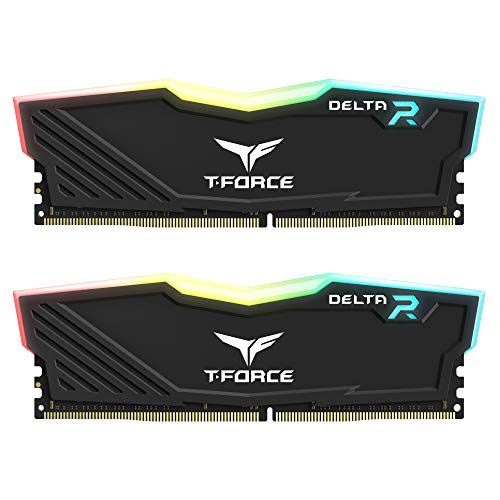
TeamGroup T-Force Delta RGB 32GB (2x16GB) DDR4 3200MHz
This kit combines stylish RGB with solid performance. It is a good choice for professionals who want visual appeal. Owners report easy setup and good overclocking headroom.
Pros
- Vibrant RGB lighting
- Good performance for the price
- Reliable and stable
Cons
- RGB adds cost
- Not the highest capacity

Corsair Dominator Platinum RGB 64GB (2x32GB) DDR5 5200MHz
This premium kit offers high capacity and quality. It features a sleek design and customizable RGB. Owners note it runs cool and performs well, but at a higher price.
Pros
- Premium build quality
- High capacity for heavy tasks
- Excellent heat spreader
Cons
- Expensive
- Requires DDR5 platform
What matters most
How Much Memory Do You Need? For basic office work, 16GB is often enough. For video editing or 3D rendering, 32GB is a good start. If you run virtual machines or handle massive datasets, 64GB or more is wise. Consider future needs. More memory can extend the life of your workstation.
DDR4 vs DDR5: What to Choose? DDR5 is the latest standard with higher speeds and better efficiency. It requires a compatible motherboard and CPU. DDR4 is mature and often cheaper. If you are building a new system, DDR5 is a future-proof choice. For existing systems, stick with DDR4.
Understanding Speed and Latency Memory speed (MHz) affects data transfer rate. Higher speed means faster performance. Latency (CL) measures delay. Lower latency is better. Balance speed and latency for optimal results. For most professionals, a 3200MHz CL16 or 5600MHz CL40 kit works well.
ECC Memory for Critical Work ECC memory detects and corrects data errors. It is used in servers and workstations where data integrity is vital. ECC requires a compatible motherboard and CPU. If you work with financial data or scientific simulations, consider ECC for peace of mind.
How they stack up
| # | Model | Capacity | Best for | Score | Price |
|---|---|---|---|---|---|
| 1 | Corsair Vengeance DDR5 64GB (2x32GB) 5600MHz | 64GB (2x32GB) | Heavy multitasking and large datasets | 9.4 | Check price |
| 2 | G.Skill Trident Z5 RGB 32GB (2x16GB) DDR5 6000MHz | 32GB (2x16GB) | Enthusiast builds with overclocking | 9.2 | Check price |
| 3 | Crucial Ballistix 32GB (2x16GB) DDR4 3600MHz | 32GB (2x16GB) | DDR4 systems needing performance | 9.0 | Check price |
| 4 | Kingston Fury Beast 64GB (2x32GB) DDR4 3200MHz | 64GB (2x32GB) | Budget-friendly large capacity | 8.7 | Check price |
| 5 | Samsung 32GB (1x32GB) DDR4 2666MHz ECC | 32GB (1x32GB) | Workstations requiring ECC | 8.5 | Check price |
| 6 | TeamGroup T-Force Delta RGB 32GB (2x16GB) DDR4 3200MHz | 32GB (2x16GB) | Aesthetics and performance | 8.3 | Check price |
| 7 | Corsair Dominator Platinum RGB 64GB (2x32GB) DDR5 5200MHz | 64GB (2x32GB) | Premium DDR5 build | 8.0 | Check price |
Common questions
Is 64GB RAM overkill for professional work?
For heavy workloads like 8K video editing, complex simulations, or running multiple virtual machines, 64GB can be beneficial. It allows you to keep many applications open without slowdowns. For typical office tasks, 32GB is plenty.
What is the difference between DDR4 and DDR5?
DDR5 offers higher speeds and better power efficiency than DDR4. It also has higher capacity per module. However, DDR5 requires a compatible motherboard and CPU. DDR4 is still capable and often more affordable.
Can I mix different RAM brands or speeds?
Technically, yes, but it is not recommended. Mixing can cause instability and reduce performance. It is best to use identical modules from the same kit for dual-channel operation and reliability.
What does CL mean in RAM specs?
CL stands for CAS Latency, a measure of delay between commands and data availability. Lower CL means faster response. For example, CL16 is faster than CL18 at the same speed.
Do I need to enable XMP or EXPO?
Most RAM runs at a default speed lower than its rated speed. Enabling XMP (Intel) or EXPO (AMD) in BIOS allows the memory to run at its advertised speed. This is safe and improves performance.
Is ECC memory worth it for a professional?
ECC memory is valuable if data corruption is a concern. It detects and corrects single-bit errors. It is essential for servers and scientific work. But it requires compatible hardware and is slightly slower.
Does RAM speed affect rendering performance?
Yes, faster RAM can improve rendering times, but the effect is modest. Memory speed and latency influence data transfer. For tasks like video editing, having enough capacity is more important than raw speed.
Can I use server memory in a desktop?
Server memory often uses ECC and is registered (RDIMM), which is not compatible with standard desktop motherboards. You need a motherboard that supports ECC or RDIMM. Check your motherboard specs before buying.
How do I know if RAM is compatible with my motherboard?
Check your motherboard’s QVL (Qualified Vendor List). This list shows tested memory modules. Also ensure the type (DDR4 or DDR5) matches. Consult the manual for slot configuration and max capacity.
What is the best RAM for a workstation?
The best RAM depends on your CPU and motherboard. For new systems, DDR5 with high capacity is ideal. For older systems, high-speed DDR4 with low latency is good. Consider brands like Corsair, G.Skill, and Crucial for reliability.
Final word
For most professionals, choose the Corsair Vengeance DDR5 64GB kit. It delivers high capacity and speed, making it versatile for video editing, 3D rendering, and virtual machines. If you are on a budget or using DDR4, the Kingston Fury Beast 64GB offers great value. For critical data integrity, the Samsung ECC module is a solid choice.
Marcus Chen
Marcus covered consumer electronics for enthusiast tech publications for six years before joining ChoiceCrest. He specializes in translating manufacturer spec sheets into plain-language buying advice, with a focus on audio, computing accessories and smart-home gear.