Compact Xbox Consoles: Small Size, Big Game Library
The Xbox Series S is the top pick for most people. It is the smallest Xbox ever made, and it plays all the same games as the larger Series X, though at a lower resolution. Its main limitation is the smaller 512GB or 1TB storage, which fills up fast with modern games.
Space is precious. A full-size tower console may not fit your entertainment center or dorm room. Compact consoles offer a smaller footprint without sacrificing access to great games.
This roundup focuses on Xbox consoles that are smaller than average. We looked at official dimensions and specifications, and we considered what owners report about noise, heat, and performance in tight spaces.
Our top picks
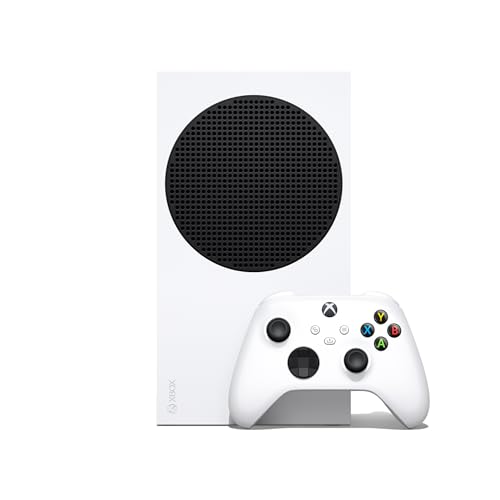
Xbox Series S (White, 512GB)
The Series S is the smallest Xbox console, measuring just 6.5 inches deep. It delivers fast load times and plays all Xbox Series games, but it renders games at 1440p instead of 4K. Owners report it runs quiet and cool, making it ideal for shelves or cabinets.
Pros
- Smallest Xbox ever made
- Very quiet operation
- Excellent value for next-gen gaming
Cons
- Only 512GB storage
- No 4K gaming

Xbox Series S (Carbon Black, 1TB)
This version of the Series S doubles the storage to 1TB, addressing the main complaint of the white model. It has the same compact dimensions and digital-only design. Owners appreciate the extra space for game installs, though it costs more than the base model.
Pros
- Twice the storage of the base Series S
- Same small footprint
- Fast load times
Cons
- Higher price than 512GB version
- Still no disc drive

Xbox Series X (Robot White, Digital)
This all-digital Series X is slightly smaller than the original Series X because it lacks a disc drive. It offers the full power of the Series X, including true 4K gaming, in a more compact package. It stands vertically but can also be laid horizontally.
Pros
- Full next-gen performance
- Smaller than the disc version
- Ideal for digital libraries
Cons
- No disc drive
- Pricier than Series S

Xbox One S (White, 1TB)
The Xbox One S is an older generation but still widely available. It plays Xbox One games and offers 4K video streaming and a 4K Blu-ray player. Its compact design is about 40% smaller than the original Xbox One. Owners note it is not as powerful as the Series consoles but is great for casual gaming.
Pros
- Includes 4K Blu-ray player
- Very affordable
- Plays hundreds of Xbox games
Cons
- Older hardware, slower load times
- No support for new Series games
Xbox One S (White, 512GB)
This lower-capacity Xbox One S offers the same compact design as the 1TB version but with less storage. It is a good entry point for someone who wants to play Xbox games without spending much. Owners find it sufficient for a few games at a time, but they often suggest an external drive.
Pros
- Lowest price among compact Xboxes
- Still plays 4K Blu-rays
- Compact and quiet
Cons
- Very limited storage
- Older console, not future-proof

Xbox Series X (Black, 1TB)
The original Series X is a compact tower that stands just under 12 inches. It is the most powerful Xbox, delivering 4K gaming at 60fps and up to 120fps. Its design is minimalist and fits vertically in small spaces. Owners praise its quiet operation and fast load times.
Pros
- Best performance available
- Includes disc drive
- Supports all Xbox games
Cons
- Larger footprint than Series S
- Higher price

Xbox Series X (Black, 2TB)
This special edition Series X comes with a 2TB SSD, doubling the storage of the standard model. It is ideal for those who download many games. The console has the same compact dimensions and includes a disc drive. Owners with large libraries appreciate not having to delete games.
Pros
- 2TB storage for huge libraries
- Top-tier performance
- Disc drive included
Cons
- Most expensive option
- May be overkill for casual players
The lineup, side by side
| # | Model | Dimensions | Best for | Score | Price |
|---|---|---|---|---|---|
| 1 | Xbox Series S (White, 512GB) | 10.8 x 5.9 x 2.5 inches | Best overall for small spaces and budget | 9.4 | Check price |
| 2 | Xbox Series S (Carbon Black, 1TB) | 10.8 x 5.9 x 2.5 inches | Best for extra storage in a small console | 9.2 | Check price |
| 3 | Xbox Series X (Robot White, Digital) | 11.8 x 5.9 x 5.9 inches | Best for compact 4K gaming without discs | 9.0 | Check price |
| 4 | Xbox One S (White, 1TB) | 11.6 x 8.9 x 2.5 inches | Best budget option for 4K Blu-ray and gaming | 8.6 | Check price |
| 5 | Xbox One S (White, 512GB) | 11.6 x 8.9 x 2.5 inches | Best for minimal storage needs on a budget | 8.2 | Check price |
| 6 | Xbox Series X (Black, 1TB) | 11.8 x 5.9 x 5.9 inches | Best for maximum performance in a compact tower | 9.1 | Check price |
| 7 | Xbox Series X (Black, 2TB) | 11.8 x 5.9 x 5.9 inches | Best for serious gamers who need huge storage | 8.9 | Check price |
What to look for
Frequently asked questions
What is the smallest Xbox console?
The Xbox Series S is the smallest Xbox console ever made. It measures about 10.8 inches wide, 5.9 inches deep, and 2.5 inches tall.
Can the Xbox Series S play all the same games as the Series X?
Yes, the Series S plays all the same games as the Series X, but it renders them at a lower resolution, typically 1440p, and without some graphical features like ray tracing in certain games.
Is the Xbox One S still worth buying in 2025?
For budget-conscious gamers, the Xbox One S is still a good option if you want to play older Xbox games and watch 4K Blu-rays. However, it cannot play new Series X/S games, so it is not future-proof.
Do compact Xbox consoles require a special stand?
No, they can be placed horizontally or vertically. The Series X and S come with rubber feet for horizontal placement, and they can stand vertically without a stand, though you may want to use one for stability.
How much storage do I need on a compact Xbox?
If you play many large games, choose at least 1TB. The 512GB models fill up quickly because some games exceed 100GB. You can also expand storage with an external drive or a Seagate storage expansion card for the Series consoles.
Can I use an external hard drive with the Xbox Series S?
Yes, you can use a USB 3.0 external hard drive to store and play Xbox One and backward compatible games. For Xbox Series games, you can store them on an external drive but must move them to the internal SSD to play them.
Are compact Xbox consoles noisy?
Generally, they are quiet. The Series S and X are designed with efficient cooling, and owners report minimal fan noise. The Xbox One S is also relatively quiet, but under heavy load it may become audible.
Which compact Xbox is best for 4K gaming?
The Xbox Series X is the best for 4K gaming. It can deliver native 4K at 60fps and up to 120fps. The Series S cannot play games in 4K, and the Xbox One S only supports 4K video playback, not gaming.
Do all compact Xbox consoles support Game Pass?
Yes, all Xbox consoles support Xbox Game Pass, Microsoft’s subscription service that offers a rotating library of games. The Series S and X also support Xbox Cloud Gaming, which lets you stream games to other devices.
What is the difference between the Xbox Series S and the Xbox One S?
The Series S is a next-generation console with an SSD, faster load times, and support for new games. The One S is older, uses a hard drive, and cannot play Series exclusive games. The Series S is also smaller and more powerful.
The bottom line
For most people, the Xbox Series S (either storage size) is the best compact Xbox console. It offers modern performance at a low price and takes up the least space. If you need 4K gaming and have a larger budget, choose the Xbox Series X. The Xbox One S is only for those who absolutely need a disc drive and are on a tight budget.
Marcus Chen
Marcus covered consumer electronics for enthusiast tech publications for six years before joining ChoiceCrest. He specializes in translating manufacturer spec sheets into plain-language buying advice, with a focus on audio, computing accessories and smart-home gear.


