Compact Wireless Routers That Pack a Punch for Small Spaces
The TP-Link Archer AX55 is the best compact wireless router for most people, offering Wi-Fi 6 speeds and solid coverage in a small footprint. Its main advantage is the balance of performance and price, but its limitation is that it lacks a built-in modem, so you will need a separate one from your ISP.
If you live in an apartment, dorm, or travel frequently, a full-sized router can be overkill. Compact wireless routers offer the same connectivity in a smaller package, making them easy to place on a shelf or pack in a bag.
We’ve analyzed the specifications and owner feedback for the top contenders to find the best options for different needs. From budget picks to high-performance models, this guide covers the features that matter most in a small router.
What matters most
The top picks, ranked

TP-Link Archer AX55
The TP-Link Archer AX55 is a Wi-Fi 6 router that measures just 8.7 x 5.0 x 1.5 inches, making it easy to fit into tight spaces. It delivers fast AX3000 speeds and has a user-friendly app for setup. Owners praise its reliable performance and strong parental controls, but some note that the plastic build feels less premium.
Pros
- Excellent performance for the price
- Compact design fits on a bookshelf
- Easy setup with the TP-Link app
Cons
- No USB port for sharing storage
- Limited advanced features compared to higher-end models

ASUS RT-AX53U
The ASUS RT-AX53U is a compact Wi-Fi 6 router with a gamer-focused design. It offers a dedicated gaming port and supports Adaptive QoS to prioritize gaming traffic. Its size is similar to the Archer AX55, and it includes AiMesh support for mesh expansion. Some users find the app interface less intuitive.
Pros
- Dedicated gaming port
- Supports ASUS AiMesh for whole-home coverage
- Robust security features
Cons
- Slightly slower speeds than AX3000 models
- Setup can be complex for beginners

NETGEAR Nighthawk RAXE300
The NETGEAR Nighthawk RAXE300 is a tri-band Wi-Fi 6E router that offers a blazing-fast 6 GHz band, reducing interference. It is compact for its class, but larger than typical mini routers. It includes a 2.5G Ethernet port for high-speed internet plans. Owners report excellent speeds but note the higher price.
Pros
- Access to the 6 GHz band
- Future-proof technology
- Great range for a compact router
Cons
- Expensive for most users
- Bulkier than other compact options

TP-Link TL-WR902AC
The TP-Link TL-WR902AC is a tiny travel router that can fit in your pocket. It supports multiple modes including router, access point, and repeater. It has a built-in power adapter and can be powered via USB. While it only offers Wi-Fi 5 speeds, its portability is unmatched. Some users find the setup process a bit technical.
Pros
- Ultra-compact and lightweight
- Multiple operating modes
- Can be powered by a power bank
Cons
- Slower speeds due to Wi-Fi 5
- Limited Ethernet connectivity
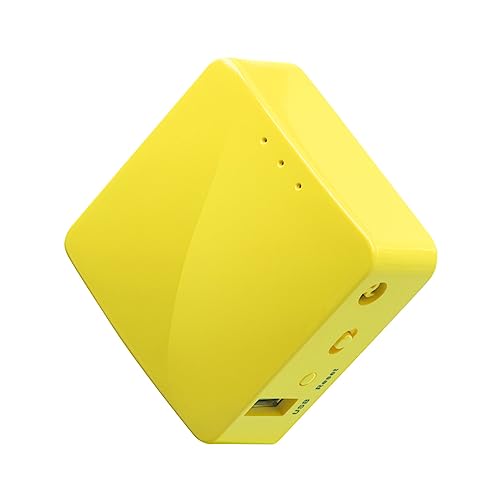
GL.iNet GL-MT300N-V2
The GL.iNet GL-MT300N-V2 is a mini wireless router that runs on OpenWrt, giving you full control over your network. It is small, with a metal casing, and can be used as a travel router, repeater, or VPN client. It has a microSD slot for storage expansion. Owners appreciate the customizability, but the default firmware is basic.
Pros
- Runs OpenWrt for advanced customization
- VPN support
- Small and rugged design
Cons
- Old Wi-Fi technology
- Performance is limited for heavy use

Asus ROG Rapture GT-AX11000
The Asus ROG Rapture GT-AX11000 is a powerful tri-band gaming router that delivers top-tier performance. While not the smallest, its angular design is relatively compact for its class. It includes a quad-core CPU and triple-level game acceleration. It is expensive but offers exceptional speeds. Some users find it overkill for small spaces.
Pros
- Blazing fast speeds
- Excellent gaming features
- Strong build quality
Cons
- Large footprint compared to true compact routers
- High price tag

Linksys E5600
The Linksys E5600 is a budget-friendly dual-band router with Wi-Fi 5 technology. It has a simple, small design and covers up to 1,500 square feet. It supports parental controls and guest Wi-Fi. Owners find it reliable for everyday use, but it lacks advanced features like MU-MIMO.
Pros
- Affordable price
- Easy setup
- Sleek design
Cons
- Slower speeds
- No USB port
Side by side
| # | Model | Wireless Standard | Best for | Score | Price |
|---|---|---|---|---|---|
| 1 | TP-Link Archer AX55 | Wi-Fi 6 (802.11ax) | Overall Best Compact Router | 9.4 | Check price |
| 2 | ASUS RT-AX53U | Wi-Fi 6 (802.11ax) | Gamers on a Budget | 9.1 | Check price |
| 3 | NETGEAR Nighthawk RAXE300 | Wi-Fi 6E (802.11ax) | Bleeding Edge Performance | 9.0 | Check price |
| 4 | TP-Link TL-WR902AC | Wi-Fi 5 (802.11ac) | Travel and Portable Use | 8.7 | Check price |
| 5 | GL.iNet GL-MT300N-V2 | Wi-Fi 4 (802.11n) | Privacy and Open Source Users | 8.4 | Check price |
| 6 | Asus ROG Rapture GT-AX11000 | Wi-Fi 6 (802.11ax) | High-End Gaming with Big Coverage | 8.2 | Check price |
| 7 | Linksys E5600 | Wi-Fi 5 (802.11ac) | Budget Buy for Basic Needs | 8.0 | Check price |
Good to know
What is a compact wireless router?
A compact wireless router is a smaller version of a traditional router, designed to take up less space. They are ideal for apartments, small offices, or travel. Despite their size, they offer similar features, including multiple Ethernet ports and wireless connectivity.
Are compact routers as good as full-sized ones?
Not always. Compact routers often have fewer antennas and less powerful hardware, which can result in shorter range and lower throughput. However, for small spaces, they are sufficient. Some high-end compact models offer performance comparable to larger routers.
Do I need a modem with a compact router?
Most compact routers are not modems. They need to be connected to a separate modem or a modem/router combo from your ISP. Some travel routers have WAN ports that can connect to a hotel Ethernet jack, but they still don’t have built-in modems.
Can I use a compact router for online gaming?
Yes, many compact routers support gaming with low latency and QoS features. However, gaming performance also depends on your internet connection and the router’s processing power. For serious gaming, look for a router with a fast CPU and gaming-specific optimizations.
How do I set up a compact wireless router?
Setup is similar to any router. Connect the router to your modem with an Ethernet cable, power it on, and follow the instructions in the manufacturer’s app or web interface. Many compact routers have easy setup wizards that guide you through creating a Wi-Fi name and password.
What is the range of a compact router?
Range depends on the router’s antenna design and power. Most compact routers cover a small to medium-sized apartment or home up to 1,500 square feet. Some models with external antennas can cover more. For larger spaces, consider a mesh system.
Are there any compact routers with Wi-Fi 6E?
Yes, some newer compact routers support Wi-Fi 6E, which adds the 6 GHz band. This provides faster speeds and less interference, but it requires compatible devices. The NETGEAR Nighthawk RAXE300 is an example, but it is larger than typical compact routers.
What should I look for in a travel router?
For travel, prioritize size, weight, and power options. Look for a router that can be powered via USB, has a compact form factor, and supports multiple modes like repeater or access point. Battery-powered options are also available if you need to work without an outlet.
Can I use a compact router as a range extender?
Many compact routers have a repeater or range extender mode. This allows them to connect to an existing Wi-Fi network and rebroadcast the signal. This is useful for extending coverage in a larger space or for travel when you want to boost a hotel’s Wi-Fi.
How often should I update my router’s firmware?
You should check for firmware updates regularly, at least every few months. Updates patch security vulnerabilities and can improve performance. Many routers have automatic updates, but it’s a good habit to manually check via the manufacturer’s app or web interface.
The bottom line
For the majority of people, the TP-Link Archer AX55 is the best compact wireless router because it offers the best balance of performance, features, and price. If you need ultimate portability for travel, the TP-Link TL-WR902AC is the top pick. For gamers who want a dedicated gaming router without a huge footprint, the ASUS RT-AX53U is a solid choice. Avoid the Asus ROG Rapture GT-AX11000 if you have a small space, as its performance is overkill and its size is not truly compact.
Marcus Chen
Marcus covered consumer electronics for enthusiast tech publications for six years before joining ChoiceCrest. He specializes in translating manufacturer spec sheets into plain-language buying advice, with a focus on audio, computing accessories and smart-home gear.


