Compact Storage Enclosures That Fit Anywhere
For most people, the Sabrent USB 3.2 10Gbps Type-C Tool-Free Enclosure is the top pick. It offers fast transfer speeds, tool-free installation, and works with both 2.5-inch SSDs and HDDs. Its main limitation is that it only fits 2.5-inch drives, not 3.5-inch ones.
A compact storage enclosure turns a bare drive into a portable backup or extra storage. Whether you need to clone a drive, expand a laptop’s capacity, or carry files between devices, a small enclosure keeps your data accessible.
We looked at models that are genuinely small, not just slightly reduced. Each enclosure here measures under a few inches, so it slips into a pocket or bag without adding bulk.
The best picks, ranked
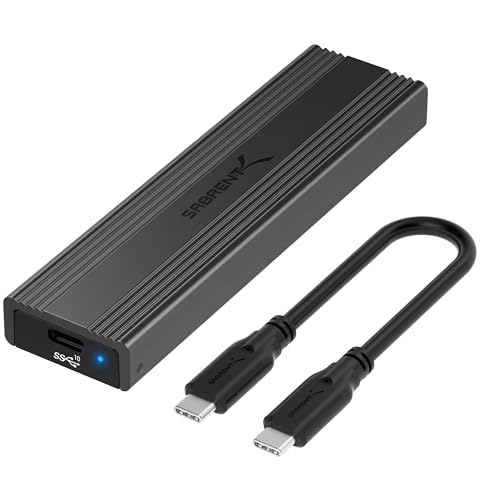
Sabrent USB 3.2 10Gbps Type-C Tool-Free Enclosure for 2.5-Inch SSD/HDD
This Sabrent enclosure supports SATA III drives up to 7mm thick. It uses a USB-C port with 10Gbps speed, and installation is truly tool-free: you slide the drive in and snap the lid. Owners report consistent performance and a secure fit. It is one of the most compact 2.5-inch enclosures available, barely larger than the drive itself.
Pros
- Tool-free design with no screws
- Aluminum body aids heat dissipation
- Includes USB-C to C and C to A cables
Cons
- Only fits 7mm drives, not 9.5mm
- No UASP support for older systems
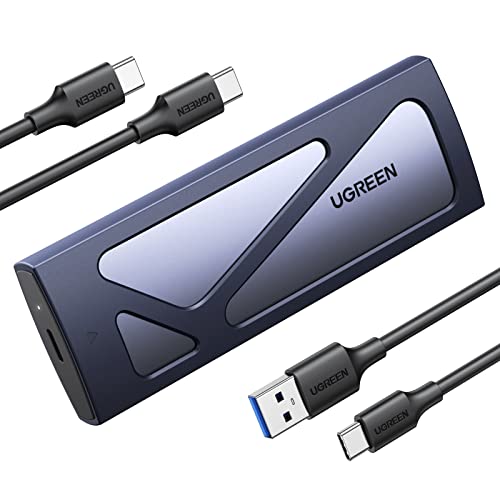
UGREEN USB C Enclosure for M.2 NVMe SSD
This UGREEN enclosure supports M.2 NVMe drives in sizes 2230, 2242, 2260, and 2280. It delivers up to 10Gbps transfer rates, making it ideal for video editors or anyone moving large files. The tool-free magnetic lid opens easily, and the aluminum shell keeps temperatures in check. It is slightly longer than some rivals but still fits in a pocket.
Pros
- Supports multiple M.2 sizes
- Magnetic lid for quick drive swaps
- Blue LED activity indicator
Cons
- No thermal pad included for some drives
- Screwless design may feel less secure

ORICO Tool-Free USB 3.0 2.5 Inch External Hard Drive Enclosure
The ORICO enclosure offers reliable USB 3.0 performance at a low price. It is simple, with a slide-in design and no tools needed. The plastic body keeps it light, but it is not as rugged as metal alternatives. It works with any 2.5-inch SATA drive up to 9.5mm thick, making it versatile for older drives.
Pros
- Very affordable
- Supports both 7mm and 9.5mm drives
- Plug and play, no driver needed
Cons
- Plastic body feels less premium
- USB-A connector may be bulky
Sabrent USB 3.2 Type-C Tool-Free Enclosure for M.2 SATA SSDs
This Sabrent enclosure is designed for M.2 SATA SSDs (B-key or B&M key). It is incredibly small, about the size of a flash drive. The USB-C port connects at 10Gbps, and the tool-free design lets you snap the drive in place. Owners praise its portability, but note it only works with SATA M.2 drives, not NVMe.
Pros
- Ultra-compact, pocketable
- Aluminum body with LED indicator
- Includes cable and screwdriver
Cons
- Does not support NVMe drives
- May get warm with heavy use

Yottamaster M.2 NVMe SSD Enclosure with USB 3.2 Type-C
The Yottamaster enclosure features a full aluminum body with a silicone sleeve for extra drop protection. It supports M.2 NVMe drives up to 2280 size, and the USB-C port offers 10Gbps speeds. The sleeve adds grip and shock resistance, making it a good choice for travel. Installation is screwless, using a slide lock.
Pros
- Silicone sleeve protects against drops
- Tool-free installation
- Ventilation holes for heat dissipation
Cons
- Sleeve adds bulk
- Only comes with one cable
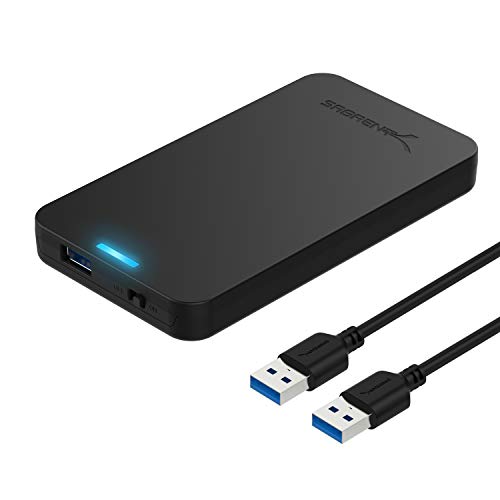
Inateck 2.5 Inch SATA Hard Drive Enclosure with USB 3.0
Inateck’s enclosure uses a unique mechanical lock to secure the drive without screws. It supports 2.5-inch SATA drives up to 9.5mm thick. The USB 3.0 interface provides up to 5Gbps, which is sufficient for most users. It is simple and reliable, with a clear LED indicator. Some users find the lock mechanism slightly stiff at first.
Pros
- Mechanical lock holds drive firmly
- Supports thick drives
- LED shows power and activity
Cons
- Not USB-C (requires adapter)
- Plastic construction

FIDECO M.2 NVMe SSD Enclosure with USB 3.2 Gen 2
The FIDECO enclosure comes with a thermal pad and aluminum heat sink to keep NVMe drives cool during sustained transfers. It supports M.2 2280 NVMe drives and connects via USB-C at 10Gbps. The tool-free design uses a sliding latch. Owners report lower temperatures compared to other enclosures, though the body is a bit wider.
Pros
- Includes thermal pad and heat sink
- Tool-free latch
- Stable performance over long transfers
Cons
- Only fits 2280 drives
- No screwless installation for some drives
How to pick the right one
How they compare
| # | Model | Interface | Best for | Score | Price |
|---|---|---|---|---|---|
| 1 | Sabrent USB 3.2 10Gbps Type-C Tool-Free Enclosure for 2.5-Inch SSD/HDD | USB 3.2 Gen 2 Type-C | Best overall for most users | 9.4 | Check price |
| 2 | UGREEN USB C Enclosure for M.2 NVMe SSD | USB 3.2 Gen 2 Type-C | Best for NVMe speed on the go | 9.2 | Check price |
| 3 | ORICO Tool-Free USB 3.0 2.5 Inch External Hard Drive Enclosure | USB 3.0 Type-A | Best budget pick | 8.8 | Check price |
| 4 | Sabrent USB 3.2 Type-C Tool-Free Enclosure for M.2 SATA SSDs | USB 3.2 Gen 2 Type-C | Best for M.2 SATA drives | 8.7 | Check price |
| 5 | Yottamaster M.2 NVMe SSD Enclosure with USB 3.2 Type-C | USB 3.1 Gen 2 Type-C | Best for durability | 8.6 | Check price |
| 6 | Inateck 2.5 Inch SATA Hard Drive Enclosure with USB 3.0 | USB 3.0 Type-A | Best for tool-free mechanical lock | 8.5 | Check price |
| 7 | FIDECO M.2 NVMe SSD Enclosure with USB 3.2 Gen 2 | USB 3.2 Gen 2 Type-C | Best for heat management | 8.3 | Check price |
Common questions
What is a compact storage enclosure?
It is a small case that lets you install a bare internal drive and connect it to your computer via USB. It makes the drive portable and easy to use externally.
Can I use a 3.5-inch desktop hard drive in a compact enclosure?
No. Compact enclosures are designed for 2.5-inch drives or M.2 SSDs. 3.5-inch drives require a larger enclosure that typically needs an external power supply.
Which is faster: USB 3.0 or USB-C?
USB-C is a connector type, not a speed. Speed depends on the version: USB 3.0 is 5Gbps, USB 3.1 Gen 2 is 10Gbps. A USB-C port can support different speeds. Check the enclosure’s specifications for actual data rates.
Will an SSD enclosure work with a hard drive?
Yes, if the enclosure supports the same form factor and interface. For example, a 2.5-inch SATA enclosure works with both SSDs and HDDs that are SATA. However, HDDs are thicker, so ensure the enclosure supports up to 9.5mm thickness.
Do I need to install drivers?
Most enclosures are plug and play on Windows, macOS, and Linux. They use standard USB mass storage drivers. Some might require UASP support for optimal performance, but drivers are usually built-in.
How do I keep my enclosure cool?
Choose an aluminum enclosure with thermal pads. Avoid covering it during use. Some enclosures have ventilation holes. If you perform heavy transfers, take breaks to let it cool down.
Can I boot an operating system from an external enclosure?
Yes, if your computer’s BIOS supports booting from USB. You can install an OS on a drive inside the enclosure and boot from it. However, performance may be slower than an internal drive, especially over USB 3.0.
What is the difference between NVMe and SATA M.2 drives?
NVMe uses the PCIe interface and offers much higher speeds, up to 3500MB/s. SATA M.2 drives use the SATA interface and top out around 550MB/s. Enclosures are specific to one interface, so check compatibility.
Are tool-free enclosures secure?
Tool-free designs often use clips or locks to hold the drive in place. They are generally secure, but some users prefer screws for extra stability. Look for enclosures with positive locking mechanisms and good reviews.
Can I use a compact enclosure with my phone or tablet?
If your phone supports USB On-The-Go (OTG) and the enclosure uses USB-C, you can connect it. However, power draw may be an issue for spinning hard drives. SSDs are more likely to work. Check your device’s compatibility.
The verdict
If you need a reliable everyday 2.5-inch enclosure, choose the Sabrent USB 3.2 10Gbps Type-C Tool-Free Enclosure. It offers the best combination of speed, build quality, and ease of use. For NVMe portable storage, the UGREEN USB C Enclosure is the way to go. Budget buyers should pick the ORICO, while those who prioritize durability should consider the Yottamaster with its silicone sleeve. Avoid any enclosure that does not match your drive’s interface or thickness.
Marcus Chen
Marcus covered consumer electronics for enthusiast tech publications for six years before joining ChoiceCrest. He specializes in translating manufacturer spec sheets into plain-language buying advice, with a focus on audio, computing accessories and smart-home gear.