Compact Mesh WiFi Systems That Fit Anywhere
The TP-Link Deco X20 is the best compact mesh WiFi system for most people. It offers strong WiFi 6 performance in a small, unobtrusive design. Its main advantage is excellent coverage for small to medium homes. The main limitation is that it lacks a USB port for sharing storage.
Mesh WiFi systems have traditionally been bulky, but compact models now offer full coverage without taking up space. Whether you live in an apartment or just want a cleaner setup, these small nodes can hide on shelves or desks.
We compared seven compact mesh systems available on Amazon. Each one is small enough to fit in tight spots, but they differ in speed, coverage, and smart home features. Owners report easy setup and reliable connections, which is what you want from a mesh network.
What matters most
What we recommend

TP-Link Deco X20 (2-pack)
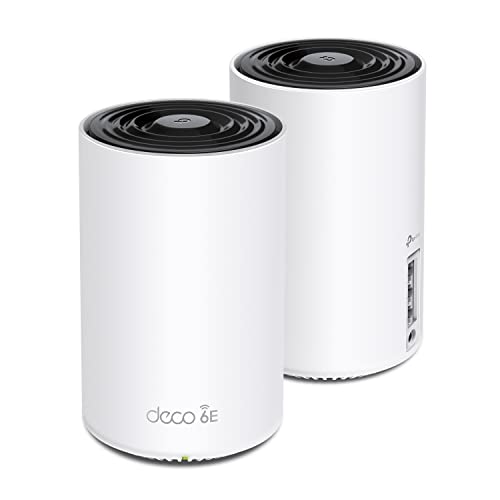
The Deco X20 delivers fast WiFi 6 speeds and solid coverage in a compact, cylindrical design. Each node is about the size of a small water bottle. Owners note that setup takes about 10 minutes using the Deco app, and the network stays stable even when multiple devices stream at once. It covers up to 5,800 square feet with the 2-pack, which is generous for its size. The lack of a USB port is a minor miss, but for most home users, this system hits the sweet spot.
Pros
- Very compact and unobtrusive
- Easy app-based setup
- Reliable WiFi 6 performance
Cons
- No USB port for storage sharing
- Limited advanced settings

Amazon eero 6 (3-pack)
The eero 6 is a small, rounded square that blends into any room. It uses WiFi 6 and works seamlessly with Alexa to manage your network via voice. Owners appreciate the simple setup through the eero app, which guides you step by step. The 3-pack covers up to 5,000 square feet, making it a great value for smaller homes. However, the eero 6 only has one Ethernet port per node, which restricts wired connections unless you buy a separate hub.
Pros
- Excellent Alexa integration
- Compact and attractive design
- TrueMesh technology optimizes paths
Cons
- Single Ethernet port per node
- No web interface for settings

Google Nest Wifi (2-pack)
Google Nest Wifi routers are small, rounded pucks that double as smart speakers. The system is incredibly easy to set up with the Google Home app, and it integrates with Google Assistant for voice control. It provides reliable WiFi 5 coverage up to 4,400 square feet with the 2-pack. Owners report that the network is stable for streaming and browsing, but the lack of WiFi 6 means it’s not as future-proof as other options. Also, the nodes only have two Ethernet ports, one for WAN and one for LAN.
Pros
- Built-in Google Assistant
- Very easy setup with app
- Attractive, low-profile design
Cons
- Older WiFi 5 technology
- Limited wired connectivity on points

Asus ZenWiFi XD5 (2-pack)
The Asus ZenWiFi XD5 is a compact mesh system that packs robust security features. It comes with AiProtection, which provides real-time threat detection and parental controls. The nodes are small and can be placed on shelves or mounted on walls. It uses WiFi 6 and covers up to 5,500 square feet. Owners report that the app is a bit more complex than others, but the extra control is worth it for tech-savvy users. The main downside is that the system is more expensive than similar models.
Pros
- Comprehensive security suite
- Wall-mountable design
- Strong parental controls
Cons
- Higher price point
- App interface can be overwhelming

Netgear Orbi AX3000 (2-pack)
The Netgear Orbi AX3000 is a compact tri-band mesh system that delivers impressive speeds, especially for homes with gigabit internet. It uses WiFi 6 and includes a dedicated backhaul channel to maintain high performance. The nodes are small and stylish, fitting into modern decor. Owners note that speeds are consistent even at the edge of coverage, which is great for gaming and 4K streaming. However, the system is relatively pricey, and the app has fewer customization options compared to competitors.
Pros
- Dedicated backhaul for speed
- Excellent for high-bandwidth activities
- Compact and attractive design
Cons
- Premium price
- Limited app settings

Linksys Velop AX4200 (2-pack)
The Linksys Velop AX4200 is a compact mesh system that handles many devices at once with its tri-band WiFi 6 technology. Each node is small and can be placed discreetly. It covers up to 6,000 square feet with the 2-pack, making it suitable for larger homes. Owners report that the system manages simultaneous streaming, gaming, and video calls without lag. The setup is straightforward with the Linksys app, but the nodes are a bit taller than some others, so they may not fit on low shelves.
Pros
- Handles many devices smoothly
- Generous Ethernet ports
- Wide coverage area
Cons
- Taller design takes more space
- App can be slow to load

TP-Link Deco X55 (2-pack)
The TP-Link Deco X55 offers a great balance of price and performance for those wanting WiFi 6 without breaking the bank. It’s a compact, white cylinder that blends into any room. The system covers up to 5,500 square feet and supports over 150 devices. Owners appreciate the easy setup and the Deco app, which provides useful parental controls and network statistics. The downside is that it lacks a USB port and some advanced features like tri-band technology, but for most users, it’s more than enough.
Pros
- Affordable WiFi 6
- Stable performance
- User-friendly app
Cons
- No USB port
- Dual-band only
How they stack up
| # | Model | WiFi technology | Best for | Score | Price |
|---|---|---|---|---|---|
| 1 | TP-Link Deco X20 (2-pack) | WiFi 6 (802.11ax) | Best overall for small homes | 9.4 | Check price |
| 2 | Amazon eero 6 (3-pack) | WiFi 6 (802.11ax) | Best for Alexa users | 9.2 | Check price |
| 3 | Google Nest Wifi (2-pack) | WiFi 5 (802.11ac) | Best for simple whole-home coverage | 9.0 | Check price |
| 4 | Asus ZenWiFi XD5 (2-pack) | WiFi 6 (802.11ax) | Best for security features | 8.8 | Check price |
| 5 | Netgear Orbi AX3000 (2-pack) | WiFi 6 (802.11ax) | Best for high-speed internet plans | 8.7 | Check price |
| 6 | Linksys Velop AX4200 (2-pack) | WiFi 6 (802.11ax) | Best for large families | 8.6 | Check price |
| 7 | TP-Link Deco X55 (2-pack) | WiFi 6 (802.11ax) | Best budget WiFi 6 option | 8.5 | Check price |
Questions worth asking
What is a compact mesh WiFi system?
A compact mesh WiFi system uses multiple small nodes that work together to create a single, seamless network. They are designed to be smaller than traditional routers, making them easier to place in tight spaces.
How many square feet can a compact mesh system cover?
Compact mesh systems vary in coverage. Some two-pack systems cover up to 5,500 square feet, while three-packs can cover more. Always check the manufacturer’s specification for your specific model.
Is WiFi 6 worth it in a mesh system?
Yes, WiFi 6 offers faster speeds, lower latency, and better performance with many connected devices. If you have a compatible internet plan and multiple devices, WiFi 6 is a worthwhile investment.
Can I expand a compact mesh system later?
Most mesh systems allow you to add more nodes to extend coverage. Ensure that the system you choose supports adding nodes from the same brand and model line.
Do mesh WiFi systems work with my existing modem?
Yes, mesh systems replace your router but still require a modem from your internet service provider. You connect the main node to your modem via an Ethernet cable.
Are compact mesh systems easy to install?
Most compact mesh systems come with a smartphone app that guides you through installation. The process typically takes 10 to 15 minutes, and no technical expertise is required.
What is the difference between a router and a mesh system?
A single router broadcasts WiFi from one point, while a mesh system uses multiple nodes to blanket your home with coverage. Mesh systems are better for eliminating dead zones and handling multiple devices.
Do compact mesh systems support parental controls?
Many mesh systems include parental controls through their companion app. You can pause internet access for specific devices, filter content, and set time limits.
Can I use a mesh system with a VPN?
Some mesh systems support VPN passthrough or can be configured to use a VPN on the router level. Check the specifications to see if the system supports your VPN needs.
Will a compact mesh system improve my internet speed?
A mesh system can improve the speed you receive in different parts of your home by providing stronger signals and better path selection. However, your overall internet speed is still limited by your ISP plan.
The verdict
If you want a compact mesh WiFi system that combines performance, ease of use, and affordability, choose the TP-Link Deco X20. It offers excellent WiFi 6 coverage for small to medium homes. For Alexa enthusiasts, the Amazon eero 6 is a close second with its smart home integration. Both are great choices, but the Deco X20 provides the best balance of features and price.
Marcus Chen
Marcus covered consumer electronics for enthusiast tech publications for six years before joining ChoiceCrest. He specializes in translating manufacturer spec sheets into plain-language buying advice, with a focus on audio, computing accessories and smart-home gear.