Compact Internal Sound Cards for Small Form Factor PCs
For most compact builds, the Creative Sound Blaster AE-5 Plus stands out as the top pick. It offers excellent audio quality and a low profile bracket. Its main limitation is that it requires a free PCIe x1 slot, which is scarce in some mini ITX cases.
Compact internal sound cards deliver high fidelity audio without sacrificing space. They fit in low profile slots and are ideal for small form factor PCs.
Whether you are building a mini ITX gaming rig or upgrading a slim desktop, these cards improve sound quality beyond onboard audio.
The top picks, ranked
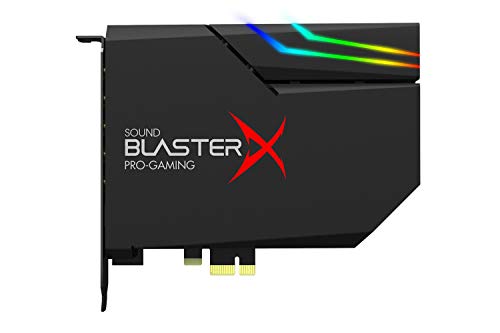
Creative Sound Blaster AE-5 Plus
The Creative Sound Blaster AE-5 Plus delivers high resolution audio with a dedicated DAC and headphone amp. It includes a low profile bracket for compact cases. Owners report clear, detailed sound and effective virtual surround.
Pros
- Excellent audio clarity
- Great for gaming and music
- Includes low profile bracket
Cons
- Requires PCIe slot
- No external volume control

ASUS Xonar SE 5.1
The ASUS Xonar SE 5.1 is an affordable low profile sound card that provides 5.1 channel audio. It is simple to install and works well for everyday listening and casual gaming. Users note its compact size and reliable performance.
Pros
- Very affordable
- Low profile design
- Good audio quality for price
Cons
- No virtual surround
- Basic software suite
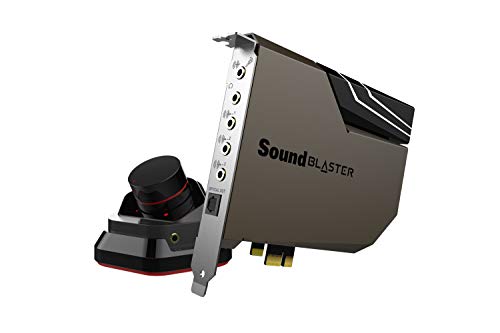
EVGA Nu Audio Card
The EVGA Nu Audio Card features a high end DAC and swappable op amps. It is designed for music enthusiasts who value precision. Its low profile bracket fits most small cases, and owners praise its transparent sound.
Pros
- Studio grade sound quality
- Swappable op amps
- Great detail retrieval
Cons
- Premium price
- No multi channel support

Creative Sound Blaster Z SE
The Creative Sound Blaster Z SE offers SBX Pro Studio virtual surround and a high headphone amp. It comes with a low profile bracket and is popular among gamers. Users report immersive audio in games and movies.
Pros
- Great virtual surround
- Strong headphone amp
- Good value
Cons
- Bulky heatsink may block adjacent slots
- Software can be complex
HT Omega Claro Halo
The HT Omega Claro Halo is a full height card but includes a low profile bracket. It provides 7.1 channel audio with high quality components. Owners appreciate its rich sound for movies and music.
Pros
- True 7.1 surround
- Excellent component quality
- Good for home theater
Cons
- Higher cost
- May not fit ultra compact cases

ASUS Essence STX II
The ASUS Essence STX II is a premium sound card with a dedicated headphone amp and high end DAC. It is designed for critical listening and music creation. Although it is a full height card, it comes with a low profile bracket.
Pros
- Reference level audio quality
- Powerful headphone amp
- Great for studio work
Cons
- Expensive
- Requires external power connector
Syba SD-PEX24031
The Syba SD-PEX24031 is a low profile sound card that adds multiple audio ports to a compact PC. It supports 5.1 surround and is easy to install. Owners report it as a reliable upgrade for older systems.
Pros
- Very compact size
- Adds multiple ports
- Inexpensive
Cons
- Basic audio quality
- Limited software features
Side by side
| # | Model | Interface | Best for | Score | Price |
|---|---|---|---|---|---|
| 1 | Creative Sound Blaster AE-5 Plus | PCIe x1 | Best overall for compact gaming PCs | 9.4 | Check price |
| 2 | ASUS Xonar SE 5.1 | PCIe x1 | Best budget compact sound card | 8.8 | Check price |
| 3 | EVGA Nu Audio Card | PCIe x1 | Best for audiophiles in compact builds | 9.1 | Check price |
| 4 | Creative Sound Blaster Z SE | PCIe x1 | Best for gaming with virtual surround | 9.0 | Check price |
| 5 | HT Omega Claro Halo | PCIe x1 | Best for home theater enthusiasts | 8.7 | Check price |
| 6 | ASUS Essence STX II | PCIe x1 | Best for music production | 8.9 | Check price |
| 7 | Syba SD-PEX24031 | PCIe x1 | Best for adding audio ports to slim PCs | 8.0 | Check price |
What matters most
Common questions
Can a compact internal sound card fit in a mini ITX case?
Yes, many come with low profile brackets and are designed for small form factor cases. Check the card’s dimensions and your case’s clearance.
Do compact sound cards improve gaming audio?
Yes, they provide better positional audio and virtual surround. They also reduce CPU load compared to onboard audio.
What is the difference between internal and external sound cards?
Internal cards install inside the PC and offer lower latency. External USB DACs are portable and easier to connect, but may have higher latency.
Are compact sound cards worth it if I have a good motherboard?
If your motherboard has premium onboard audio, you may not notice a huge difference. But dedicated sound cards often have better components and lower noise.
Can I use a compact sound card with a laptop?
No, internal sound cards require a PCIe slot found only in desktop computers. For laptops, consider a USB sound adapter.
Do sound cards support 7.1 surround sound with headphones?
Many do via virtual surround software. This simulates surround sound using stereo headphones.
What is a low profile bracket?
It is an alternative mounting bracket that reduces the card’s height, allowing it to fit in slim cases.
How do I know if my PC has a free PCIe slot?
Open your case and inspect the motherboard. Look for a slot labeled PCIe x1 or x16. You can also check your motherboard manual.
Are compact sound cards plug and play?
Most require driver installation for full features. Basic audio may work with generic drivers, but you should install the provided software.
What is the best sound card for music production?
For music production, cards like the ASUS Essence STX II offer high fidelity and low latency. They are excellent for recording and mixing.
Final word
For most compact builds, the Creative Sound Blaster AE-5 Plus is the clear winner. It balances audio quality, features, and price. If you are on a tight budget, the ASUS Xonar SE is a solid choice. Audiophiles should consider the EVGA Nu Audio Card. Choose the AE-5 Plus for the best overall experience.
Marcus Chen
Marcus covered consumer electronics for enthusiast tech publications for six years before joining ChoiceCrest. He specializes in translating manufacturer spec sheets into plain-language buying advice, with a focus on audio, computing accessories and smart-home gear.


