How to Pick a Coding Toy Starter Kit for Your Kid
Learning Resources Botley 2.0 tops the list for screen-free sequencing with no tablet required. Osmo Coding Starter Kit suits families who already use an iPad daily. Sphero Indi offers the best value, teaching logic through color tiles instead of an app.
Learning Resources Botley 2.0 teaches kids age 5 and up to sequence commands with a handheld remote, no screen involved. Setup takes more patience than an app-based kit offers. Families wanting instant tablet feedback should look at Osmo instead.
Screen-free robots, app-based block coding, and buildable robotics kits each teach a different skill at a different age, which makes picking one tricky. Seven currently sold kits were compared on age range, step or block count, screen dependence, and how owners describe durability and replay value.
What we recommend

Learning Resources Botley the Coding Robot 2.0
Botley 2.0 skips the app entirely, letting kids program moves through a handheld remote. A single sequence can run up to 150 steps, and a loop function repeats actions without re-entering them. An obstacle sensor triggers automatic detours around objects in its path.
Pros
- No tablet or app needed to play
- Loop function teaches repetition early
- Obstacle sensor adds unscripted detour play
Cons
- Buttons take practice for younger siblings
- Runs on disposable AAA batteries

Sphero Indi
Sphero Indi reads color tiles placed on the floor, so a child sequences a path without typing or reading code. Interchangeable tiles introduce conditional logic, like turning only on a specific color. A USB-C rechargeable battery keeps ongoing costs low.
Pros
- Works without any screen or app
- Rechargeable battery cuts ongoing cost
- Tiles introduce conditional logic early
Cons
- Moves slowly across thick carpet
- Tiles are easy to misplace over time
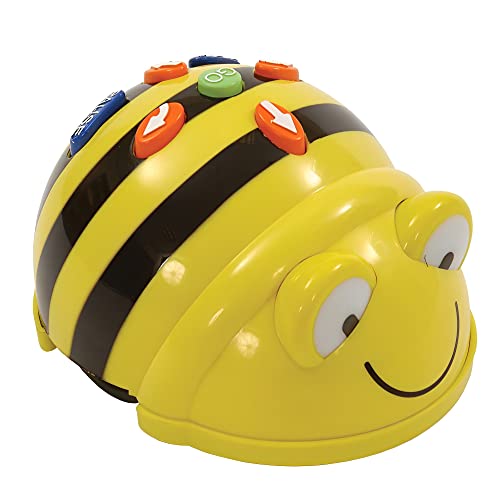
Bee-Bot
On-body directional buttons store up to 40 steps in memory, enough for early sequencing lessons. Preschool and elementary teachers favor it because the rounded shell survives repeated drops. A rechargeable internal battery skips loose disposable cells entirely.
Pros
- Rounded shell holds up to daily drops
- Simple buttons suit kids as young as 3
- Rechargeable battery needs no replacing
Cons
- 40-step limit caps advanced sequences
- No companion app to extend activities
Fisher-Price Think & Learn Code-a-pillar Twist
Each segment of this caterpillar toy snaps on to add one command, like forward, turn, or sound. Sequencing works through shape and color, so a toddler who cannot read yet can still build a program. Nine command segments ship in the set, running on AA batteries.
Pros
- Sequencing works before a child can read
- Lights and sounds reward each completed run
- Chunky segments suit toddler hands
Cons
- Fewer commands than robot-style kits
- Outgrown once a child starts reading instructions

Osmo Coding Starter Kit
Physical coding blocks snap together in front of an iPad or Fire tablet camera, moving a character on screen in real time. Loops and conditionals show up as tactile pieces rather than typed syntax. More than 30 blocks ship in the base kit, expandable with extra Osmo game packs.
Pros
- Tactile blocks make loops visible on screen
- App gives instant feedback on each move
- Expands with additional Osmo game packs
Cons
- Requires owning a compatible tablet
- Does not function away from a screen

LEGO Education Spike Essential
Buildable LEGO pieces form a robot first, then a Scratch-based app programs its motor and color sensor. This kit pushes kids from toy robots toward genuine block-based programming logic. Bluetooth connects the robot to a tablet, Chromebook, or computer for coding sessions.
Pros
- Builds real coding logic on Scratch-style blocks
- Motor and sensor teach cause and effect directly
- Works across tablet, Chromebook, and PC
Cons
- Requires a device and Bluetooth pairing
- Build time cuts into actual coding time

Matatalab Coding Set
Physical blocks placed on a control board send commands to a small robot moving across a floor mat. Several kids can build one sequence together without passing around a single tablet. Expansion packs add music and art commands for group activities.
Pros
- Lets multiple kids build one sequence together
- Needs no single screen or tablet
- Expansion packs add variety for classrooms
Cons
- More loose pieces to track and store
- Higher entry cost than a single robot
How they compare
| # | Model | Age range | Best for | Score | Price |
|---|---|---|---|---|---|
| 1 | Learning Resources Botley the Coding Robot 2.0 | 5 and up | Best overall | 9.4 | Check price |
| 2 | Sphero Indi | 4 to 8 | Best value | 9.1 | Check price |
| 3 | Bee-Bot | 3 to 7 | Best budget | 8.8 | Check price |
| 4 | Fisher-Price Think & Learn Code-a-pillar Twist | 3 to 6 | Best for preschoolers | 8.6 | Check price |
| 5 | Osmo Coding Starter Kit | 5 to 10 | Best for app-based learning | 8.4 | Check price |
| 6 | LEGO Education Spike Essential | 6 to 10 | Best for older kids ready for real code | 8.2 | Check price |
| 7 | Matatalab Coding Set | 4 to 9 | Best for classroom or group use | 8.0 | Check price |
Before you buy
What to look for in a coding toy starter kit Age range narrows the field fastest, since a toddler kit like Code-a-pillar Twist works through shape and color while Osmo assumes a child can read simple prompts. Coding method matters just as much: Botley and Bee-Bot use on-device buttons, while Spike Essential and Osmo route commands through a tablet or computer app. Step or block count sets a ceiling on complexity, from Bee-Bot’s 40 steps up to Botley’s 150. Durability decides whether a kit survives daily use, especially with a rechargeable battery instead of loose cells.
Which age group fits which kit Toddlers around age 3 do best with a toy that reacts to shape and sound rather than logic, which is why Code-a-pillar Twist skips typed commands. Ages 4 to 6 handle simple sequencing on Bee-Bot or Sphero Indi, where tiles or buttons stand in for code. By age 6 to 10, Spike Essential introduces real programming blocks modeled on Scratch, pairing a robot build with sensor logic. Osmo sits in between, since its picture-based app still helps a slightly younger reader follow along.
Screen-free robots compared with app-based kits A screen-free robot removes the need for a tablet entirely, so Botley, Bee-Bot, Sphero Indi, and Matatalab all run through buttons, tiles, or a control board. That suits parents limiting screen time or classrooms without enough devices to share. App-based kits like Osmo and Spike Essential add visual feedback that shows exactly what each block does when a program runs. The tradeoff: app-based kits stop working without the paired device, while screen-free robots keep going anywhere.
Durability for siblings or a classroom A kit used by one child once does not need to survive much, but a toy passed between siblings or a classroom needs a tougher shell. Bee-Bot’s rounded body is built for exactly that kind of repeat handling. Rechargeable kits such as Sphero Indi and Matatalab cut the ongoing cost of replacing batteries across many sessions. Sets with small loose pieces, like Osmo’s blocks or Matatalab’s control board, need a storage box so parts do not go missing.
Common questions
What age is right for a first coding toy?
Shape-based toys like Code-a-pillar Twist suit age 3, since no reading or sequencing logic is required yet. Kids age 4 to 6 are ready for simple button or tile sequencing on Bee-Bot or Sphero Indi. Save app-based or Scratch-style kits like Osmo and Spike Essential for age 6 and up.
Is screen-free or app-based coding better for kids?
Neither wins outright, since each method teaches a different skill. Screen-free robots such as Botley build sequencing habits with zero device dependency. App-based kits like Osmo add visual feedback that connects a block to the action it triggers on screen.
How many steps or blocks do these coding kits include?
Step counts vary widely by method. Bee-Bot stores up to 40 steps, Botley 2.0 handles up to 150, and Osmo ships with more than 30 physical blocks that combine in different orders.
Can coding toys work without an iPad or tablet?
Yes, several kits skip devices entirely. Botley, Bee-Bot, Sphero Indi, and Matatalab all run through onboard buttons, color tiles, or a control board. Osmo and Spike Essential do require a tablet or computer to function.
What is the best coding toy for a 4-year-old?
Sphero Indi fits a 4-year-old well, since color tiles let a child build a path without reading instructions. Bee-Bot is a close alternative, with a similarly simple button layout and a shell built to survive drops.
Which coding kit is closest to real programming?
LEGO Education Spike Essential comes closest, since its app runs on Scratch, the same block language many schools use to teach programming. Kids drag blocks to control a motor and sensor on a robot they build themselves.
Are coding robots tough enough for a classroom?
Bee-Bot and Matatalab are both built with repeat classroom use in mind. Bee-Bot’s rounded shell resists drops, and Matatalab’s control board lets several students share one sequence instead of passing around a single device.
Coding toy vs coding robot: what is the difference?
A coding toy can mean anything from a snap-together caterpillar to an app-based block kit. A coding robot specifically moves in response to a program. Botley, Bee-Bot, and Sphero Indi are robots, while Code-a-pillar Twist and Osmo’s on-screen character do not move around a room.
Our take
Learning Resources Botley 2.0 suits most families best, since it teaches sequencing screen-free and handles long enough sequences to challenge older kids. Parents of a toddler under 4 should pick Fisher-Price Code-a-pillar Twist instead, since it works by shape rather than logic. Families already invested in an iPad, or a child ready for Scratch-style programming, are better served by Osmo Coding or LEGO Education Spike Essential.
Rachel Simmons
Rachel previously worked in child-product retail and brings a practical, detail-first eye to gear reviews, focusing on safety standards, ease of use and the fine print that matters most for new caregivers.