Travel Chromebooks That Stand Up to the Road
The Lenovo IdeaPad Flex 5i Chromebook Plus is the top pick for most travelers because it balances a 14 inch touchscreen with a lightweight frame and all day battery life. Its main advantage is the versatile 360 degree hinge that lets you switch between laptop and tablet modes for cramped airplane trays. The main limitation is that the display is not as bright as some premium models, so outdoor use can be a bit challenging.
Traveling with a laptop means making tradeoffs. You want something light enough to carry all day, but powerful enough to stream movies and get work done. Chromebooks are ideal because they boot fast, update quietly, and rely on cloud storage so you don’t need heavy hard drives.
We looked at the latest models from Acer, ASUS, Lenovo, HP, and Samsung to find the best travel companions. Whether you are a digital nomad, a student on spring break, or a business traveler, there is a Chromebook here that fits your bag and your budget.
The shortlist, ranked
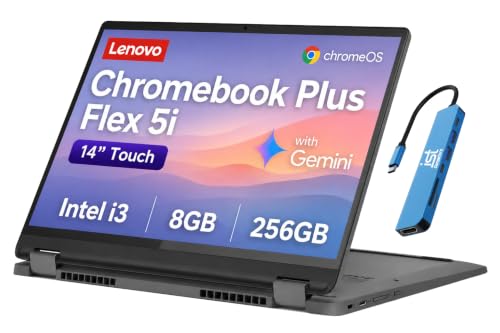
Lenovo IdeaPad Flex 5i Chromebook Plus
This 14 inch convertible Chromebook offers a solid build, a responsive touchscreen, and a comfortable keyboard. Owners report that the battery easily lasts a full day of mixed use, and the 360 degree hinge is sturdy for tent mode on a nightstand. It handles Android apps smoothly, making it a great entertainment hub on a flight.
Pros
- Excellent keyboard and trackpad
- Bright, color accurate display
- Solid performance for multitasking
Cons
- Battery life is good but not class leading
- Charger is bulky

Acer Chromebook Spin 714
The Spin 714 is a premium Chromebook with a durable aluminum body and a sharp 14 inch WQXGA display. It comes with a garaged USI stylus for note taking, which is handy for annotating documents. Owners praise its fast performance and the fact that it meets military grade durability standards, so it can survive a bump in overhead luggage.
Pros
- Sharp, high resolution display
- Garaged stylus is convenient
- Military grade durability
Cons
- Fan noise under heavy load
- Slightly expensive

ASUS Chromebook Plus CX34
This Chromebook is designed for all day productivity with a 14 inch Full HD display and a powerful Intel Core i3 processor. The standout feature is its exceptional battery life, which owners report can stretch beyond 12 hours with moderate use. It also has a fast charging capability that gives you hours of use from a short charge, perfect for layovers.
Pros
- Outstanding battery endurance
- Fast charging
- Lightweight aluminum design
Cons
- Speakers are average
- No touchscreen option

HP Chromebook x360 14b
For travelers on a tight budget, the HP x360 14b delivers a versatile 2 in 1 design at a wallet friendly price. It has a 14 inch touchscreen and a sturdy hinge that allows for laptop, tablet, and tent modes. While not as powerful as premium models, it handles everyday tasks like email, browsing, and video streaming without lag.
Pros
- Very affordable
- Touchscreen with USI stylus support
- Good keyboard for the price
Cons
- Storage is limited to 64GB
- Performance is entry level

Samsung Galaxy Chromebook 2
The Galaxy Chromebook 2 is a fanless and lightweight laptop with a stunning QLED display that makes colors pop. It is incredibly thin and light, making it easy to slip into a small bag. Owners love the premium feel and the touchscreen, but note that the battery life is shorter than some competitors, so pack a charger for long days.
Pros
- Vibrant QLED display
- Very light and thin
- Fanless silent operation
Cons
- Battery life is around 7 hours
- Only one USB-C port

ASUS Chromebook Flip CM3
This 12 inch detachable Chromebook is built for durability with a rugged design that meets military grade standards. It features a 360 degree kickstand and a detachable keyboard, so you can use it as a tablet for reading maps or watching movies. Its battery life is impressive, and the display is bright enough to use outdoors.
Pros
- Rugged and spill resistant
- Detachable keyboard for flexibility
- Long battery life
Cons
- Performance is limited
- Keyboard is sold separately? Actually included, but small

Acer Chromebook 314
The Acer Chromebook 314 is a straightforward clamshell laptop that focuses on essentials. It has a 14 inch display with a matte finish to reduce glare, and a battery that can last through a full school day. While it lacks a touchscreen and premium features, it is reliable and affordable, making it a great choice for students or anyone who needs a simple travel laptop.
Pros
- Great value for money
- Matte display reduces reflections
- Good battery life
Cons
- Performance is basic
- Build quality is plastic
How to pick the right one
Side by side
| # | Model | Display | Best for | Score | Price |
|---|---|---|---|---|---|
| 1 | Lenovo IdeaPad Flex 5i Chromebook Plus | 14 inch Full HD IPS touchscreen | Best overall for most travelers | 9.4 | Check price |
| 2 | Acer Chromebook Spin 714 | 14 inch WQXGA (2560 x 1600) touchscreen | Best for business travelers | 9.2 | Check price |
| 3 | ASUS Chromebook Plus CX34 | 14 inch Full HD anti-glare | Best battery life for long flights | 9.1 | Check price |
| 4 | HP Chromebook x360 14b | 14 inch Full HD touchscreen | Best budget friendly option | 8.8 | Check price |
| 5 | Samsung Galaxy Chromebook 2 | 13.3 inch QLED Full HD touchscreen | Best for style and portability | 8.7 | Check price |
| 6 | ASUS Chromebook Flip CM3 | 12 inch WUXGA (1920 x 1200) touchscreen | Best for outdoor adventures | 8.5 | Check price |
| 7 | Acer Chromebook 314 | 14 inch Full HD anti-glare | Best for students on a budget | 8.3 | Check price |
Questions worth asking
Are Chromebooks good for travel?
Yes, Chromebooks are excellent for travel because they are lightweight, have long battery life, and boot up quickly. They are designed for cloud based work, so you can access your files from anywhere with an internet connection.
How much RAM do I need in a travel Chromebook?
For basic tasks like browsing and streaming, 4GB is sufficient. If you plan to use many tabs or Android apps, 8GB is recommended for smoother performance.
Can I use a Chromebook offline?
Yes, you can use Chromebooks offline for many tasks. You can enable offline access for Google Docs, Sheets, and Slides, and download movies from streaming services for offline viewing.
What is the best battery life for a Chromebook?
Look for a Chromebook that offers at least 10 hours of battery life. Models like the ASUS Chromebook Plus CX34 can last over 12 hours, which is ideal for long flights or days without access to a power outlet.
Are touchscreen Chromebooks worth it for travel?
Touchscreens are useful for navigation and when using Android apps. They also allow you to use the device in tablet mode, which is convenient for reading or watching videos. However, they can add weight and cost.
How durable are Chromebooks for travel?
Many Chromebooks are built to military grade durability standards, meaning they can withstand drops and bumps. Look for models with aluminum or reinforced plastic construction for extra peace of mind.
Can I connect a Chromebook to a TV or monitor in my hotel?
Yes, most Chromebooks have an HDMI port or support USB-C video output. You can connect to a TV or monitor to enjoy a larger screen for presentations or streaming.
Do Chromebooks have SIM card slots for cellular data?
Some Chromebooks support LTE, but they are less common. If you need cellular connectivity, search for models with LTE capability, or use a mobile hotspot.
What is the difference between ChromeOS and other operating systems?
ChromeOS is a lightweight operating system centered around the Chrome browser. It is secure, fast, and automatically updates. It supports Android apps and Linux apps, but some Windows or Mac software is not available.
How do I choose between a Chromebook and a traditional laptop for travel?
If your travel needs involve web browsing, email, video streaming, and cloud based productivity, a Chromebook is a great choice. If you need specialized software like Adobe Photoshop or video editing programs, a traditional laptop might be necessary.
Our pick
For most travelers, the Lenovo IdeaPad Flex 5i Chromebook Plus is the best all around choice because it offers a winning combination of performance, versatility, and build quality at a reasonable price. If you prioritize battery life above all else, the ASUS Chromebook Plus CX34 is the clear winner, but it lacks a touchscreen. If durability is your main concern, the Acer Chromebook Spin 714 is a rugged premium option that can handle rough conditions.
Marcus Chen
Marcus covered consumer electronics for enthusiast tech publications for six years before joining ChoiceCrest. He specializes in translating manufacturer spec sheets into plain-language buying advice, with a focus on audio, computing accessories and smart-home gear.