Multi-Device Charging Stations for Phones, Watches and Earbuds
A household with a MacBook and several phones to power gets the most from the Anker Prime Charging Station, an 8-in-1 hub with 240 watts across outlets and ports. Apple users wanting MagSafe, Watch and AirPods together should pick the Belkin BoostCharge Pro 3-in-1. A tidy nightstand fits best with the compact Anker Prime Dock Stand.
The Anker Prime Charging Station handles the widest range of devices here, combining AC outlets with USB-C and USB-A ports at 240 watts total output for a desk running a laptop and several phones. An Apple-focused household gets a cleaner three-device setup from the Belkin BoostCharge Pro 3-in-1, which charges an iPhone, Apple Watch and AirPods from one base. A nightstand with limited space suits the smaller Anker Prime Dock Stand instead of either larger hub.
Charging stations differ mainly in total wattage, the mix of wired ports versus wireless pads, and how many devices they realistically serve at once. We compared port counts, wireless charging speeds, included cables and physical footprint across current Anker, Belkin, iOttie and ESR listings before narrowing this to seven stations.
Our top picks

Anker Prime Charging Station (8-in-1, 240W)
This Anker hub packs two AC outlets alongside four USB-C and two USB-A ports, delivering up to 240 watts shared across everything plugged in. Each USB-C port can push up to 140 watts on its own, enough to charge a 16-inch laptop at real speed rather than a trickle. It suits a desk running a laptop, monitor accessory and phone from a single power strip replacement.
Pros
- 240 watts covers a laptop and several devices charging together
- AC outlets mean standard plugs do not need a separate adapter
- High per-port USB-C output charges a laptop at real speed
Cons
- Larger footprint than a simple multi-port charger
- More capacity than a single-phone-and-watch household needs

Anker Prime Charger (200W, 6 Ports, GaN)
Anker’s gallium nitride design packs 200 watts of output into a body smaller than many lower-wattage chargers, splitting power intelligently across up to six connected devices. It skips AC outlets in favor of USB-C and USB-A ports only, keeping the price below the full 8-in-1 station. A traveler or a desk without a need for standard AC plugs gets most of the Prime hub’s capability for less.
Pros
- 200 watts in a smaller body than the full 8-in-1 station
- GaN design runs cooler and more efficiently than older chargers
- Lower price than the AC-outlet version for similar USB output
Cons
- No AC outlets for standard wall-plug devices
- Six ports can still bottleneck if every device demands max power simultaneously

Belkin BoostCharge Pro 3-in-1 Wireless Charging Station
Belkin shapes this station around Apple’s own device lineup, with a magnetic upright pad for an iPhone, a side cradle for an Apple Watch and a flat pad for AirPods or a similar wireless earbuds case. An active cooling fan inside the base manages heat during faster charging sessions. It fits a nightstand or desk where all three device types already exist in an Apple household.
Pros
- Three dedicated charging zones avoid overlap or misalignment
- Active cooling helps maintain consistent wireless charging speed
- Upright phone angle keeps the screen visible while charging
Cons
- Built specifically around Apple devices, limited use for Android phones
- Apple Watch charger needs the included puck, not interchangeable with just any cable

Belkin Qi2 25W Magnetic Wireless Charging Station
This Belkin pad uses the newer Qi2 wireless standard, which adds magnetic alignment similar to MagSafe and supports faster charging speeds than older Qi chargers. A single flat pad design keeps it simpler than the three-zone BoostCharge Pro, aimed at someone who only needs a phone charged. Qi2 compatibility also extends to newer Android phones that support the standard, not just iPhones.
Pros
- Qi2 magnetic alignment keeps the phone centered on the pad automatically
- 25 watt output charges faster than standard 10 to 15 watt Qi pads
- Works with Qi2 compatible Android phones, not just iPhones
Cons
- Single-device design, no watch or earbuds charging zone
- Full 25 watt speed depends on the phone also supporting Qi2
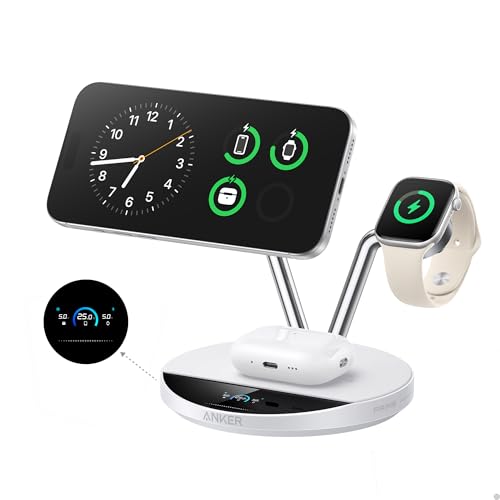
Anker Prime Dock Stand Wireless Charging Station
Anker’s dock stand focuses on a single phone, holding it upright at a 25 watt Qi2 charging rate without the added bulk of multi-device stations. Its smaller footprint fits a nightstand where a phone is the only device that needs charging overnight. Multiple charging angle options let the screen face a useful direction for a bedside clock display.
Pros
- Compact footprint suits a nightstand better than larger multi-device hubs
- Adjustable angle works well for viewing the screen as a bedside clock
- 25 watt Qi2 speed matches larger stations despite the smaller size
Cons
- No watch or earbuds charging zone included
- Limited to one phone at a time

iOttie iON Wireless 3 Charging Station
iOttie’s iON Wireless 3 covers a phone, watch and earbuds similar to the Belkin BoostCharge Pro but at a noticeably lower price point. Wireless output tops out below Belkin’s Qi2 speeds, which suits a buyer prioritizing cost over the fastest possible charge. A folding design lets the stand pack flatter for travel than most fixed charging hubs.
Pros
- Covers three device types at a lower price than Belkin’s equivalent
- Foldable design travels flatter than fixed charging stands
- Reasonable choice for a buyer who does not need maximum charging speed
Cons
- Slower wireless output than Qi2 stations like the Belkin models
- Build materials feel less premium than Anker or Belkin equivalents

ESR HaloLock 3-in-1 Wireless Charging Station
ESR’s HaloLock magnet array holds a phone firmly in place during charging, reducing the risk of a loose connection shifting the phone off the pad overnight. Alongside the phone stand, dedicated pads handle a watch and earbuds case. It targets a buyer who has had phones slip off flatter magnetic pads from other brands.
Pros
- Strong magnetic alignment keeps the phone from slipping during charging
- Covers three device types in one compact stand
- Lower price than Belkin’s equivalent three-device station
Cons
- Maximum wireless output trails newer Qi2 stations
- HaloLock magnets work best with ESR’s own MagSafe-compatible cases
How they compare
| # | Model | Total output | Best for | Score | Price |
|---|---|---|---|---|---|
| 1 | Anker Prime Charging Station (8-in-1, 240W) | 240 watts | Best overall for a desk with multiple devices | 9.4 | Check price |
| 2 | Anker Prime Charger (200W, 6 Ports, GaN) | 200 watts | Best value for high-wattage charging | 9.0 | Check price |
| 3 | Belkin BoostCharge Pro 3-in-1 Wireless Charging Station | iPhone (MagSafe), Apple Watch, earbuds | Best for an iPhone, Apple Watch and AirPods together | 8.9 | Check price |
| 4 | Belkin Qi2 25W Magnetic Wireless Charging Station | Qi2 | Best for fast magnetic wireless charging | 8.7 | Check price |
| 5 | Anker Prime Dock Stand Wireless Charging Station | Qi2 | Best for a minimalist nightstand setup | 8.5 | Check price |
| 6 | iOttie iON Wireless 3 Charging Station | Phone, watch, earbuds | Best budget 3-in-1 station | 8.3 | Check price |
| 7 | ESR HaloLock 3-in-1 Wireless Charging Station | Phone (MagSafe), watch, earbuds | Best for MagSafe stability during charging | 8.2 | Check price |
What matters most
What to look for in a charging station Total wattage and port mix decide what a station can realistically power. A desk running a laptop needs AC outlets or high-wattage USB-C like the Anker Prime hubs provide, while a nightstand charging only a phone and watch does not need anywhere near that capacity.
Best for a desk with a laptop and multiple devices The Anker Prime Charging Station and its 200 watt GaN sibling both scale to laptop charging speeds, which single-phone stands cannot match. Choosing between them comes down to whether AC outlets for standard plugs matter or whether USB-C and USB-A ports cover everything already in use.
Best for an Apple device household A household with an iPhone, Apple Watch and AirPods benefits most from a purpose-built three-zone stand like the Belkin BoostCharge Pro, which avoids the alignment guesswork of a flat universal pad. The ESR HaloLock offers a similar three-device layout with a stronger magnetic hold at a lower price.
Best for a minimalist nightstand or budget setup Anyone charging just a phone overnight does not need a multi-device hub at all; the compact Anker Prime Dock Stand or the single-pad Belkin Qi2 station cover that case without extra bulk. A buyer watching price across three devices should consider the iOttie iON Wireless 3 over pricier three-zone alternatives.
Frequently asked questions
What does GaN mean on a charging station?
GaN, or gallium nitride, is a chip material that lets a charger deliver high wattage in a smaller, cooler-running body than older silicon-based chargers, as used in the Anker Prime Charger.
Can one charging station power a laptop and a phone at the same time?
Yes, a high-wattage hub like the Anker Prime Charging Station splits its total output across connected devices, so a laptop and phone can charge together as long as combined demand stays under the station’s rated wattage.
What is Qi2 and how is it different from regular Qi wireless charging?
Qi2 is a newer wireless charging standard that adds magnetic alignment, similar to Apple’s MagSafe, and generally supports faster charging speeds than older Qi chargers. The Belkin Qi2 station and Anker Prime Dock Stand both use this standard.
Do I need a station with dedicated Apple Watch charging?
Only if an Apple Watch needs charging regularly from the same station. Apple Watch uses a different charging method than a phone or earbuds, so a station needs a specific puck or cradle built for it, as seen on the Belkin BoostCharge Pro and ESR HaloLock.
Is magnetic wireless charging more reliable than a flat pad?
Magnetic systems like MagSafe or ESR’s HaloLock keep a phone centered and reduce the chance of it sliding off a pad overnight. A flat non-magnetic pad can lose contact with the phone if it shifts even slightly during the night.
How many watts does a phone actually need from a charging station?
Most phones charge at 15 to 25 watts wirelessly or faster over a wired USB-C connection, so a station rated well above that, like the 240 watt Anker Prime hub, has plenty of headroom even when charging several devices at once.
Can Android phones use the same charging stations as iPhones?
Wired USB-C ports work with any compatible phone regardless of brand. Wireless pads built around MagSafe, like the Belkin BoostCharge Pro, work best with iPhones, though Qi2-certified Android phones can use Qi2 stations like the Belkin Qi2 pad.
Do charging stations include the cables needed?
Most hubs, including the Anker Prime stations, include at least one USB-C cable, but a buyer running several wired devices at once should check exactly how many cables ship in the box before assuming every port is ready to use immediately.
Final word
A desk charging a laptop alongside phones and accessories gets the most use out of the Anker Prime Charging Station, since its 240 watt output and mixed port selection cover nearly any device combination. An Apple-only household should skip the larger hub and go straight to the Belkin BoostCharge Pro for its purpose-built iPhone, Watch and AirPods layout, while anyone just charging a phone overnight is better served by the smaller, cheaper Anker Prime Dock Stand.
Marcus Chen
Marcus covered consumer electronics for enthusiast tech publications for six years before joining ChoiceCrest. He specializes in translating manufacturer spec sheets into plain-language buying advice, with a focus on audio, computing accessories and smart-home gear.


