Which Bluetooth OBD2 Scanner Fits a Home Garage
BlueDriver Bluetooth Pro suits most home garages. It reads enhanced ABS, airbag and transmission codes with no subscription. OBDLink MX+ goes deeper, driving FORScan and MultiECUScan from a laptop. For a plain code translation before a shop visit, Veepeak OBDCheck BLE+ covers the basics.
BlueDriver Bluetooth Pro is the pick for most home mechanics. Enhanced ABS, airbag and transmission codes ship with the hardware, so nothing renews later. Depth of that enhanced coverage still varies by make, which is the honest catch. Ford owners who want FORScan should buy the OBDLink MX+ instead.
Every adapter sold since 1996 reads the same generic powertrain codes. Real separation starts at the modules beyond the engine, at what sits behind a paywall, and at how much current the dongle pulls while the car is parked. We compared published module coverage, supported apps, Bluetooth version and sleep behaviour. Owner reports on pairing stability and app quality filled the remaining gaps.
Our top picks
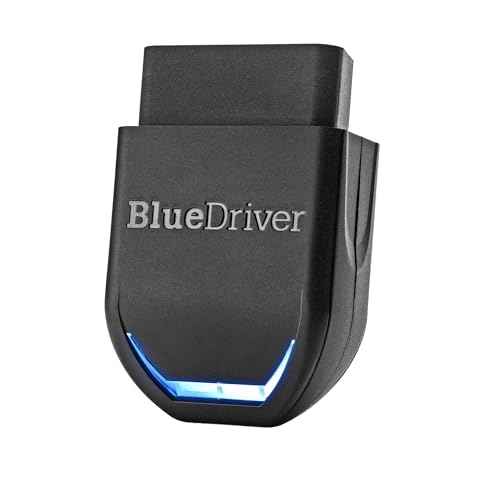
BlueDriver Bluetooth Pro OBDII Scan Tool
Enhanced diagnostics reach ABS, airbag and transmission modules on many makes, well past the generic powertrain codes every dongle can read. Repair reports match a code and vehicle to fixes drawn from a database of verified repairs. Everything arrives with the hardware, so no renewal keeps it working.
Pros
- Enhanced module codes with no renewal fee
- Repair reports link each code to likely fixes
- Emissions readiness check before a smog test
Cons
- No bidirectional actuator tests
- Enhanced depth differs from make to make

OBDLink MX+ Bluetooth OBD2 Scanner
Third-party software is built around this adapter, including FORScan for Ford and Lincoln and MultiECUScan for Fiat group cars. Manufacturer-specific parameters extend past generic OBD2 on GM, Chrysler, Toyota and Nissan. Sleep mode drops current once the ignition is off, so it can live in the port.
Pros
- Drives FORScan and other laptop-based apps
- High sample rate suits live data logging
- Sleep mode allows permanent installation
Cons
- Deepest features need a Windows laptop
- Steeper learning curve than beginner apps

TOPDON TopScan Bluetooth OBD2 Scanner
Bidirectional control tells a module to act, cycling a fuel pump, cooling fan or ABS pump on command. That turns a suspected part into a confirmed one without pulling anything off the car. Service resets handle oil life, electronic parking brake, steering angle and throttle relearn.
Pros
- Active tests confirm a part before you replace it
- Service resets cover routine maintenance jobs
- Reads every available system, not just the engine
Cons
- Full coverage renews yearly after the included term
- Bidirectional support depends on the vehicle

Autel MaxiAP AP200 Bluetooth OBD2 Scanner
One vehicle brand of your choosing gets full system diagnostics at no extra cost. Additional brands unlock separately, which suits a one or two car household better than blanket coverage nobody uses. Service functions include oil reset, electronic parking brake, steering angle and battery registration.
Pros
- Dealer-level fault codes on your chosen brand
- Service resets included rather than added on
- Full system scanning without dealer software
Cons
- Each additional brand unlocks separately
- Dense app layout for a first-time user

Veepeak OBDCheck BLE+ OBD2 Scanner
Treat this as a Bluetooth Low Energy bridge rather than a diagnostic tool in its own right. Torque Pro, OBD Fusion and Car Scanner supply the gauges, graphs and code lookups. Generic codes, freeze frame and live sensor data all come through cleanly, while ABS and airbag faults stay invisible.
Pros
- Pairs reliably with iPhones over BLE
- Works across several well-supported apps
- Small enough to live in the glovebox
Cons
- No ABS, SRS or transmission codes
- Useful features sit in a separate app purchase

FIXD OBD2 Scanner
Codes arrive translated into plain language with a severity rating attached. A loose gas cap reads as minor rather than alarming, which saves an unnecessary panic. Its maintenance timeline tracks oil changes and service intervals for each vehicle profile.
Pros
- Severity ratings help judge urgency
- Maintenance reminders tied to each car
- Simplest app here for a new owner
Cons
- Detailed repair estimates sit behind a paid tier
- Reads engine and emissions codes only

Vgate iCar Pro Bluetooth 4.0 OBD2 Scanner
Sleep mode engages after the ignition goes off, dropping draw low enough to leave the adapter in the port. Dual mode Bluetooth pairs with iOS and Android, which matters in a two-phone household. Module depth comes entirely from whichever app you run, since the hardware is a generic interface.
Pros
- Sleep mode limits parasitic battery drain
- Pairs with both phone platforms
- Works well as a spare adapter for a second car
Cons
- No manufacturer-specific module access
- Connection quality tracks the app you choose
Before you buy
What a Bluetooth OBD2 scanner can actually read Generic powertrain codes come from every adapter sold since 1996, so that ability sorts nothing. Ask instead what happens past the check engine light. ABS, airbag and transmission modules speak manufacturer-specific protocols, and only some tools hold the keys. Bidirectional control goes further again by commanding a part to move, which converts a guess into a test. Settle on the depth you need before comparing hardware.
Subscriptions versus one-time unlocks Pricing structure separates these tools more than the electronics do. BlueDriver bundles enhanced diagnostics outright with nothing to renew. Autel MaxiAP AP200 opens one brand fully and sells the rest as separate unlocks. TOPDON TopScan renews yearly to keep full coverage live. FIXD reserves repair estimates for a paid tier, while Veepeak and Vgate assume you will buy Torque Pro or OBD Fusion yourself.
Can you leave a dongle plugged in all the time? An adapter that never sleeps can flatten a battery on a car left parked for two weeks. OBDLink MX+ and Vgate iCar Pro both drop into low current sleep once the ignition is off. Adapters without that behaviour belong in the glovebox between jobs. On any vehicle already fighting a parasitic drain, unplug regardless of what the listing promises.
Best picks for Ford owners, iPhone users and first-timers Ford and Lincoln owners gain the most from OBDLink MX+, since FORScan unlocks module configuration no phone app touches. Fiat, Alfa and Lancia drivers get the same leverage through MultiECUScan. iPhone owners should confirm Bluetooth Low Energy in the listing, because classic Bluetooth ELM327 clones refuse to pair with iOS. Someone who only wants the warning light explained is better served by FIXD than by a powerful tool they never learn.
How they stack up
| # | Model | Vehicle coverage | Best for | Score | Price |
|---|---|---|---|---|---|
| 1 | BlueDriver Bluetooth Pro OBDII Scan Tool | 1996 and newer OBD2 cars and trucks | Best overall | 9.4 | Check price |
| 2 | OBDLink MX+ Bluetooth OBD2 Scanner | iOS, Android and Windows | Best for deep module access | 9.2 | Check price |
| 3 | TOPDON TopScan Bluetooth OBD2 Scanner | Bidirectional active tests | Best for bidirectional tests | 9.0 | Check price |
| 4 | Autel MaxiAP AP200 Bluetooth OBD2 Scanner | One free brand, others unlock separately | Best value full system scan | 8.8 | Check price |
| 5 | Veepeak OBDCheck BLE+ OBD2 Scanner | Bluetooth Low Energy 4.0 | Best budget | 8.6 | Check price |
| 6 | FIXD OBD2 Scanner | Bluetooth Low Energy | Best for beginners | 8.3 | Check price |
| 7 | Vgate iCar Pro Bluetooth 4.0 OBD2 Scanner | Bluetooth 4.0 dual mode | Best to leave plugged in | 8.0 | Check price |
Questions worth asking
What is the best Bluetooth OBD2 scanner for a home mechanic?
BlueDriver Bluetooth Pro covers the widest ground with no subscription, reaching ABS, airbag and transmission codes on many makes. Pick OBDLink MX+ instead if FORScan or laptop module work is the goal.
Can a Bluetooth OBD2 scanner read ABS and airbag codes?
Only tools with manufacturer-specific coverage can. BlueDriver, OBDLink MX+, TOPDON TopScan and Autel MaxiAP AP200 reach those modules on supported vehicles. Generic interfaces such as Veepeak and Vgate stop at engine and emissions codes.
Which OBD2 adapter works with FORScan?
OBDLink MX+ is the adapter most Ford owners run, because FORScan needs high throughput and full protocol support. Pair it over Bluetooth and drive the software from a Windows laptop.
Is it safe to leave an OBD2 dongle plugged in all the time?
Only with a tool that sleeps. OBDLink MX+ and Vgate iCar Pro both cut current draw after ignition off. Anything lacking a sleep mode should come out, especially on a car that sits for weeks.
BlueDriver vs OBDLink MX+: which one should I buy?
BlueDriver needs only a phone and hands back repair reports alongside enhanced codes. OBDLink MX+ reaches deeper through PC software and logs live data faster. Diagnosis favours BlueDriver; module work favours MX+.
Do Bluetooth OBD2 scanners work with an iPhone?
Yes, provided the adapter uses Bluetooth Low Energy. Veepeak OBDCheck BLE+, BlueDriver, FIXD and Vgate iCar Pro all pair with iOS. Older classic Bluetooth ELM327 clones generally will not.
Do I need bidirectional control in a home garage?
It earns its keep when you want to confirm a part before buying one, such as cycling a cooling fan. TOPDON TopScan runs those active tests where the vehicle allows. Most owners chasing a check engine light never use the feature.
Will an OBD2 scanner turn off a check engine light for good?
Clearing removes the stored code, but the light returns while the fault remains. Clearing also wipes emissions readiness monitors, so drive a full cycle before any smog test.
How reliable are the repair suggestions in these apps?
Suggestions point you at the common cause for that code and vehicle, which narrows the search. Wiring faults and connector corrosion still need your own checks. Treat the app output as a starting list, not a diagnosis.
Our pick
BlueDriver Bluetooth Pro earns the buy for a home garage, since enhanced ABS, airbag and transmission codes plus repair reports arrive with nothing to renew. Anyone comfortable with a Windows laptop, Ford owners most of all, gets further with OBDLink MX+ and FORScan. Buyers who only want the warning light explained before booking a shop should stop at FIXD and spend the difference on parts.
Tony Russo
Tony trained as an automotive technician and spent years in service and parts retail before moving into writing. He focuses on garage tools, car care products and accessories from a hands-on maintenance perspective.