Binder Dividers That Survive a Full School Year
Avery Big Tab Insertable Dividers lead for durable write-on tabs and reinforced edges. Cardinal OneStep Index Dividers suit anyone who wants pre-printed number tabs with zero setup. Avery Index Maker Clear Label Dividers work best for anyone printing custom labels from a template.
Avery Big Tab Insertable Dividers handle daily flipping best, thanks to reinforced tabs and a laminate coating that resists tearing. Setup takes longer, though, since the insertable strips need labeling before use.
Cheap dividers rip at the rings within a semester or a fiscal quarter, a common complaint in owner reviews. We compared tab thickness, hole reinforcement, and label systems across current Amazon listings to find sets built for daily use.
How to pick the right one
What to look for in binder dividers Tab material decides how long dividers last more than any other factor. Laminated or poly tabs survive daily flipping far longer than plain cardstock. Reinforced holes matter just as much, since torn holes cause most divider replacements. Compare tab count against how many sections a project actually needs before buying a bigger pack.
Pre-printed vs write-on vs printable labels Pre-printed numbered tabs work fastest for anyone skipping custom section names. Write-on tabs suit changing categories, like a student’s rotating class schedule. Printable clear-label dividers give the cleanest look for office use, but need a printer and template file.
Best binder dividers for students versus office use Students juggling multiple subjects benefit from write-on or color-coded tabs they can relabel each semester. Office binders holding reports or client files often look more professional with clear printed labels. Either group should match tab count to how many sections they actually track.
Choosing tab count and reinforcement for heavy daily use Binders opened daily need reinforced or poly tabs rather than standard cardstock. Five-tab sets suit simple filing, while eight or twelve-tab sets fit detailed project tracking or a full year of records. Poly costs more but resists moisture in bags or job sites where paper tabs curl.
The best picks, ranked

Avery Big Tab Insertable Dividers, 8-Tab Set
A clear plastic overlay covers each tab, so printed inserts stay legible after months of flipping. Reinforced binding edges resist the ring tears that plague lighter cardstock. Eight tabs handle most classroom or project binders without crowding the spine.
Pros
- Tabs resist tearing at the rings
- Clear overlay keeps printed labels sharp
- Works with standard 3-ring binders
Cons
- Insertable strips add setup time
- Only 8 tabs per pack

Cardinal OneStep Index Dividers, 8-Tab
Cardinal prints numbers straight onto each tab, skipping the labeling step entirely. Every set bundles a copier-friendly table of contents page. Heavier card stock than economy dividers helps these survive frequent binder swaps.
Pros
- No labeling required out of the box
- Mylar reinforcement resists tearing
- Includes a printable table of contents
Cons
- Fixed numbering limits reuse
- Tabs are narrower than jumbo styles

Avery Index Maker Clear Label Dividers, 8-Tab
Free downloadable templates let anyone print custom tab text from a home printer. Clear label strips leave no visible edge once applied, unlike handwritten tabs. Office binders that need a polished, uniform look suit this set best.
Pros
- Labels look seamless once printed
- Free template downloads simplify design
- Consistent look across large binder sets
Cons
- Requires a printer to use the labels
- Less reinforcement than laminated tabs

Avery Write-On Dividers with Tabs, 5-Tab
Write-on tabs skip printing entirely, so students get dividers ready in minutes. An erasable coating lets tab names change as a class or project shifts. Five tabs keep this pack compact for smaller binders.
Pros
- Erasable tabs allow relabeling
- No printer or template needed
- Lower cost per pack
Cons
- Only 5 tabs limits categories
- Handwriting looks less polished than printed labels

Avery Ready Index Table of Contents Dividers, 12-Tab
Twelve tabs suit binders tracking monthly reports, class periods, or a full year of sections. A matching printable contents page numbers each divider automatically. Squeezing in four extra tabs makes each one narrower than in an 8-tab set.
Pros
- Twelve tabs cover a full year or more categories
- Auto-numbered table of contents included
- Reinforced holes resist ring wear
Cons
- Narrower tabs than 5 or 8-tab packs
- Fixed sequence is less flexible
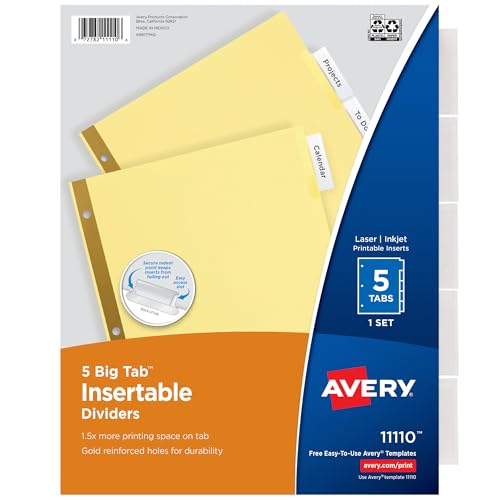
Avery Big Tab Insertable Dividers, 5-Tab Buff
Bright, distinct tab colors make jumping to a section fast, no label reading required. Buff-colored paper cuts glare under fluorescent office lighting better than bright white stock. Five tabs suit simpler filing systems well.
Pros
- Bright colors speed up visual scanning
- Buff paper cuts glare
- Reinforced tabs resist tearing
Cons
- Fewer tabs than larger sets
- Color options vary by pack

Cardinal Poly Index Dividers, 8-Tab
Poly material resists moisture and creasing better than paper stock, handy for binders traveling between job sites or backpacks. Tabs snap into a low-profile design that keeps the binder from bulging. Certain inkjet inks can smear when printed directly on poly.
Pros
- Poly resists water and creasing
- Low-profile tabs reduce binder bulge
- Holes will not tear like paper stock
Cons
- Inkjet ink can smear on poly
- Costs more per tab than paper sets
Compared at a glance
| # | Model | Tab count | Best for | Score | Price |
|---|---|---|---|---|---|
| 1 | Avery Big Tab Insertable Dividers, 8-Tab Set | 8 | Best overall | 9.4 | Check price |
| 2 | Cardinal OneStep Index Dividers, 8-Tab | 8 | Best for quick setup | 9.1 | Check price |
| 3 | Avery Index Maker Clear Label Dividers, 8-Tab | 8 | Best for custom printing | 8.9 | Check price |
| 4 | Avery Write-On Dividers with Tabs, 5-Tab | 5 | Best budget | 8.6 | Check price |
| 5 | Avery Ready Index Table of Contents Dividers, 12-Tab | 12 | Best for large binders | 8.7 | Check price |
| 6 | Avery Big Tab Insertable Dividers, 5-Tab Buff | 5 | Best for color coding | 8.5 | Check price |
| 7 | Cardinal Poly Index Dividers, 8-Tab | 8 | Best for durability | 8.3 | Check price |
Good to know
What is the difference between insertable and pre-printed dividers?
Insertable dividers ship with a blank tab pocket for a printed or handwritten strip. Pre-printed dividers already show numbers or letters on the tab itself. Insertable sets offer more flexibility, and pre-printed sets save setup time.
How many tabs do I need for a school binder?
Most students do fine with 5 to 8 tabs per subject binder, matching major topics or units. A full-year binder tracking monthly sections often needs 12 tabs instead.
Can binder dividers fit a 2-inch or 3-inch binder?
Yes, standard 8.5 x 11 inch dividers fit any ring binder size, since tab position, not binder depth, determines compatibility. Check that the divider is built for 3-ring, not 2-ring, binders.
Do write-on dividers smudge over time?
Erasable write-on tabs resist smudging better than plain paper tabs, but heat or repeated erasing can fade them. Pencil or permanent marker tends to hold up longer than dry-erase pens on these surfaces.
Are poly dividers better than paper dividers?
Poly dividers resist water, tearing, and creasing better than paper stock, which suits bags, job sites, or humid storage. Paper dividers stay lighter and cheaper for everyday office use.
Which tab size works best for a table of contents system?
Big Tab or jumbo styles pair best with a table of contents page, since the larger surface holds longer labels clearly. Standard tabs work fine when labels stay short, like single numbers.
Can I print custom labels on my own printer?
Yes, clear-label divider sets work with inkjet and laser printers using free templates from the manufacturer’s site. Standard printer paper settings usually need no adjustment.
How do I stop binder dividers from tearing out?
Pick dividers with reinforced or Mylar-coated holes, and avoid overstuffing the rings past their rated capacity. Poly dividers also resist tearing better than lightweight cardstock over repeated use.
Final word
Avery Big Tab Insertable Dividers earn the top recommendation, since reinforced tabs and a laminate coating survive daily flipping without tearing. Anyone wanting zero setup time should pick Cardinal OneStep instead, since the numbers arrive pre-printed. Office users who need a polished, uniform look should choose Avery Index Maker Clear Label Dividers and print labels from a template.
Marcus Chen
Marcus covered consumer electronics for enthusiast tech publications for six years before joining ChoiceCrest. He specializes in translating manufacturer spec sheets into plain-language buying advice, with a focus on audio, computing accessories and smart-home gear.