Which Coding Toy Fits Your Kid’s Age and Skill Level?
Fisher-Price’s Code-a-pillar suits toddlers with screen-free sequencing. Sphero Mini teaches app-based block coding once kids reach elementary age. LEGO Education SPIKE Prime bridges block coding into real Python for kids ready to move beyond drag-and-drop.
A coding toy pitched above a child’s reading level backfires fast, and one pitched too simple gets abandoned within a week.
Screen-free toys teach sequencing through physical blocks or a remote, while app-based toys move into drag-and-drop code and later real syntax, so we compared minimum age, screen dependency, and how far each toy’s coding method scales.
The best picks, ranked
Fisher-Price Think & Learn Code-a-pillar
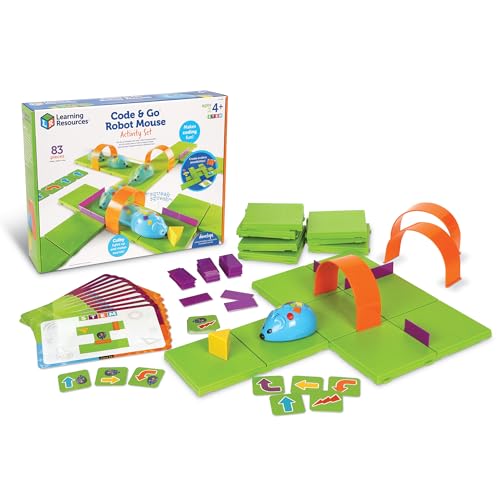
Kids snap segments together in different orders, and each order changes the caterpillar’s path across the floor. No screen or app enters the process at all. Every segment stands for one command, such as turn left or play a sound.
Pros
- Fully screen-free play from start to finish
- Large segments suit toddler hands and grip
- Introduces sequencing before a child can read
Cons
- Concepts stay basic with no path to advanced coding
- Included segments limit how complex a path can get

Sphero Mini App-Enabled Robot Ball
A free companion app teaches block-based coding through drag-and-drop commands, close to introductory Scratch lessons. Kids can drive the ball manually first, then switch to programmed routines. Simple movement blocks give way to loops as skills build.
Pros
- Block coding scales from basic moves into loops
- Manual driving mode eases kids into programmed control
- USB rechargeable design skips disposable batteries
Cons
- Needs a compatible smartphone or tablet to run
- Small size makes it easy to lose

LEGO Education SPIKE Prime Set
Kids build the physical robot first, then move into the coding app to program movement and sensors. Visual blocks handle early lessons, and the same interface later unlocks Python syntax. That combination gives a longer runway than toys that stay purely block-based.
Pros
- Advances from visual blocks into genuine Python code
- Building the robot teaches mechanical skills alongside coding
- Rechargeable hub avoids recurring battery costs
Cons
- Costs more than single-purpose coding toys
- Assembly adds setup time before coding starts

Botley the Coding Robot 2.0
A handheld remote programs up to 80 steps without any app or screen involved. Kids press directional buttons to build a sequence, then watch Botley carry it out. Built-in obstacle detection lets it react to objects placed along its programmed path.
Pros
- Screen-free coding through the handheld remote alone
- Obstacle detection reacts to objects during a run
- Up to 80 steps allows fairly complex paths
Cons
- Remote input moves slower than app-based programming
- No later progression to text-based coding

Osmo Coding Starter Kit
Physical puzzle-piece blocks snap together, and a tablet camera reads the sequence to animate an on-screen character. Kids build commands by hand before the tablet executes them. That tactile step suits kids who learn better by touching real pieces than dragging icons.
Pros
- Physical blocks fit kids who need tactile input
- Tablet feedback shows each sequence’s result instantly
- Coding blocks themselves need no batteries
Cons
- Requires buying the separate Osmo base and a compatible tablet
- Limited to Osmo’s own ecosystem of apps and games
Botley 2.0 Activity Set with Coding Cards
Physical coding cards let a group of kids arrange a sequence together before programming Botley to follow it. Classrooms benefit most, since several kids can collaborate on one robot at once. Cards keep the sequencing process visible, which makes group discussion easier.
Pros
- Coding cards ease group collaboration over a single remote
- Screen-free format suits classrooms limiting device use
- Visible card sequences help kids explain their logic
Cons
- Card storage adds extra pieces to track
- Shares the base Botley robot’s step limitations
Kano Computer Kit Complete
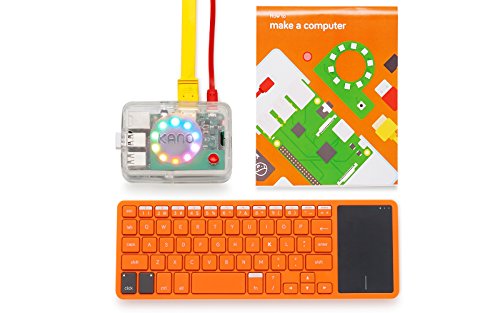
Kids assemble a working computer from individual components, then tackle coding challenges in Python and JavaScript through Kano’s guided app. Hardware assembly comes before any programming lesson. Older kids ready to leave block coding behind get a full text-based environment here.
Pros
- Teaches hardware assembly, not software alone
- Guided challenges introduce real Python and JavaScript syntax
- Built-in display skips the need for a separate tablet
Cons
- Complexity jumps well past toy-style coding robots
- Price reflects the full computer kit format
How they stack up
| # | Model | Minimum age | Best for | Score | Price |
|---|---|---|---|---|---|
| 1 | Fisher-Price Think & Learn Code-a-pillar | 3 years | Best for toddlers | 9.0 | Check price |
| 2 | Sphero Mini App-Enabled Robot Ball | 8 years | Best overall | 9.2 | Check price |
| 3 | LEGO Education SPIKE Prime Set | 10 years | Best for advancing to text-based coding | 9.1 | Check price |
| 4 | Botley the Coding Robot 2.0 | 5 years | Best value | 8.7 | Check price |
| 5 | Osmo Coding Starter Kit | 5 years | Best for visual learners | 8.8 | Check price |
| 6 | Botley 2.0 Activity Set with Coding Cards | 5 years | Best for classroom or group use | 8.5 | Check price |
| 7 | Kano Computer Kit Complete | 6 years, best suited to 8 and up | Best for older kids ready to build a computer | 8.9 | Check price |
How to choose
What to look for in a beginner coding toy Minimum age matters more than marketing copy on the box. A toy pitched above a child’s reading or motor skills causes frustration fast. Screen-free options suit younger kids or homes limiting device time, and app-based toys generally scale further as skills grow.
Screen-free vs app-based coding toys, which fits better? Physical segments and remote sequencing work well for toddlers and kids who aren’t reading fluently yet. App-based toys introduce drag-and-drop block coding, which mirrors real programming logic and scales into loops, conditionals, and eventually text-based syntax.
When should a kid move from block coding to text-based code? Kids around 9 to 12, already comfortable with block logic, benefit most from toys or kits bridging into real syntax like Python. Skipping straight to text-based coding without block experience first discourages most beginners early on.
Matching a coding toy to how a kid learns Tactile learners often do better with physical blocks or cards they arrange by hand before a robot executes the sequence. Kids who love building enjoy kits combining physical assembly with programming, rather than a toy that arrives fully built.
Questions worth asking
What is the best coding toy for a 5 year old?
Botley the Coding Robot suits most 5 year olds, since its remote teaches sequencing without requiring reading or a tablet.
Do coding toys need a screen to work?
Not all of them. Fisher-Price’s Code-a-pillar and Botley use physical sequencing with no screen, while Sphero Mini and Osmo need an app on a tablet or phone.
What age should kids start learning to code?
Basic sequencing can start around age 3 with screen-free toys. App-based block coding fits kids around 6 to 8, and text-based coding usually works best from age 9 or 10 up.
Block coding vs text-based coding, which should beginners try first?
Block coding comes first for most kids, since it teaches logic and sequencing without syntax errors getting in the way, which makes text-based coding easier to pick up later.
Are coding robots better than coding apps alone for beginners?
Physical robots give immediate, tangible feedback that app-only coding lacks, and that feedback holds younger kids’ attention during early lessons.
Can coding toys actually teach real programming skills?
Toys that progress into block coding and eventually text-based languages, like LEGO SPIKE Prime or Kano’s kit, teach logic that transfers directly to real coding environments.
Sphero Mini vs Botley, what’s the difference?
Sphero Mini needs an app and teaches drag-and-drop block coding with room to grow, while Botley uses a screen-free remote for simpler, more immediate sequencing suited to younger kids.
Do beginner coding toys need WiFi or internet?
Most app-based toys need an initial download but no ongoing internet access during play, while screen-free toys like Botley need no connectivity at all.
Is LEGO SPIKE Prime worth it for a beginner?
It costs more than single-purpose coding toys, but the jump from visual blocks into real Python syntax gives it a longer useful life as a kid’s skills grow.
Our pick
Start toddlers and early readers with screen-free sequencing toys, then move to app-based block coding around age 7 or 8. Kids ready for real syntax gain the most from kits that bridge blocks into Python, rather than jumping straight into a full programming environment.
Rachel Simmons
Rachel previously worked in child-product retail and brings a practical, detail-first eye to gear reviews, focusing on safety standards, ease of use and the fine print that matters most for new caregivers.