Which Adhesive Labels Fit Your Printer or Label Maker
For most home printing, Avery 5160 Easy Peel Address Labels balance compatibility and cost. Daily shippers get faster output from DYMO LabelWriter 4XL Shipping Labels on a compatible thermal printer. Brother QL owners should stick with the matching Brother DK-1201 roll, since other brands rarely fit that printer.
Avery 5160 Easy Peel Address Labels suit anyone printing addresses on a home laser or inkjet printer, since the corner-peel design resists curling, though the plain white finish looks basic on gifts or notes.
Labels differ by roll versus sheet format, adhesive strength and printer compatibility, so we compared those specifications alongside owner feedback across shipping, mailing and organizing use cases.
Before you buy
What to look for in adhesive labels Adhesive strength decides whether a label survives shipping or just needs to hold for a week. Permanent adhesive suits shipping and mailing; removable adhesive suits temporary organizing tasks. Format matters too, since rolls feed dedicated thermal printers while sheets run through printers most households already own. Measure the target envelope, box or container before ordering a full pack.
Sheet labels vs roll labels Sheet labels such as Avery 5160 and Avery 5163 need no new hardware, since a laser or inkjet printer handles them directly. Roll labels like the DYMO 30256 or Brother DK-1201 print faster per label but require a compatible thermal printer or label maker. A few packages a week rarely justifies buying dedicated label hardware. Daily sellers make that investment back quickly through faster batches.
Best adhesive labels for shipping vs mailing Shipping labels need bigger dimensions and stronger adhesive to survive cardboard, tape and transit handling. Letters and postcards only need a smaller, lighter sheet like Avery 5160. Online sellers often lock in one thermal size, such as MUNBYN’s 4 by 6 inch roll, so every carrier reads it the same way. Someone mailing a handful of envelopes a month rarely needs more than a standard sheet pack.
Choosing clear, colored or write-on labels Clear film like Avery 6572 disappears against colored or patterned packaging, where white stock would stand out. Color-coding dots like Avery 22806 are built for sorting by hand, not for print jobs. Brother and DYMO printers each use their own roll format, so labels from one brand rarely fit the other’s machine. Checking compatibility before ordering avoids a return on an otherwise fine product.
The shortlist, ranked

Avery 5160 Easy Peel Address Labels
Avery 5160 sheets fit standard laser and inkjet printers, the same machines most home offices already own. Each sheet holds 30 labels at 1 inch by 2.625 inches, for a 750-label pack across 25 sheets. Peeling starts from one corner, so labels lift flat instead of curling at the edge.
Pros
- Runs on printers already sitting on a home desk
- Corner-peel design keeps labels flat, not curled
- Refill sheets are easy to find at most retailers
Cons
- Sheet format prints slower than a roll for daily shipping batches
- Only comes in plain white, unlike colored label options
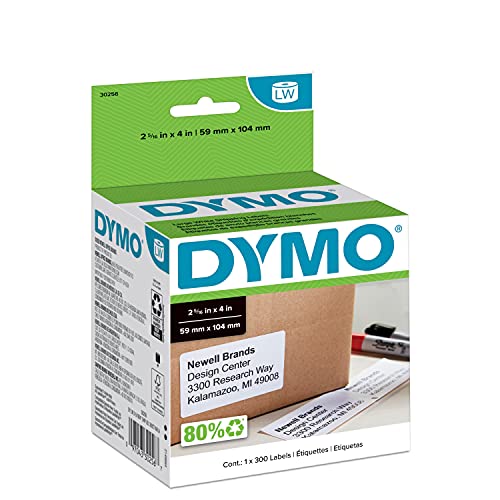
DYMO LabelWriter 4XL Shipping Labels (30256)
DYMO’s 4XL roll skips ink and toner entirely, printing through direct thermal heat instead. A 300-label roll measures 4 inches by 2.3 inches, matching common carrier label sizes. Feeding a fresh roll takes seconds, which matters once shipping volume spikes.
Pros
- Prints without ink, toner or ribbon costs
- Handles a shipping label in a few seconds
- Roll feed suits repeat daily shipping runs
Cons
- Fits only the wide-format 4XL printer, not smaller DYMO models
- Print can fade after prolonged heat or sun exposure

Avery 5163 Shipping Labels
Avery 5163 scales up to a 2 inch by 4 inch label, sized for boxes rather than envelopes. Ten labels print per sheet, for 250 labels across 25 sheets, on the same laser or inkjet printer used for documents. Ultrahold adhesive is formulated to grip cardboard and padded mailers.
Pros
- Skips the cost of a dedicated thermal printer
- Ultrahold adhesive sticks to textured mailers
- Sheet format suits occasional rather than daily shippers
Cons
- Ten labels per sheet means more sheets for large batches
- Printing is slower than a thermal roll at high volume

Brother DK-1201 Standard Address Labels
Brother’s DK-1201 roll is die-cut for QL-series printers, producing 1.1 inch by 3.5 inch address labels. A roll holds 400 labels and prints through direct thermal heat, so no cartridge runs dry. Sensors on the printer stop each label automatically at the die-cut line.
Pros
- Automatic sensing stops printing at the right spot every time
- No ink cartridge to buy or replace
- Roll format suits frequent, small-batch printing
Cons
- Works only with Brother QL printers, not other brands
- Fixed label size limits use beyond addresses

MUNBYN Direct Thermal Shipping Labels 4×6
MUNBYN’s pack ships four rolls of 220 labels, for 880 total 4 by 6 inch labels. Direct thermal printers from MUNBYN, Rollo and similar brands can all read the roll, not just one manufacturer’s hardware. No ink, toner or ribbon adds to the running cost.
Pros
- Works across several thermal printer brands, not one
- Four-roll pack cuts down on how often rolls need swapping
- Strong tack adhesive holds through cardboard box handling
Cons
- Direct thermal print fades faster under heat than laser toner
- Fixed 4×6 size does not suit small item labeling
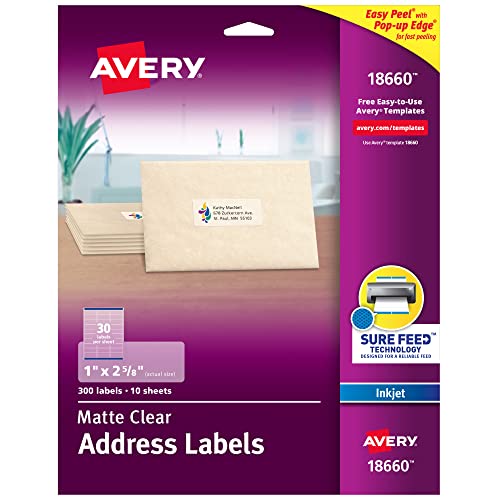
Avery 6572 Clear Easy Peel Address Labels
Avery 6572 prints on clear film instead of white stock, so text appears to float on packaging. Sheets hold 30 labels at 1 inch by 2.625 inches, matching the standard address label size. Inkjet ink sets on the film correctly, while laser heat is not rated for this material.
Pros
- Blends into colored or patterned packaging
- Matches the common 1 by 2.625 inch size for easy swapping
- Corner-peel edge limits curling on removal
Cons
- Laser printers cannot use this clear film
- Needs dark, high-contrast text to stay legible

Avery 22806 Round Color Coding Labels
Avery 22806 packs 192 round dots across 8 sheets, sized at 0.75 inches across, in assorted colors. Removable adhesive lets a label move between files, folders or bins without leaving residue. These dots get written on by hand, not run through a printer.
Pros
- Removable adhesive repositions without leaving residue
- Assorted colors speed up visual sorting by category
- Small size fits folders, bins and calendar squares
Cons
- Not printable, so every label is handwritten
- Round shape holds far less text than a rectangle
Side by side
| # | Model | Label Size | Best for | Score | Price |
|---|---|---|---|---|---|
| 1 | Avery 5160 Easy Peel Address Labels | 1 in x 2.625 in | Best overall | 9.4 | Check price |
| 2 | DYMO LabelWriter 4XL Shipping Labels (30256) | 4 in x 2.3 in | Best for thermal label printers | 9.1 | Check price |
| 3 | Avery 5163 Shipping Labels | 2 in x 4 in | Best for bulk shipping on a standard printer | 8.8 | Check price |
| 4 | Brother DK-1201 Standard Address Labels | 1.1 in x 3.5 in | Best for Brother QL label makers | 8.5 | Check price |
| 5 | MUNBYN Direct Thermal Shipping Labels 4×6 | 4 in x 6 in | Best value for high-volume shippers | 8.3 | Check price |
| 6 | Avery 6572 Clear Easy Peel Address Labels | 1 in x 2.625 in | Best for a clear, no-label look | 8.1 | Check price |
| 7 | Avery 22806 Round Color Coding Labels | 0.75 in diameter | Best for organizing and color coding | 8.0 | Check price |
Good to know
What is the best adhesive label for a home printer?
Avery 5160 fits most laser and inkjet printers already at home, making it a common starting point for mailing and file labels.
Can DYMO labels work in a Brother label maker?
No. DYMO rolls like the LabelWriter 4XL are sized and sensed for DYMO hardware only, so a Brother QL printer needs its own DK-1201 roll instead.
Which adhesive label works best for shipping boxes?
DYMO LabelWriter 4XL Shipping Labels suit sellers who own a compatible thermal printer, while Avery 5163 covers anyone printing on a standard laser or inkjet machine.
Are roll labels better than sheet labels?
Rolls print faster per label for repeat, high-volume shipping, but they need a dedicated thermal printer or label maker. Sheets use a printer most households already own.
How long does an adhesive shipping label stay stuck?
Permanent adhesive on rolls like the MUNBYN thermal labels holds through normal transit handling, though direct thermal print can fade if a package sits in heat or sunlight.
Do clear adhesive labels work in laser printers?
No. Avery 6572 clear film is rated for inkjet only, since laser printer heat is not designed for that material.
What is the best label for color-coding files?
Avery 22806 round color-coding dots come in assorted colors with removable adhesive, built for sorting files, folders or inventory by hand.
Can removable labels be repositioned after sticking?
Yes. Removable adhesive on the Avery 22806 dots lifts and repositions without leaving residue, unlike the permanent adhesive on shipping or address labels.
Is a thermal label printer worth it for occasional shipping?
A thermal printer pays off once shipping volume climbs past a few packages a week. Occasional shippers often do fine printing Avery 5163 sheets on an existing printer.
Our pick
Avery 5160 remains the practical default for anyone printing addresses or mail on a printer they already own. Sellers shipping daily should switch to DYMO LabelWriter 4XL Shipping Labels or the MUNBYN thermal rolls, since ink-free thermal output saves time at volume. Brother QL owners get the most reliable results from the matching DK-1201 roll rather than swapping in a universal label.
Marcus Chen
Marcus covered consumer electronics for enthusiast tech publications for six years before joining ChoiceCrest. He specializes in translating manufacturer spec sheets into plain-language buying advice, with a focus on audio, computing accessories and smart-home gear.