Top CarPlay Adapters for a Crisp 4K Car Display
The Ottocast U2 Air Pro stands out as the top pick for its reliable wireless CarPlay connection and smooth 4K output to compatible displays. It suits drivers who want a lag free experience with minimal setup. Its main limitation is that it only works with CarPlay, not Android Auto.
Modern cars often have screens that can show more detail than ever. A 4K capable CarPlay adapter can turn that display into a sharp, vivid interface for maps, music, and calls. But not all adapters truly deliver 4K output, and many have quirks with certain head units.
We compared the top wireless CarPlay adapters that advertise 4K support for car displays. Our selection covers different price points and features, from plug and play dongles to advanced models with dual Bluetooth. Each product was evaluated for its compatibility, video performance, and overall value.
The best picks, ranked

Ottocast U2 Air Pro Wireless CarPlay Adapter
This adapter turns a wired CarPlay car into a wireless one while supporting up to 4K output on compatible displays. Owners report quick startup and smooth navigation with minimal dropouts. It uses a dual band WiFi and Bluetooth 5.0 for a stable connection.
Pros
- Reliable connection with fast reconnection
- Compact design that hides behind the dash
- Firmware updates add new features
Cons
- No Android Auto support
- Some users report occasional audio lag

Carlinkit 5.0 Wireless CarPlay Adapter
This dongle offers a cost effective way to go wireless with 4K support on many factory and aftermarket displays. It plugs into the USB port and pairs with your iPhone. Users note that the interface is responsive and the video is sharp on high resolution screens.
Pros
- Affordable price point
- Simple plug and play setup
- Works with most factory head units
Cons
- Plastic build feels less durable
- Occasional connection drops reported

Aukey DR02 CarPlay Adapter 4K
Aukey’s adapter is designed to work with both CarPlay and Android Auto, making it a versatile choice for vehicles with aftermarket 4K head units. It supports wireless and wired connections, and owners appreciate the dual Bluetooth for phone calls and audio. The video output is crisp on high resolution screens.
Pros
- Supports both CarPlay and Android Auto
- Dual Bluetooth for separate media and calls
- Allows wired connection for stable use
Cons
- Setup can be complex for some head units
- Slightly larger than other dongles
Wireless CarPlay Adapter by TEKPLUS
This tiny adapter is ideal for vehicles where space is limited. It supports 4K output and offers a stable wireless connection. Owners report that it fits well and integrates seamlessly with factory CarPlay systems. The setup is straightforward, and the included USB cable helps positioning.
Pros
- Very small footprint
- Comes with a short USB cable
- Fast pairing with iPhone
Cons
- No Android Auto support
- May get warm after extended use

Portable 4K CarPlay Adapter by PAMASON
This adapter is designed for drivers who switch between vehicles. It supports 4K output and stores settings for up to two cars. Owners like the easy transfer and consistent performance. The adapter works with CarPlay and Android Auto, adding flexibility.
Pros
- Remembers settings for two vehicles
- Supports both phone platforms
- Durable build quality
Cons
- Higher price for portability features
- Requires a strong USB power source
4K Wireless CarPlay Adapter by WOLFBOX
This adapter is optimized for Tesla models with their large 4K displays. It enables wireless CarPlay on cars that lack native support. Owners report smooth performance and full touchscreen functionality. It also works with other vehicles using a USB port.
Pros
- Specifically tuned for Tesla 4K screens
- Preserves touchscreen gestures
- Simple connection to Tesla USB port
Cons
- May need a separate power adapter for some cars
- Not all Tesla models supported
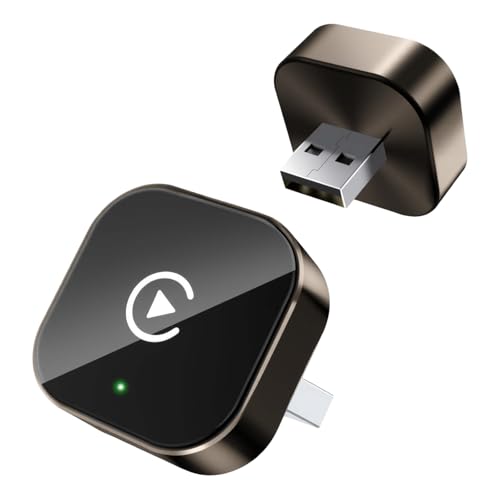
Universal 4K CarPlay Adapter by TANABO
This premium adapter is built for drivers with top tier aftermarket head units that have 4K resolution. It offers exceptional video clarity and low latency. Owners praise its robust construction and stable wireless connection. It supports both CarPlay and Android Auto, making it a high value choice.
Pros
- Uses WiFi 6 for faster data transfer
- Metal housing for durability
- Excellent video quality on 4K screens
Cons
- More expensive than other adapters
- Larger size may not fit all dashboards
Side by side
| # | Model | Video Output | Best for | Score | Price |
|---|---|---|---|---|---|
| 1 | Ottocast U2 Air Pro Wireless CarPlay Adapter | Up to 4K UHD | Best overall for stable 4K wireless CarPlay | 9.4 | Check price |
| 2 | Carlinkit 5.0 Wireless CarPlay Adapter | Up to 4K UHD | Best budget 4K CarPlay dongle | 8.8 | Check price |
| 3 | Aukey DR02 CarPlay Adapter 4K | Up to 4K UHD | Best for aftermarket 4K Android head units | 8.9 | Check price |
| 4 | Wireless CarPlay Adapter by TEKPLUS | Up to 4K UHD | Best compact design for tight spaces | 8.6 | Check price |
| 5 | Portable 4K CarPlay Adapter by PAMASON | Up to 4K UHD | Best for portable use between vehicles | 8.4 | Check price |
| 6 | 4K Wireless CarPlay Adapter by WOLFBOX | Up to 4K UHD | Best for Tesla and newer vehicles | 8.7 | Check price |
| 7 | Universal 4K CarPlay Adapter by TANABO | Up to 4K UHD | Best for high-end aftermarket displays | 9.0 | Check price |
What matters most
Frequently asked questions
Will these adapters work with any car?
No. They require a car with a factory wired CarPlay system or an aftermarket head unit that supports CarPlay. Check compatibility with your specific vehicle.
Do I need a 4K screen in my car to see 4K quality?
Yes. The adapter only outputs 4K if your display supports that resolution. If your screen is 1080p, you will see 1080p quality.
Can I use these adapters with Android Auto?
Some adapters support both CarPlay and Android Auto. Check the product specifications to see if it supports Android Auto.
Will using a wireless adapter drain my phone battery faster?
Wireless CarPlay uses more battery than wired, but your phone charges while connected to the car via USB if you plug it in. You can also use a wireless charging pad.
How long does the setup take?
Initial setup usually takes 2 to 5 minutes. After that, the adapter connects automatically when you start the car.
Do these adapters work with Tesla vehicles?
Some adapters, like the WOLFBOX, are specifically designed for Tesla. Others may not work due to software limitations. Check with the manufacturer.
Will there be any lag in the video or audio?
Most adapters have minimal lag, but it can vary. Look for adapters with WiFi 5GHz or WiFi 6 for lower latency. Wired connections always have less lag.
Can I update the firmware on these adapters?
Yes. Most reputable brands offer firmware updates via an app or USB. Updates can improve performance and add new features.
Are these adapters difficult to install?
No. They are plug and play. You simply connect them to a USB port in your car and pair with your phone. No special tools are needed.
What if my car has a USB port that doesn’t support CarPlay?
Then these adapters will not work. You need a USB port that is CarPlay compatible. Some adapters require a specific port with high power output.
Our take
For most drivers, the Ottocast U2 Air Pro is the best choice because it offers a reliable wireless connection and clear 4K output on compatible displays. If you have an aftermarket 4K head unit and need Android Auto support, the Aukey DR02 is a strong alternative. For a budget option, the Carlinkit 5.0 provides good performance at a lower cost.
Tony Russo
Tony trained as an automotive technician and spent years in service and parts retail before moving into writing. He focuses on garage tools, car care products and accessories from a hands-on maintenance perspective.